web
You’re offline. This is a read only version of the page.
close
Skip to main content

Announcements

No record found.

News and Announcements icon
Community site session details

Community site session details

Session Id :
Microsoft Dynamics AX (Archived)

AX 2012 R3 Missing Labels

(0) ShareShare
ReportReport
Posted on by 675

Missing Labels in AX 2012 R3. Our development team started working on customization and suddenly all labels are not appearing. I tried stopping AOS and deleted Standard folder in APPL. 

Any one have any clue on this issue?
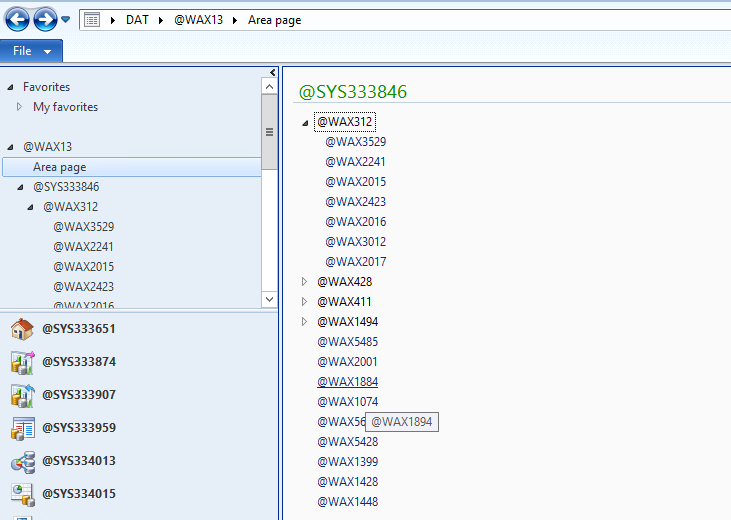
*This post is locked for comments

I have the same question (0)
  • Suggested answer
    rudra Profile Picture
    6,534 on at

    Hi ,

    Have you deleted .auc files which exists in a different location.

    Usually when stopping aos and deleting .ald and restarting the aos will generate these files again but in ur case its not getting solved, have you come across these below links

    www.axstart.com/ax-2012-r2-labels

    community.dynamics.com/.../108493.aspx

  • André Arnaud de Calavon Profile Picture
    303,365 Super User 2026 Season 1 on at

    Have you also checked the language setting on the user options? Perhaps a language is setup which does not have translated labels for this module.

  • Suggested answer
    Community Member Profile Picture
    on at

    If you have already completed the AOS restart and refresh steps

    i suggest if you check the model files

    may be label model file got deleted

    Please verify and update us with your findings.

  • z4hid.kh4n Profile Picture
    675 on at

    I have tried steps suggested. But no luck. Even I restored the Model DB from other environment to rule out any issues caused by development. Language setup in user profile is also correct.

  • André Arnaud de Calavon Profile Picture
    303,365 Super User 2026 Season 1 on at

    It will be difficult guessing what could be wrong if you checked all suggestions above.

    Perhaps you can try to reinstall the database (model files) and then check if all remains OK.

  • Verified answer
    z4hid.kh4n Profile Picture
    675 on at

    Hi Guys,

    Uninstalling and installing the client in other drive fixed the issue.

    Thanks

  • Denis Macchinetti Profile Picture
    16,444 on at

    Hi

    Please, tick your answer as verified.

Under review

Thank you for your reply! To ensure a great experience for everyone, your content is awaiting approval by our Community Managers. Please check back later.

Helpful resources

Quick Links

Introducing the 2026 Season 1 community Super Users

Congratulations to our 2026 Super Stars!

Congratulations to our 2025 Community Spotlights

Thanks to all of our 2025 Community Spotlight stars!

Leaderboard > 🔒一 Microsoft Dynamics AX (Archived)

#1
Joris dG Profile Picture

Joris dG 5

#2
Sagar Suman Profile Picture

Sagar Suman 2 Super User 2026 Season 1

#2
Alexey Lekanov Profile Picture

Alexey Lekanov 2

Last 30 days Overall leaderboard

Featured topics

Product updates

Dynamics 365 release plans
