web
You’re offline. This is a read only version of the page.
close
Skip to main content

Announcements

No record found.

News and Announcements icon
Community site session details

Community site session details

Session Id :
Microsoft Dynamics AX (Archived)

Free text invoices fact box does not show contacts information section

(0) ShareShare
ReportReport
Posted on by 57

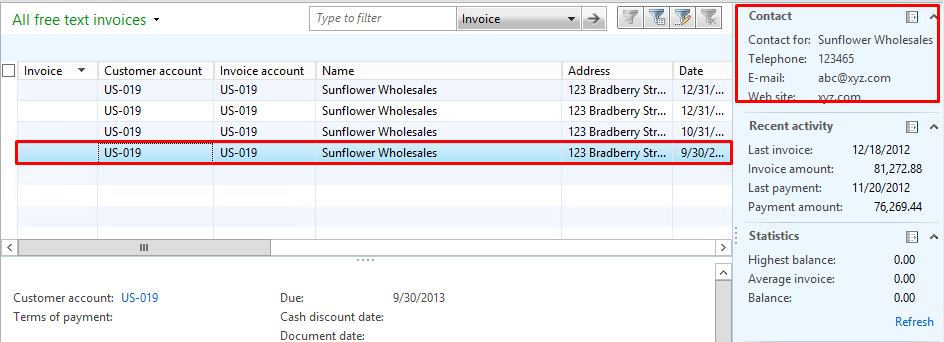
When I am trying to see free text invoice form fact box information that has a contact section, is not showing the contact information.

Navigation for free text invoice fact box

Accounts receivable -- Common -- Free text invoices -- All Free text Invoices 
pastedimage1569628679317v2.png

double click on selected free text invoice 

pastedimage1569628740857v3.png

I can able to see contact fact box info in all free text invoice section but when I opened the same free text invoice then Contact fact box section is not updating info.

If anyone could point me in the right directions, it would be greatly appreciated. :) 

*This post is locked for comments

I have the same question (0)
  • G V N Reddy Profile Picture
    57 on at

    Free text fact box contact info section data is not getting updated.

  • Ludwig Reinhard Profile Picture
    Microsoft Employee on at

    Hi GVN,

    Have you already tried hitting the refresh update button?

    Do you see the same issue for all other customers?

    What AX2012 do you operate here?

    Is this possibly an older one RTM, R2?

    Best regards,

    Ludwig

  • Mahim Kulbhushan Chauhan Profile Picture
    287 on at

    Did you try to change the address to primary ??

    Let me know 

  • Suggested answer
    guk1964 Profile Picture
    10,888 on at

    I think you are misunderstanding the field-  this is not for the address of the customer address .

    It is meant to display the customer contact person information instead of the customer itself.

    Select the contact person ( there is a separate field for this) on the free text invoice, which will  then show you the details of selected contact person in the factbox

    Otherwise you need to do a small customisation.

  • Ludwig Reinhard Profile Picture
    Microsoft Employee on at

    Good Morning GVN,

    Have you been able to get this issue resolved in the meantime?

    Best regards,

    Ludwig

Under review

Thank you for your reply! To ensure a great experience for everyone, your content is awaiting approval by our Community Managers. Please check back later.

Helpful resources

Quick Links

Introducing the 2026 Season 1 community Super Users

Congratulations to our 2026 Super Stars!

Meet the Microsoft Dynamics 365 Contact Center Champions

We are thrilled to have these Champions in our Community!

Congratulations to the March Top 10 Community Leaders

These are the community rock stars!

Leaderboard > 🔒一 Microsoft Dynamics AX (Archived)

#1
Joris dG Profile Picture

Joris dG 5

#2
Alexey Lekanov Profile Picture

Alexey Lekanov 2

#2
Henrik Nordlöf Profile Picture

Henrik Nordlöf 2 User Group Leader

Last 30 days Overall leaderboard

Featured topics

Product updates

Dynamics 365 release plans
