web
You’re offline. This is a read only version of the page.
close
Skip to main content

Announcements

No record found.

News and Announcements icon
Community site session details

Community site session details

Session Id :
Microsoft Dynamics AX (Archived)

Autofill parameters

(0) ShareShare
ReportReport
Posted on by 260

pastedimage1563282777266v2.png

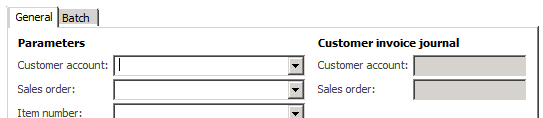
Hi, my employer wants me to auto-populate Customer Account, Sales Order, Item Number lookup parameters
created using UIBuilder if someone uses the Select button from Customer Account and Sales Order witch is by default from the query to set a range.

Basically, if the Customer account is 100 on the gray box they want to populate the other Customer account automatically. 

I did some research on the internet but I didn't find a solution.

Does anyone have any ideas?

Thank you.

*This post is locked for comments

I have the same question (0)
  • Suggested answer
    Satish Panwar Profile Picture
    14,673 Moderator on at

    Hi bois,

    Is the screenshot above a custom one? Not sure why you want to duplicate the effort. When you click on select, behind the scenes the query is build and executed. you need to see where that query is being built and then retrieve/assign the value to fields under parameters section. If this is custom development, suggest that you change this behavior and use standard select button.

    Thanks,

    Satish Panwar

    Please help verify answer(s) if they guide you in right direction so other community members can also benefit from your question with verified answer.

  • bois0155 Profile Picture
    260 on at

    pastedimage1563298715388v1.png

    Yes, it is a custom one. The dialog is created using the UIBuilder class. They are using the Parameters field to populate with lookups and show on the report.

    I just would like to know how to automatically populate it based on the query criteria values and If it is possible of course. How do I refresh the dialog fields after selecting the criteria on the select button?

  • André Arnaud de Calavon Profile Picture
    304,307 Super User 2026 Season 1 on at

    Hi bois0155,

    Why are some dialog fields like customer account and sales order added? A user can click the Select button to interact with the query.

Under review

Thank you for your reply! To ensure a great experience for everyone, your content is awaiting approval by our Community Managers. Please check back later.

Helpful resources

Quick Links

Introducing the 2026 Season 1 community Super Users

Congratulations to our 2026 Super Stars!

Meet the Microsoft Dynamics 365 Contact Center Champions

We are thrilled to have these Champions in our Community!

Congratulations to the March Top 10 Community Leaders

These are the community rock stars!

Leaderboard > 🔒一 Microsoft Dynamics AX (Archived)

#1
CP04-islander Profile Picture

CP04-islander 26

#2
imran ul haq Profile Picture

imran ul haq 8

#3
André Arnaud de Calavon Profile Picture

André Arnaud de Cal... 4 Super User 2026 Season 1

Last 30 days Overall leaderboard

Featured topics

Product updates

Dynamics 365 release plans
