web
You’re offline. This is a read only version of the page.
close
Skip to main content

Notifications

Announcements

No record found.

Community site session details

Community site session details

Session Id :
Supply chain | Supply Chain Management, Commerce
Answered

Trade Agreement for Product Variants

(0) ShareShare
ReportReport
Posted on by

Dear Champions–

 I have successfully created Trade Agreement for ‘Products’.

Now when I am checking out ‘Product Masters’ with Configuration Technology ‘Predefined Variant’, unlike the other, the price isn’t auto updated.

  1. I have created Trade Agreement Journal as below:

<> 2019_2D00_10_2D00_26-12_5F00_44_5F00_39_2D00_2019_5F00_10_5F00_26_5F00_12_5F00_42_5F00_10_5F00_Journal_5F00_lines_5F00_trade_5F00_agreement_5F00_Finance_5F00_and_5F00_Operations-_2D00_-Paint.png
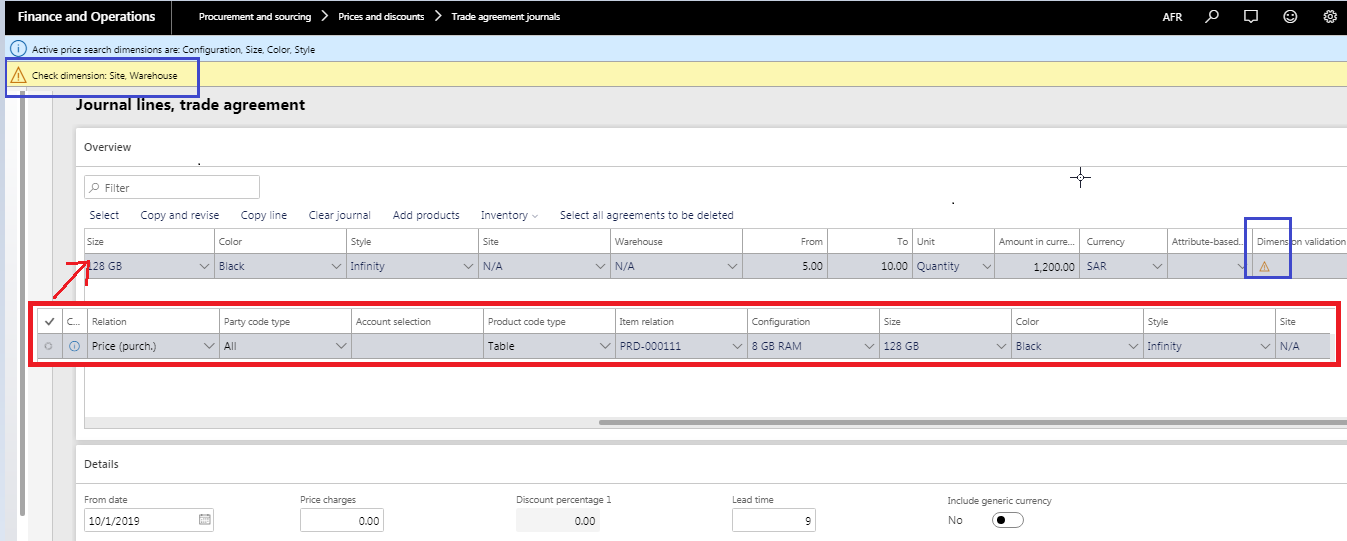
I have posted the Trade Agreement journal as well.

  1. I have ensured that the Site & Warehouse dimension is selected against a Released Product as below:

<> 2019_2D00_10_2D00_26-11_5F00_43_5F00_38_2D00_2019_5F00_10_5F00_26_5F00_12_5F00_42_5F00_10_5F00_Journal_5F00_lines_5F00_trade_5F00_agreement_5F00_Finance_5F00_and_5F00_Operations-_2D00_-Paint.png

  1. However, In Purchase Order, I am not able to get the price updated. Proof is below:

<> 2019_2D00_10_2D00_26-14_5F00_07_5F00_31_2D00_All-purchase-orders-_2D002D00_-Finance-and-Operations.png


Could this be due to the error in STEP 1 – the two highlighted boxes? How can I clear those warning?

Is there any additional steps to perform while handling Products with Variants so that it fetches the agreement price in PO?

Many Thanks,

Sarath

I have the same question (0)
  • Verified answer
    Zain Mehmood Profile Picture
    4,187 Most Valuable Professional on at

    Hi Sarath,

    Have you ensured the purchase price check box checked for product dimension group Configuration which you created for product? 

    This validation is for if any case any price validation check mark is missed and on trade agreement your making a combination which is not valid for your desired setup. 

    Please mark YES against the answer that helps you. Thanks 

    Regards,

    Zain 

  • Community Member Profile Picture
    on at

    Hi Zain ,

    I have toggled the Purchase Update Group 'Latest Purchase  Price' to YES in Release Products > Purchase FastTab as below:

    2019_2D00_10_2D00_26-17_5F00_33_5F00_56_2D00_Released-product-details-_2D002D00_-Finance-and-Operations.png

    It is still not reflecting in Purchase Order. Is it because, there is some other settings? Or, could it be because the Product already has an active agreement?

    Many Thanks,

    Sarath

  • Verified answer
    Zain Mehmood Profile Picture
    4,187 Most Valuable Professional on at

    Hi Sarath,

    Check the settings for Price and discount setup under procurement & sourcing module, check Active price discount. 

    What I was referring to was the product dimension groups on your product should have the active for purchase price button enabled, These dimension group attached on your product should have this enabled. 

    10.png

    Same the case should have been with storage dimension group,

    11.png

    Also see if the date of the trade agreement lies in the same period as your purchase orders. Once your criteria will  match with these settings the data validation would have no sign, 

    Please mark YES against the answer that helps you. Thanks

    Warm Regards,

    Zain 

  • Zain Mehmood Profile Picture
    4,187 Most Valuable Professional on at

    Hi Sarath,

    Did you tried the upper mentioned way on this ?

    Regards,

    Zain

  • Suggested answer
    Sachin Agrawal Profile Picture
    150 on at

    As per the shared screen, kindly check the following information in forms:

    1. In trade agreement journal form, site and warehouse is displaying information as "NA". Is it the right warehouse. As it is displaying information "Check dimension site and warehouse"

  • Community Member Profile Picture
    on at

    Hi Zain - 

    I have set it up as you had mentioned.The Purchase Price in Storage Dimension Group and Product Dimension Group configuration did the trick. Thanks for the rightful pointers.

    With Regards,

    Sarath

Under review

Thank you for your reply! To ensure a great experience for everyone, your content is awaiting approval by our Community Managers. Please check back later.

Helpful resources

Quick Links

Responsible AI policies

As AI tools become more common, we’re introducing a Responsible AI Use…

Neeraj Kumar – Community Spotlight

We are honored to recognize Neeraj Kumar as our Community Spotlight honoree for…

Leaderboard > Supply chain | Supply Chain Management, Commerce

#1
Laurens vd Tang Profile Picture

Laurens vd Tang 284 Super User 2025 Season 2

#2
Siv Sagar Profile Picture

Siv Sagar 178 Super User 2025 Season 2

#3
André Arnaud de Calavon Profile Picture

André Arnaud de Cal... 116 Super User 2025 Season 2

Last 30 days Overall leaderboard

Featured topics

Product updates

Dynamics 365 release plans



