web
You’re offline. This is a read only version of the page.
close
Skip to main content

Announcements

No record found.

News and Announcements icon
Community site session details

Community site session details

Session Id :
Microsoft Dynamics AX (Archived)

Errors when trying to import forecast

(0) ShareShare
ReportReport
Posted on by 239

Hello All , 

We keep getting the error below when we execute the import batch job :
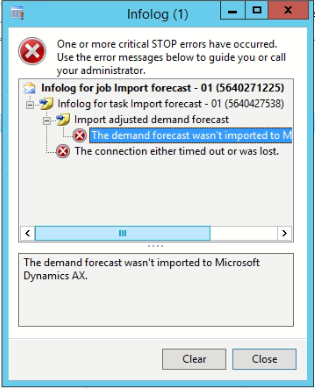
2677.Screenshot_5F00_16.png

we tried to extend the timeout on the analysis service but we have no luck 

Any Help please

Thanks in advance 

Ma'en

*This post is locked for comments

I have the same question (0)
  • Suggested answer
    Ludwig Reinhard Profile Picture
    Microsoft Employee on at

    Hello Ma'en,

    Can you detail how you tried importing the forecast values? How were the data prepared and what tool / import technique did you use to get the data imported?

    Best regards,

    Ludwig

  • Maen.Moutaz Profile Picture
    239 on at

    Hello ludwig ,

    We generate the statistical baseline forecast from the AX itself and then make some adjustment in the forecasted excel sheet and then publish it to the cube. Then after publish i am trying to import from the "Import forecast" available in the AX itself

    we are using Microsoft Dynamics AX 2012 version 6.3.164.0 CU 8 .

    Thanks ,

    Ma'en

  • Suggested answer
    Ludwig Reinhard Profile Picture
    Microsoft Employee on at

    Hello Ma'en,

    Can you check the following hotfix on LCS, which seems to address your issue:

    Issue 3924229"The demand forecast wasn't Imported to Microsoft dynamics AX" error message when you import a demand forecast file

    fix.lcs.dynamics.com/.../Details;qc=887ce4d15800ac8fc8bff98a9da9ad4f4e234950143a2458f2bf1ece20ae37cb

    Best regards,

    Ludwig

  • Mourad Profile Picture
    70 on at

    Hello Ludwig, Ma'en,

    We have the exact same problem as Ma'en described. I wanted to know if there are maybe a Miscrosoft hotfix available online, because the only thing provided in the link is to contact Microsoft Support.

    I know it is a bit old now, but what did Microsoft provide you with to be able to import properly. Thank you.

    Best Regards,

    Mourad.  

  • Ludwig Reinhard Profile Picture
    Microsoft Employee on at

    Hi Mourad,

    Have you already checked the hotfixes for your system version on LCS?

    What AX2012 version do you operate?

    Best regards,

    Ludwig

  • Cedric Profile Picture
    250 on at

    Hi Mourad

    I had this problem a few weeks ago, and I created a request with Micorsoft that had no post-charge, for them to send me the hotfix, since it is not an "official" hotfix.
    The problem was solved immediately.

    Regards.
  • Mourad Profile Picture
    70 on at

    Hi Ludwig,

    I apperciate the quick reply, thank you.

    We are on AX2012 R3 CU10, on LCS the search gave the link you provided (3924229).

    Regards,

    Mourad.

  • Mourad Profile Picture
    70 on at

    The "HOTFIX" from Microsoft did the trick !

    Thanks everyone !

Under review

Thank you for your reply! To ensure a great experience for everyone, your content is awaiting approval by our Community Managers. Please check back later.

Helpful resources

Quick Links

Introducing the 2026 Season 1 community Super Users

Congratulations to our 2026 Super Stars!

Meet the Microsoft Dynamics 365 Contact Center Champions

We are thrilled to have these Champions in our Community!

Congratulations to the March Top 10 Community Leaders

These are the community rock stars!

Leaderboard > 🔒一 Microsoft Dynamics AX (Archived)

#1
Joris dG Profile Picture

Joris dG 5

#2
Andrew Jones a1x Profile Picture

Andrew Jones a1x 2

#3
GL-01081504-0 Profile Picture

GL-01081504-0 1

Last 30 days Overall leaderboard

Featured topics

Product updates

Dynamics 365 release plans
