web
You’re offline. This is a read only version of the page.
close
Skip to main content

Notifications

Announcements

No record found.

Community site session details

Community site session details

Session Id :
Supply chain | Supply Chain Management, Commerce
Answered

Specify the product master dimension during RAF on the advanced warehouse mobile app

(0) ShareShare
ReportReport
Posted on by 25

Good day

We are planning on reporting as finish a batch order using the advanced warehousing app, using the Report as finish menu item. We use product masters with different product dimensions defined. 

Report-as-finish.PNG

Is there a way to specify the product dimension that is being produced on the advanced warehousing app when report as finish? We have configured the menu item but currently the product dimensions do not come up to update using the app.
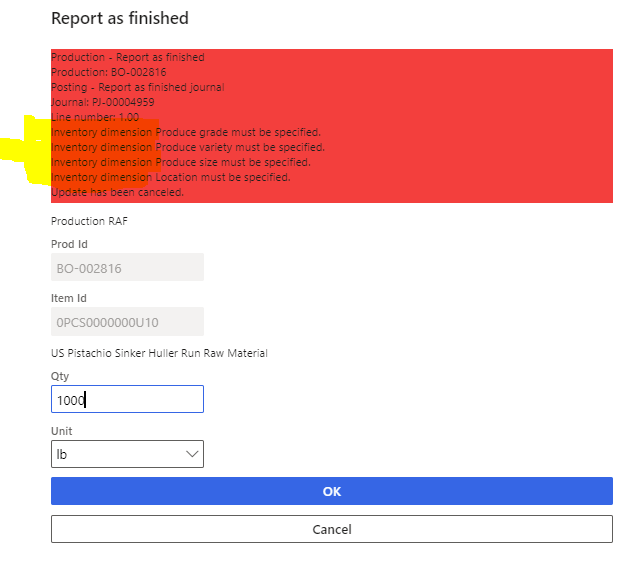
RAF-mobile-device.PNG

I have the same question (0)
  • Oleksiy  Khoroshylov Profile Picture
    1,747 User Group Leader on at

    Aren't product dimensions specified when you create batch order for FG item? Are you RAFing co- or by-products instead on a main FG item?

  • DawidPutter Profile Picture
    25 on at

    Hi Oleksiy

    We are reporting as finish co-products (I know the screenshot menu item I gave was for report as finish). Initial dimensions are specified when creating the batch order, but they can change depending what is actually produced. The operator therefore needs the ability to override them in the mobile device. We are doing process manufacturing, so what you end up with as WIP/FG is not also clearly defined when from the beginning when the batch order is created.

  • Verified answer
    Alina Lica Profile Picture
    on at

    Hi Dawid,

    Entering dimensions when doing RAF on mobile app is not possible.

    You can scan a barcode instead, containing all the required dimensions.

    Thanks,

    Alina

  • DawidPutter Profile Picture
    25 on at

    Hi Alina

    Thanks for reaching out. That was my suspicion.

    Can you please elaborate what you said regarding scanning a barcode with the required dimensions? I think the whole issue is that the system does not allow you to enter/scan any product dimension value at the time reporting as finish using the advanced warehousing mobile device.

    Thanks,

    Dawid

  • Verified answer
    Alina Lica Profile Picture
    on at

    Hi Dawid,

    I mean, on Released products form - Barcodes and there add a record with all the dimensions for your product. Then you can either scan and manually enter the barcode number.

    Thanks,

    Alina

Under review

Thank you for your reply! To ensure a great experience for everyone, your content is awaiting approval by our Community Managers. Please check back later.

Helpful resources

Quick Links

Responsible AI policies

As AI tools become more common, we’re introducing a Responsible AI Use…

Neeraj Kumar – Community Spotlight

We are honored to recognize Neeraj Kumar as our Community Spotlight honoree for…

Leaderboard > Supply chain | Supply Chain Management, Commerce

#1
Laurens vd Tang Profile Picture

Laurens vd Tang 288 Super User 2025 Season 2

#2
Siv Sagar Profile Picture

Siv Sagar 178 Super User 2025 Season 2

#3
André Arnaud de Calavon Profile Picture

André Arnaud de Cal... 116 Super User 2025 Season 2

Last 30 days Overall leaderboard

Featured topics

Product updates

Dynamics 365 release plans



