web
You’re offline. This is a read only version of the page.
close
Skip to main content

Notifications

Announcements

No record found.

Community site session details

Community site session details

Session Id :
Small and medium business | Business Central, N...
Suggested Answer

How can i send a PostRequest (Error 415)

(0) ShareShare
ReportReport
Posted on by
I am trying to start a post request to my web service. But unfortunately it doesn't quite work yet.
procedure sendPostRequest()
    var
        client: HttpClient;
        content: HttpContent;
        headers: HttpHeaders;
        response: HttpResponseMessage;
        request: HttpRequestMessage;
        MessagingServiceSetup: Record "Messaging Service Setup WMR";
        IsSuccessful: Boolean;
        JsonText: Text;
        ResponseStream: InStream;
        TempBlob: Codeunit "Temp Blob";
        ResponseJson: JsonObject;
        jwt: text;
    begin
        MessagingServiceSetup.Get();

        request.GetHeaders(headers);
        headers.Add('Accept''application/json');
        headers.Add('user''Dynamics 365');

        request.SetRequestUri(MessagingServiceSetup."Service URL");
        request.Method('POST');

        JsonText := BuildAuthReqContent(MessagingServiceSetup.Username, MessagingServiceSetup.Password);
        content.WriteFrom(JsonText);
        request.Content(content);

        IsSuccessful := client.Send(request, response);
        if not IsSuccessful then
            Error('Authentication failed!');

        if not response.IsSuccessStatusCode then begin
            //Fehlerhandling
            exit;
        end;

        clear(TempBlob);
        TempBlob.CreateInStream(ResponseStream);

        response.Content.ReadAs(ResponseStream);
        ResponseJson.ReadFrom(ResponseStream);
        GetPropertyFromJsonObject(ResponseJson, 'jwt', jwt);
        if confirm(jwtthen;
    end;

    local procedure GetPropertyFromJsonObject(var JsonObjectJsonObject; PropertyName: Textvar PropertyValue: Text)
    var
        ValueToken: JsonToken;
        ValueJsonValue;
    begin
        if JsonObject.Get(PropertyName, ValueTokenthen
            if ValueToken.IsValue then begin
                Value := ValueToken.AsValue();
                If not (Value.IsNull or Value.IsUndefinedthen
                    PropertyValue := Value.AsText();
            end;
    end;

    procedure SetURLsToDefault(var MessagingServiceSetup: Record "Messaging Service Setup WMR")
    begin
        MessagingServiceSetup."Service URL" := '';
    end;

    local procedure BuildAuthReqContent(Username: Text[50]; Password: Text[250]ContentText: Text
    var
        ContentJson: JsonObject;
    begin
        ContentJson.Add('username', Username);
        ContentJson.Add('password', Password);
        ContentJson.WriteTo(ContentText);
    end;
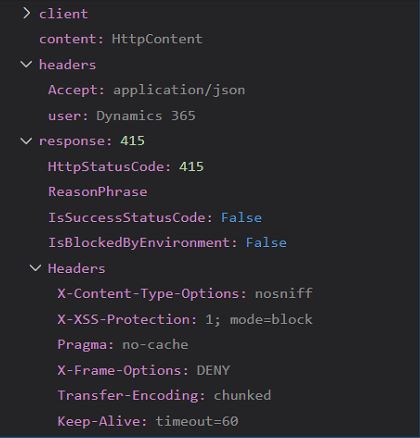
when I debug I get the error code 415 and I don't know why it comes. Everything seems to be good with the request but there are problems with the response.debug2.JPGdebug1.JPG
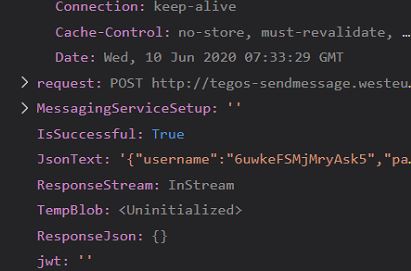
if I send the same request through Postman, everything works fine. Can anyone tell me what I am doing wrong? The goal is to start a post request to my web service and to save a jwt token received in the Json in the field MessagingServiceSetup.token
I have the same question (0)
  • Suggested answer
    Marco Mels Profile Picture
    on at

    Hello,

    We currently do not have dedicated Dev support via the Dynamics 365 Business Central forums, but I wanted to provide you some additional resources to assist.  If you need assistance with debugging or coding I would recommend discussing this on one of our communities.

    www.yammer.com/.../

    dynamicsuser.net/.../developers

    I will open this up to the community in case they have something to add.

    Thanks.

  • Suggested answer
    Ethan-Sorenson Profile Picture
    225 on at

    A 415 error means the media type is not supported. I would add an additional header to explicitly specify that the content type is Json.

    "Content-Type", "application/json"

    You can also check your postman request for any other headers or parameters that it is sending that aren't in BC.

  • Community Member Profile Picture
    on at

    I checked the header before and u are right. Content-Type was missing. I already had the content type in the header. However, I get an error in the line of the content type when debugging. But there is nothing in the error message. That's why I changed the content type to Accept.

    Do you have any idea how I can fix this error?

  • Suggested answer
    Ethan-Sorenson Profile Picture
    225 on at

    The Content-Type should definitely be there, it is probably a step in the right direction if this error message went away.

    Try adding it back, and change this line to output to a text variable, and send that text to a message box so you can see the raw response from the server.
    response.Content.ReadAs(ResponseStream)

    This is a post request I have working.

    pastedimage1591942928948v1.png

  • Community Member Profile Picture
    on at

    Thanks for your quick reply. It looks like I forgot to include header in the content. I no longer get an error message when debugging. Nevertheless, in my token field my token is not saved as a response. if you still have a solution for me I would be infinitely grateful to you

  • Ethan-Sorenson Profile Picture
    225 on at

    I'm glad you were able to figure it out.

    It is hard to say why that part isn't working, because I don't know what your Json Payload looks like.

Under review

Thank you for your reply! To ensure a great experience for everyone, your content is awaiting approval by our Community Managers. Please check back later.

Helpful resources

Quick Links

Responsible AI policies

As AI tools become more common, we’re introducing a Responsible AI Use…

Neeraj Kumar – Community Spotlight

We are honored to recognize Neeraj Kumar as our Community Spotlight honoree for…

Leaderboard > Small and medium business | Business Central, NAV, RMS

#1
OussamaSabbouh Profile Picture

OussamaSabbouh 3,143

#2
Jainam M. Kothari Profile Picture

Jainam M. Kothari 1,694 Super User 2025 Season 2

#3
YUN ZHU Profile Picture

YUN ZHU 1,067 Super User 2025 Season 2

Last 30 days Overall leaderboard

Featured topics

Product updates

Dynamics 365 release plans