web
You’re offline. This is a read only version of the page.
close
Skip to main content

Announcements

No record found.

News and Announcements icon
Community site session details

Community site session details

Session Id :
Finance | Project Operations, Human Resources, ...
Suggested Answer

Batch job log size

(0) ShareShare
ReportReport
Posted on by 32

We are running the standard batch job to invoice sales orders. On average this is invoicing around 500 orders a day.

The issue we are encountering is that the log file is often too small for this, as shown below:
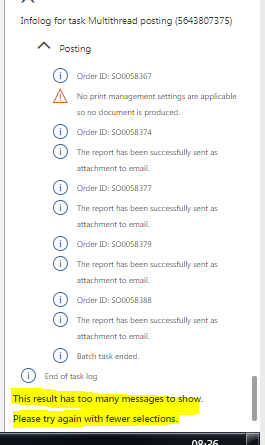
pastedimage1572338204493v1.png

Obviously one answer would be to split the batch job into smaller one but would add more administration and maintenance.

Is there are standard way of increasing the log size or viewing it from another part of the system?

Thanks

I have the same question (0)
  • Suggested answer
    Adria Ariste Profile Picture
    User Group Leader on at

    In the past you could change the MaxErrors value in the Info class, but that's overlayering now. I don't know if there's another way to extend those methods in the Info class to allow more messages.

    If you don't want to split the postings you could add extra functionality and create a log table to store the info outputs for each invoice posted.

    Adrià Ariste - Senior technical consultant @ Axazure - Read my blog!

  • Suggested answer
    Khushhal Garg Profile Picture
    1,514 on at

    How many orders are you posting in one batch task? I think this setting is on AR parameters > Updates tab. You can reduce number of orders in one batch task and have more batch tasks created then you can see smaller info for each task.

  • Suggested answer
    Fangyuan Hou Profile Picture
    on at

    Hi Chris,

    We are consider to improve this area in the near future. It is under investigation. You can find more information by search in LCS portal.

    fix.lcs.dynamics.com/.../

  • Chris Litton Profile Picture
    32 on at

    Thanks Fangyuan - that is good to know that its something that is being looked at.

    DO you know during the investigation whether they are looking at ordering the message so that errors/warnings are returned first? As otherwise is 500+ lines to scroll through to see the actual issues.

Under review

Thank you for your reply! To ensure a great experience for everyone, your content is awaiting approval by our Community Managers. Please check back later.

Helpful resources

Quick Links

Introducing the 2026 Season 1 community Super Users

Congratulations to our 2026 Super Stars!

Meet the Microsoft Dynamics 365 Contact Center Champions

We are thrilled to have these Champions in our Community!

Congratulations to the April Top 10 Community Leaders

These are the community rock stars!

Leaderboard > Finance | Project Operations, Human Resources, AX, GP, SL

#1
Giorgio Bonacorsi Profile Picture

Giorgio Bonacorsi 804

#2
André Arnaud de Calavon Profile Picture

André Arnaud de Cal... 639 Super User 2026 Season 1

#3
Subra Profile Picture

Subra 528

Last 30 days Overall leaderboard

Product updates

Dynamics 365 release plans
