web
You’re offline. This is a read only version of the page.
close
Skip to main content

Announcements

No record found.

News and Announcements icon
Community site session details

Community site session details

Session Id :
Microsoft Dynamics AX (Archived)

Insufficient rights for user test

(0) ShareShare
ReportReport
Posted on by

Hello everyone,

I have been working on roles and permissions lately and one of our client has a customized role for sales order processing which requires permission to create alerts based on SO delivery date.

But when i try to create alerts for the delivery date, system is showing me an error which says "Insufficient rights for user".
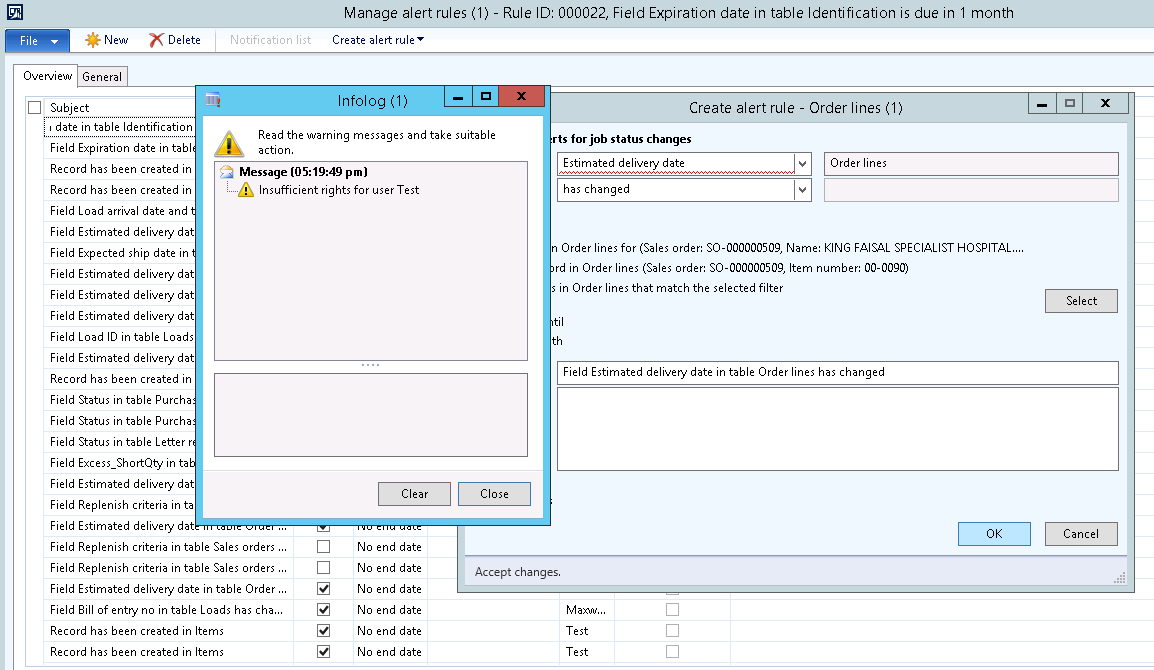
permissions-error.png

Can someone please guide me upon which Sub-role to add to this role so that i can enable the Alerts setup.

Thanks.

*This post is locked for comments

I have the same question (0)
  • Suggested answer
    Prashant Singh Profile Picture
    8,802 on at

    Dear Hassan,

    Please try to give privileges of  "EventManageAndUseAlerts". Or add sub role as Information technology manager.

    Regards,

    Prashant Kumar

  • Community Member Profile Picture
    on at

    Hi Prashant,

    Have already given above privileges.. No luck !

  • Basheer17 Profile Picture
    2,720 on at

    Client session has to be restarted for newly assigned privileges to take effect. 

  • krishna.rao@dax Profile Picture
    3,020 on at

    If it's customized, find the relevant role to access the the form

    menu item (Right click)-> Add ins -> Security tools -> View related security roles.

    Add the relevant role to the user.

  • Suggested answer
    Vilmos Kintera Profile Picture
    46,149 on at

    When I was troubleshooting workflow menu item access issues, I have discovered that you could put an error message in SysWorkflowDocument.assertAsUser before each return code, like error(strFmt('Entry point %1', workflowPermission.parmActionMenuItem())); for the 1st entry (you have 4 in total). That would include what menu item's permission has failed during assertion for workflow processing, that can be checked in the workflow execution history.

  • Suggested answer
    Vilmos Kintera Profile Picture
    46,149 on at

    Here is the resolution for this issue on my blog:

    www.daxrunbase.com/.../investigating-workflow-security-issues

  • Vilmos Kintera Profile Picture
    46,149 on at

    Can you please make sure you tick the checkboxes for helpful answers next to each post, so the topic gets resolved? Thank you.

Under review

Thank you for your reply! To ensure a great experience for everyone, your content is awaiting approval by our Community Managers. Please check back later.

Helpful resources

Quick Links

Introducing the 2026 Season 1 community Super Users

Congratulations to our 2026 Super Stars!

Meet the Microsoft Dynamics 365 Contact Center Champions

We are thrilled to have these Champions in our Community!

Congratulations to the April Top 10 Community Leaders

These are the community rock stars!

Leaderboard > 🔒一 Microsoft Dynamics AX (Archived)

#1
CP04-islander Profile Picture

CP04-islander 39

#2
Michel ROY Profile Picture

Michel ROY 14

#3
imran ul haq Profile Picture

imran ul haq 8

Last 30 days Overall leaderboard

Featured topics

Product updates

Dynamics 365 release plans
