web
You’re offline. This is a read only version of the page.
close
Skip to main content

Notifications

Announcements

No record found.

Community site session details

Community site session details

Session Id :
Finance | Project Operations, Human Resources, ...
Suggested Answer

Info message Yes, No need to popup in sys operation framework

(0) ShareShare
ReportReport
Posted on by 30

Hi team,

I have created a batch job with Sys Operation Framework. Once user click on Ok, then wants to popup info message like
Are you sue to delete the transaction? Yes or No

If user clicked on Yes then only it will allow to procced. else nothing happen
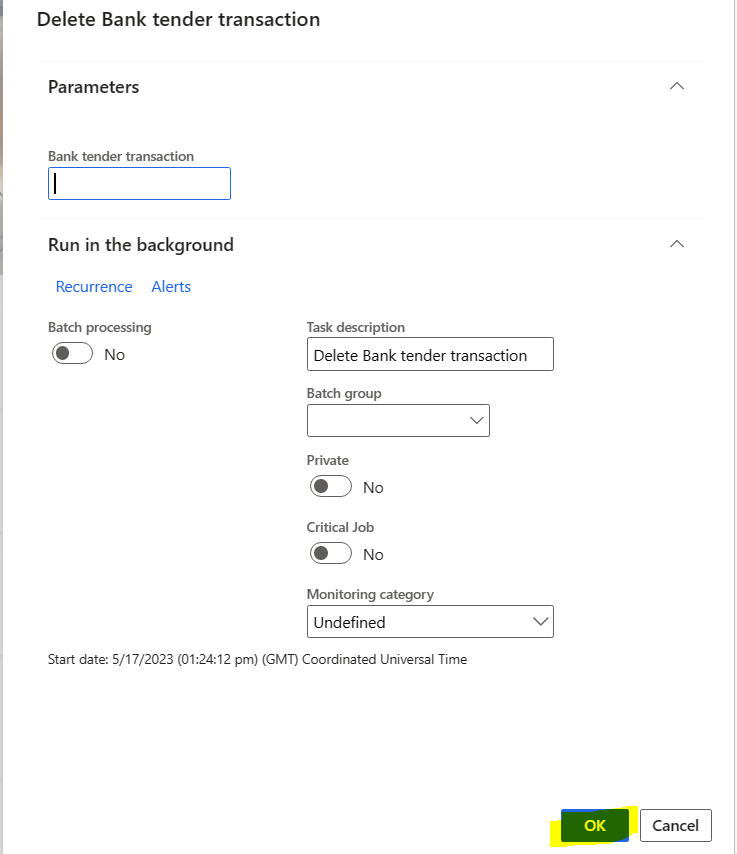
pastedimage1684330810536v1.png

Controller class

internal final class DeleteBankTenderController extends SysOperationServiceController
{
    public static void main(Args args)
    {
        DeleteBankTenderController sysOperationController = new DeleteBankTenderController();
        sysOperationController.parmClassName(classStr(DeleteBankTenderService));
        sysOperationController.parmMethodName(methodStr(DeleteBankTenderService, operation));
        sysOperationController.parmExecutionMode(SysOperationExecutionMode::Synchronous);
        sysOperationController.startOperation();
    }

    public ClassDescription defaultCaption()
    {
        return "DeleteBankTenderTrans";
    }

}

Pls give me more shed on this.

thanks!

I have the same question (0)
  • Suggested answer
    Mohit Rampal Profile Picture
    12,565 Moderator on at

    Hi, Please check this thread

    community.dynamics.com/.../on-ok-click-button-need-info-yes-no-box-using-x

  • @rp@n Profile Picture
    30 on at

    Thanks Mohit,

    My question is , is't possible to bring in sys operation framework?

    pls give me more shed on this.

    thansk!

  • Martin Dráb Profile Picture
    237,813 Most Valuable Professional on at

    dialogPostShow() method may be a good place for this dialog box.

  • @rp@n Profile Picture
    30 on at

    Hi Mohit,

    In controller class - Override methods

    I saw 2 methods -

    Validate()

    ValidateParameter()

    I never used those before. Do you know which is useful to validate the value in text box.

    any code sample do you have?

    pls give me more shed on this,

    thanks!

  • Martin Dráb Profile Picture
    237,813 Most Valuable Professional on at

    To know what the method do, look into them.

    To know where they're used, use "Find references". This will show you that input is validated even if no dialog is shown, therefore putting your code there doesn't meet you requirements.

    As you see, you can find many answers by yourself, if you try a bit.

Under review

Thank you for your reply! To ensure a great experience for everyone, your content is awaiting approval by our Community Managers. Please check back later.

Helpful resources

Quick Links

Responsible AI policies

As AI tools become more common, we’re introducing a Responsible AI Use…

Neeraj Kumar – Community Spotlight

We are honored to recognize Neeraj Kumar as our Community Spotlight honoree for…

Leaderboard > Finance | Project Operations, Human Resources, AX, GP, SL

#1
Martin Dráb Profile Picture

Martin Dráb 660 Most Valuable Professional

#2
André Arnaud de Calavon Profile Picture

André Arnaud de Cal... 512 Super User 2025 Season 2

#3
Sohaib Cheema Profile Picture

Sohaib Cheema 291 User Group Leader

Last 30 days Overall leaderboard

Product updates

Dynamics 365 release plans
