web
You’re offline. This is a read only version of the page.
close
Skip to main content

Notifications

Announcements

No record found.

Community site session details

Community site session details

Session Id :
Microsoft Dynamics CRM (Archived)

Server Side Sync | Mailbox Alert: ExchangeSyncPrivilegeDeniedFailure & ExchangeSyncGeneralCrmItemSyncError - Tracecode 130

(1) ShareShare
ReportReport
Posted on by 125

Hi Community,

shouting out loud for all server side sync (SSS) experts in the world..
This topic is frustrating as one can find only little documentation and even less guidance for troubleshooting in the web.
Also service providers can´t help with 100% knowledge around that. :(

If a/some community members have deep knowledge (or think to have..) and are also willing to provide some (paid) help to us, they are cordially invited to get in contact with me.

In the meantime I´ve been proceeded through ~58000 lines within tracelog entity. (see also here: https://community.dynamics.com/crm/f/117/p/260348/731565#731565 )
At least I deleted all records yesterday by bulk deletion tool, one tracecode after another checking error messages in detail.
Therefore also the SSS monitoring dashboard didn´t show me errors afterwards.


Today we again have new error messages in the dashboard, mostly with tracecode 130
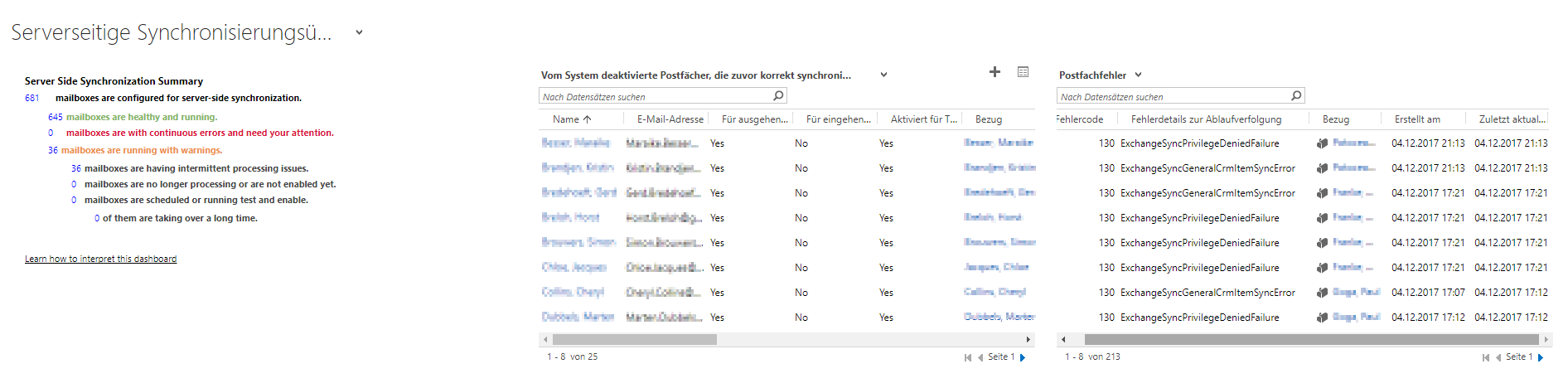
sss-dashboard.png

Walking through single mailboxes showing alerts like this:
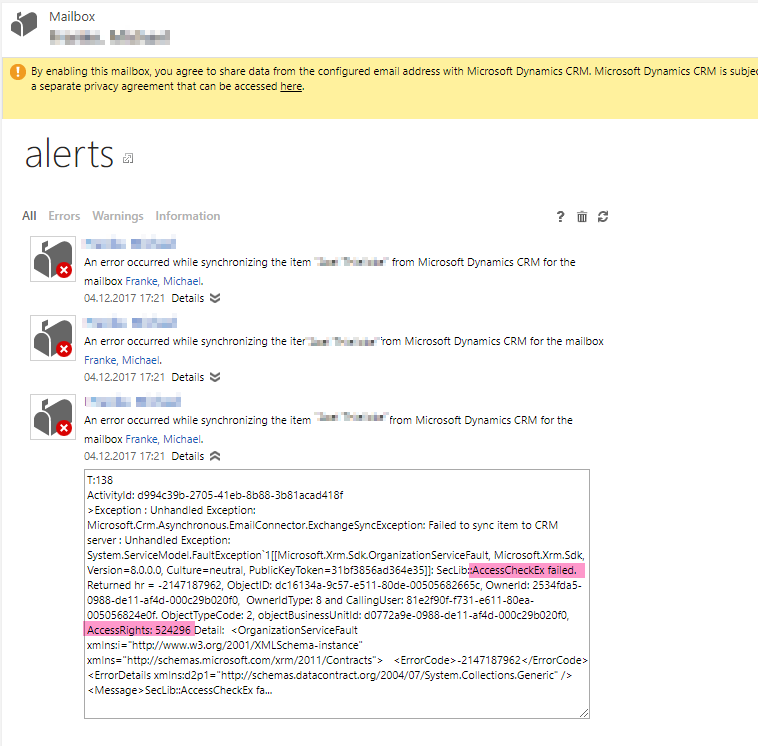
sss-mailbox-alerts.png

I am a bit confused about the detailed error message as I read, that this particular user is missing "assignTO" (AccessRights: 524296)permission for contact records.
Indeed our users don´t have permission to assign contacts in CRM, but I can´t understand why this is upcoming in context of service side sync.
It also seems that parts of the error details are cut off at the mailbox wall. Where can I find the whole alert message?


Hoping that someone can give me more insights here.
Any help would be kindly appreciated.
Regards

Oliver

*This post is locked for comments

I have the same question (0)
  • rowdy146 Profile Picture
    125 on at

    Hi Community,

    anyone there who can help us out here?

  • Suggested answer
    Community Member Profile Picture
    on at

    I am guessing on this, but it is probably an issue with your append and append to permissions.  For example, if your users have read on the contact entity set to organization, while the remaining permissions are set to user (quarter moon), then they would only be allowed to attach records to the contact's that they own.  So, it is possible you have an email which they were sent with a contact copied which they don't have append permissions for.  The other side of this is the append to permissions, which sets the access on the record being attached to another record, so that has to be considered as well.

    This thread talks about the core permissions needed for the Server Side Sync.  I haven't tested these fully but I did get past some errors with an "Everyone" role with these settings for general server side sync errors:

    Core Records
    -Sync Error (all quarter moon)
    -Trace (all full moon - organization owned entity)
    Business Management
    - Email Server Profile (full moon: read)
    - Mailbox (full moon:read; quarter moon: write, append, append to)
    - Mailbox Auto Tracking Folder (quarter moon: read, write, append, append to)
    Business Management - Privacy Related Privileges
    - Use Dynamics 365 App for Outlook (full moon)
    - Sync to Outlook (full moon)

  • Shwaa77 Profile Picture
    175 on at

    Thanks Scott your Answer helped me out! Was getting "ExchangeSyncPrivilegeDeniedFailure" for a couple users.

Under review

Thank you for your reply! To ensure a great experience for everyone, your content is awaiting approval by our Community Managers. Please check back later.

Helpful resources

Quick Links

Responsible AI policies

As AI tools become more common, we’re introducing a Responsible AI Use…

Neeraj Kumar – Community Spotlight

We are honored to recognize Neeraj Kumar as our Community Spotlight honoree for…

Leaderboard > 🔒一 Microsoft Dynamics CRM (Archived)

#1
SA-08121319-0 Profile Picture

SA-08121319-0 4

#1
Calum MacFarlane Profile Picture

Calum MacFarlane 4

#3
Alex Fun Wei Jie Profile Picture

Alex Fun Wei Jie 2

Last 30 days Overall leaderboard

Featured topics

Product updates

Dynamics 365 release plans



