web
You’re offline. This is a read only version of the page.
close
Skip to main content

Notifications

Announcements

No record found.

Community site session details

Community site session details

Session Id :
Finance | Project Operations, Human Resources, ...
Answered

Business Events Not Triggered Automatically

(0) ShareShare
ReportReport
Posted on by 1,214

Hi,

I created a custom business event and triggers it on power automate flow.

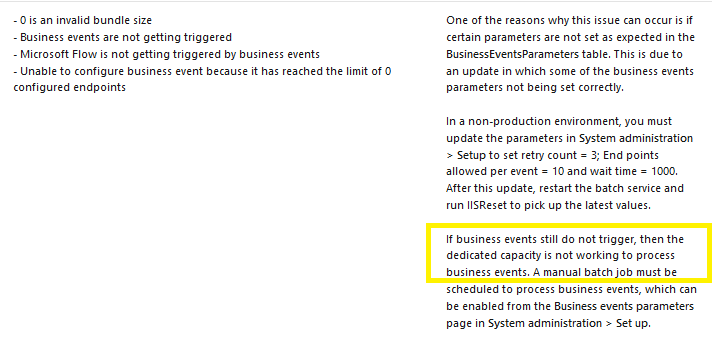
In business events parameters, I already follow the setup mentioned in documentation
business-event-not-trigger.png

But for some reason I still need to manually run the business event batch job every time I want to trigger the event.

What does it mean by "the dedicated capacity is not working to process business events"?

What do I need to trigger business events automatically in DEV and UAT environments?

Thank you.

I have the same question (0)
  • Verified answer
    nmaenpaa Profile Picture
    101,160 Moderator on at

    Just set the batch to keep running by setting up the recurrence schedule and putting the "Batch processing" slider to Yes in the batch dialog. It works just like all other batch jobs in the system - you can run it one time or set a recurrence.

  • HAIRUL HAZRI Profile Picture
    1,214 on at

    Hi Nikolais,

    is it not possible to trigger the event only upon request?

    The idea is to trigger approval power automate flow on a button click in sales order form.

    1. User click a button to request permission to modify completed sales order.

    2. Business event is triggered, runs the power automate flow.

    3. Approver will approve/reject the sales order modification request.

    4. Form will be enabled for modification if approved.

    My concern with recurring schedule is, the trigger will be slightly delayed.

    But if setting the recurrence too frequent, won't it impact the system resources heavily?

    What is typically the ideal recurrence frequency for this kind of scenario?

  • Suggested answer
    nmaenpaa Profile Picture
    101,160 Moderator on at

    Business events are always asynchronous so it's always slightly delayed. No matter whether business events are sent by the recurring batch, or without it, the system has to send and process them. And system resources are used for this.

    Ideal recurrence depends on your requirement. It can be for example every minute, or every 5 minutes.

  • HAIRUL HAZRI Profile Picture
    1,214 on at

    I see. Okay I understand now. Thank you Nikolaos.

  • NoobGamer Profile Picture
    2 on at

    Hi Hairul /Nikolaos,

                          I have created the custom business event and I am trying to trigger the business event in Power Automate but I don't see any response when I test the flow in Power Automate ,Both custom Business event and out of the box business is not getting triggered , this is the new dev environment ,should I have to enable any setup in order to trigger the business Event in Power Automate  .

                  But previously I have used the same custom Business event in the other dev Environment everything was working fine . But In this new dev environment I could not able to Trigger any of the Events.. Can someone please tell me what will be the cause for this ? I can even see the End Points but still nothing works here

Under review

Thank you for your reply! To ensure a great experience for everyone, your content is awaiting approval by our Community Managers. Please check back later.

Helpful resources

Quick Links

Responsible AI policies

As AI tools become more common, we’re introducing a Responsible AI Use…

Neeraj Kumar – Community Spotlight

We are honored to recognize Neeraj Kumar as our Community Spotlight honoree for…

Leaderboard > Finance | Project Operations, Human Resources, AX, GP, SL

#1
Martin Dráb Profile Picture

Martin Dráb 611 Most Valuable Professional

#2
André Arnaud de Calavon Profile Picture

André Arnaud de Cal... 529 Super User 2025 Season 2

#3
Sohaib Cheema Profile Picture

Sohaib Cheema 285 User Group Leader

Last 30 days Overall leaderboard

Product updates

Dynamics 365 release plans
