web
You’re offline. This is a read only version of the page.
close
Skip to main content

Announcements

No record found.

News and Announcements icon
Community site session details

Community site session details

Session Id :
Microsoft Dynamics AX (Archived)

Deleting Upgraded company in AX2012

(0) ShareShare
ReportReport
Posted on by 5,682

Hi,

While deleting company from AX2012R2 CU7, showing attached error message. We want to know about 'How do delete particular company accounts with all transactions from that company?'.

Error message:

'Cannot delete a record in Ledger (ledger). The corresponding AOS validation failed.
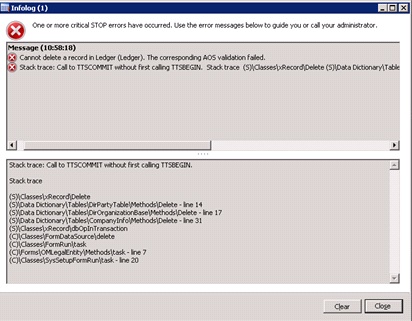
We have upgraded companies data from AX2009 RU7 to AX2012R2 CU7.

Thanks in advance
A.D.Karthik

*This post is locked for comments

I have the same question (0)
  • Suggested answer
    André Arnaud de Calavon Profile Picture
    305,150 Super User 2026 Season 1 on at

    Hi,

    When you have records in the table GeneralJournalEntry (Accounting transactions) this error will be raised. This some caution because this table is globally shared (separated per legal entitiy with the field Ledger) and I think Microsoft want to prevent deleting the wrong transactions.

    So it is not possible using standard AX to delete a company with transactions in the general ledger.

    It was better to delete the company prior to upgrading it to AX 2012.

  • Verified answer
    Community Member Profile Picture
    on at

    Consider deleting the trasaction data first before deleting the company

    you can use Classes\SysDatabaseTransDelete to delete the data

    go to the Classes\SysDatabaseTransDelete and run the class to initiate the transactions delete process in the compnay

    you need to identify shared company transaction data and delete it

    Once all the transaction data is deleted then you can consider deleting company without any issue.

    Please verify and update us with your findings

  • André Arnaud de Calavon Profile Picture
    305,150 Super User 2026 Season 1 on at

    Thanks Nitesh. Not all versions of AX 2012 do have support to delete the accounting transactions. I had noticed this in R3. Checked it and it was added in AX 2012 R2 with CU 7.

    So starting from this version it is possible to use this class and delete really all transactions.

    But before you will use this class:

    - Make sure you have a backup of the database

    - Ensure the correct legal entity is active before starting this class. Watch the dialog box carefully before continue with the real deleting of the transactions.

  • Karthik Desappan Profile Picture
    5,682 on at

    hi andre/nithesh,

    I have one doubt for deleting a company through Classes\SysDatabaseTransDelete if when using this class delete all the transaction In all the legal entity(company) or only current legalenity(company).let me give the answer for this class functionality.....

  • Verified answer
    Community Member Profile Picture
    on at

    it deletes only transactions (not master data)  in current company

  • Verified answer
    André Arnaud de Calavon Profile Picture
    305,150 Super User 2026 Season 1 on at


    Hi Karthik,

    It is restricted in code to use only the current active legal entity:

    private void deleteGeneralJournalEntryTable()
    {
        GeneralJournalEntry         journalEntry;
        GeneralJournalAccountEntry  accountEntry;
        ;
        journalEntry.skipDatabaseLog(true);
        journalEntry.skipDataMethods(true);
        journalEntry.skipDeleteActions(false);
    
        ttsBegin;
        delete_from accountEntry
        exists join journalEntry
            where accountEntry.GeneralJournalEntry == journalEntry.RecId &&
                  journalEntry.Ledger              == Ledger::current();
    
        delete_from journalEntry
            where journalEntry.Ledger == Ledger::current();
    
        ttsCommit;
    }
    

  • Karthik Desappan Profile Picture
    5,682 on at

    Thanks andre and nithesh for your instance response.......

    Regards,

    A.D.Karthik

Under review

Thank you for your reply! To ensure a great experience for everyone, your content is awaiting approval by our Community Managers. Please check back later.

Helpful resources

Quick Links

Introducing the 2026 Season 1 community Super Users

Congratulations to our 2026 Super Stars!

Meet the Microsoft Dynamics 365 Contact Center Champions

We are thrilled to have these Champions in our Community!

Congratulations to the April Top 10 Community Leaders

These are the community rock stars!

Leaderboard > 🔒一 Microsoft Dynamics AX (Archived)

#1
CP04-islander Profile Picture

CP04-islander 24

#2
Michel ROY Profile Picture

Michel ROY 14

#3
Jagadabi Profile Picture

Jagadabi 6

Last 30 days Overall leaderboard

Featured topics

Product updates

Dynamics 365 release plans
