web
You’re offline. This is a read only version of the page.
close
Skip to main content

Notifications

Announcements

No record found.

Community site session details

Community site session details

Session Id :
Small and medium business | Business Central, N...
Suggested Answer

Business Central cannot be updated

(0) ShareShare
ReportReport
Posted on by 43

Hi,

We have been getting the below when we logged into Business Central in the last few days.  Before that, there was another message about Business Central cannot be updated due to some extension issue. 
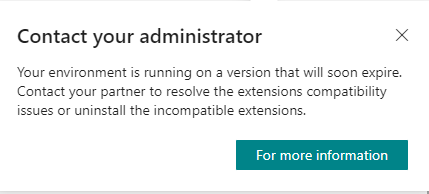
BC_2D00_UnableToUpdate_2D00_Error.png

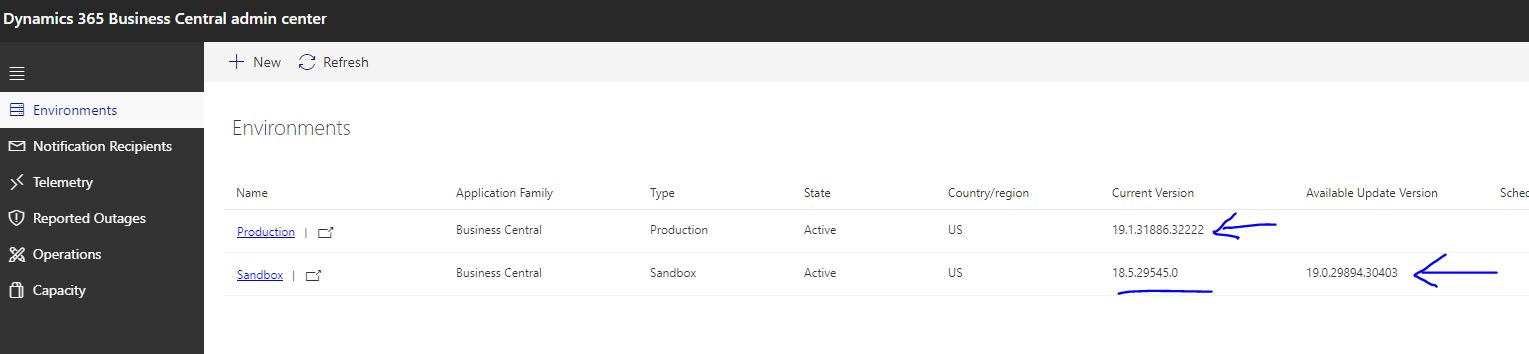
Looking into our BC admin center, it showed that our Production environment is more current than our Sandbox environment.  
BC_2D00_UnableToUpdate_2D00_Error2.png

Does that mean the issue is with our Sandbox environment?  

How can we fix the issue?  

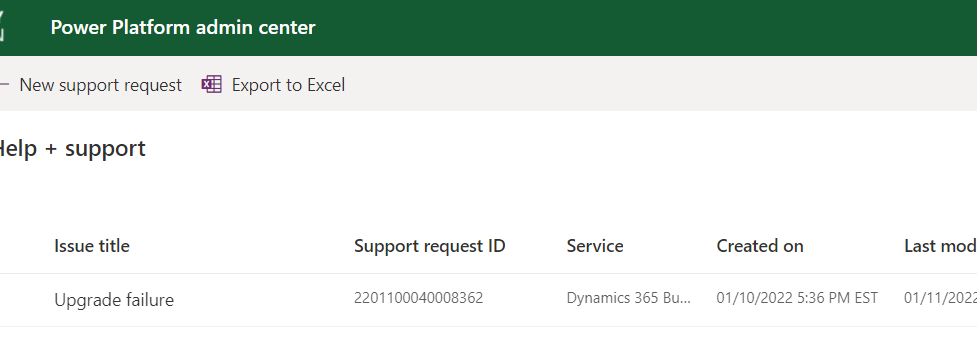
After clicking into the Sandbox environment in the above screen, I see a link to Create "New Support Request".  But, that brought me to "Power platform admin center".  I did create a ticket there yesterday evening, but I did not get any response yet.  Is BC part of Power Platform?  
BC_2D00_UnableToUpdate_2D00_Error3.png

Any ideas?  

dc7669

I have the same question (0)
  • Suggested answer
    MahGah Profile Picture
    15,529 on at

    Hi

    That could because of your Sandbox. Also it is possible that your Sandbox has an app that stop it from upgrade.

    Select the Sandbox in Admin center. Then from top of the page use Update Setting and schedule it for update (for tomorrow for example) then from error message find the extension that causes issue and see if you can upgrade that extension to newer version. Then schedule another upgrade for Sandbox and see if it upgrades or not.

    If you can find the error email then you can upgrade extension then schedule update for Sandbox.

  • Suggested answer
    YUN ZHU Profile Picture
    95,329 Super User 2025 Season 2 on at

    Hi, I also have customers who have received this notification. It seems that this is for the tenant level. As long as there is an environment before 19.0 in the tenant, this notification will appear. And this notification seems to be a new feature in 19.0. I didn't see this notification in 18.0.

    BC is not part of Power Platform, but Microsoft seems to want to integrate BC Admin Center into Power Platform admin center.

    For submitting support to MS, you can refer to the link below.

    https://docs.microsoft.com/en-us/dynamics365/business-central/dev-itpro/technical-support#summary-of-where-to-file-bugs-and-issues

    pastedimage1641945109842v1.png

    Hope this will help.

    Thanks.

    ZHU

  • Andrea Schoech Profile Picture
    5 on at

    Hello,

    I am having the problem that I receive notifications that the update failed, but no reason for it. Then I wait for the next update date, and it fails again. Having this problem in 3 different tenants, only with Sandboxes.

    pastedimage1641968096893v1.png

    Does anyone have similar problems? Having this probem since november. 

    Best regards

    Andrea

  • Suggested answer
    MahGah Profile Picture
    15,529 on at

    Hi

    We had the same issue before and you can find other posts here about it as well. The best solution is to ask your partner to contact Microsoft and ask them to investigate 

  • dc7669 Profile Picture
    43 on at

    Hi Zhu,

    There were two suspect custom Extensions in our Business Central Sandbox Environment.  I removed (uninstalled and unpublished) them and tried upgrade.  Yet, it still failed.

    I tend to agree at this point that the error message may be for tenant level because the message appear regardless whether I am in Production or Sandbox environment.

    How did your client resolve the issue?  Or simply ignore it as it may not be doing any harm?  

    Thanks.

    dc7669

  • Suggested answer
    Marco Mels Profile Picture
    on at

    Hello,

    I agree with all that has been said here. If you are on SaaS, you can easily ask your partner to raise a support ticket on your behalf.

    Thanks.

  • Suggested answer
    dc7669 Profile Picture
    43 on at

    Well, Microsoft Support did get back with me.  They said that it was because my "Cloud Migration" was turned on in my Sandbox environment and so, the upgrade failed.

    So, I disabled "Cloud Migration" from "Cloud Migration Management" in Sandbox of BC.

    Then, tried to upgrade Sandbox again.  And it was successful.

    It look a few iterations to bring it to the same version as Production.  

    But, this issue is solved for me.

    dc7669

Under review

Thank you for your reply! To ensure a great experience for everyone, your content is awaiting approval by our Community Managers. Please check back later.

Helpful resources

Quick Links

Responsible AI policies

As AI tools become more common, we’re introducing a Responsible AI Use…

Neeraj Kumar – Community Spotlight

We are honored to recognize Neeraj Kumar as our Community Spotlight honoree for…

Leaderboard > Small and medium business | Business Central, NAV, RMS

#1
OussamaSabbouh Profile Picture

OussamaSabbouh 3,143

#2
Jainam M. Kothari Profile Picture

Jainam M. Kothari 1,694 Super User 2025 Season 2

#3
YUN ZHU Profile Picture

YUN ZHU 1,067 Super User 2025 Season 2

Last 30 days Overall leaderboard

Featured topics

Product updates

Dynamics 365 release plans
