web
You’re offline. This is a read only version of the page.
close
Skip to main content

Announcements

No record found.

News and Announcements icon
Community site session details

Community site session details

Session Id :
Finance | Project Operations, Human Resources, ...
Answered

How to add the custom field in the standard workflows

(0) ShareShare
ReportReport
Posted on by 534

Hi Guys,

Requirement -

I need to add the custom field "Job ID" in the standard workflow "Expense report".

pastedimage1655827106595v1.png

Solution-

I have added the custom field "Job ID " in the standard table "TrvExpTable"

pastedimage1655827216080v3.png

Now my  problem is, after adding the custom field "JobID" in the table "TrvExpTable" I can't able to see that custom field in workflow condition dropdown.
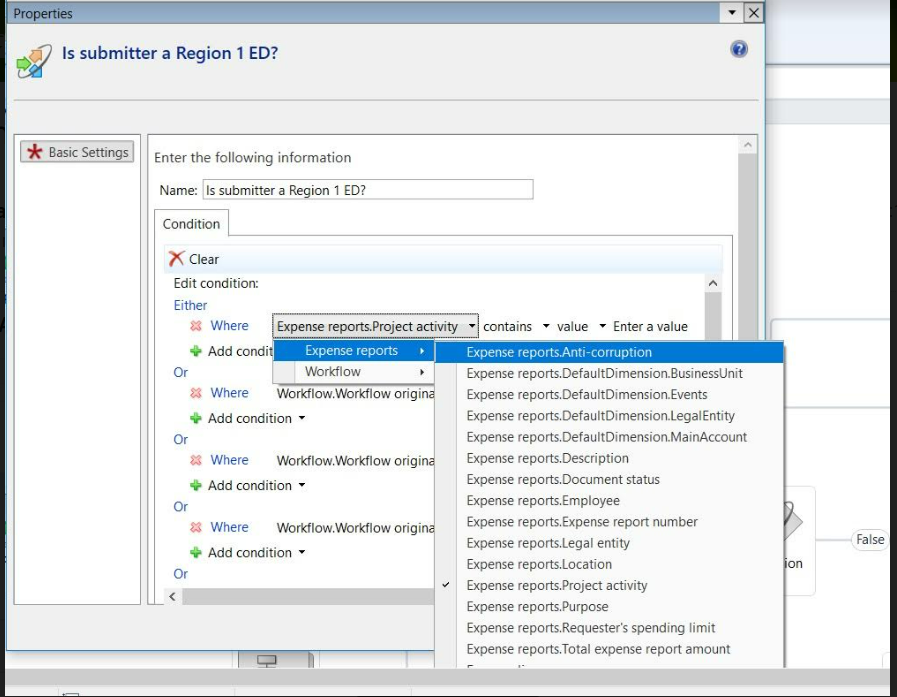
pastedimage1655827260557v4.png

Later I came to know that it should also be added in the "Query" as well, but I don't know in which query I should add.

How to find the standard workflow query.

Please help me to solve this..

I have the same question (0)
  • Verified answer
    abdultp Profile Picture
    867 on at

    Hi,

    For the workflow type 'TrvDocumentTemplate' you can find the document 'TrvWorkflowExpHeader'. If you look into the query which is returned from the class method getqueryname(), it has data source 'TrvExpTable' with Dynamic Fields property set to No. You just need to extend that query & add the field 'JobID'.

    Regards,

  • Suggested answer
    Dynamics Community 101 Profile Picture
    310 on at

    Hi Jenifer,

    You need to add the field in workflow-query and it should automatically populate in the workflow conditions.

Under review

Thank you for your reply! To ensure a great experience for everyone, your content is awaiting approval by our Community Managers. Please check back later.

Helpful resources

Quick Links

Introducing the 2026 Season 1 community Super Users

Congratulations to our 2026 Super Stars!

Meet the Microsoft Dynamics 365 Contact Center Champions

We are thrilled to have these Champions in our Community!

Congratulations to the March Top 10 Community Leaders

These are the community rock stars!

Leaderboard > Finance | Project Operations, Human Resources, AX, GP, SL

#1
Giorgio Bonacorsi Profile Picture

Giorgio Bonacorsi 616

#2
André Arnaud de Calavon Profile Picture

André Arnaud de Cal... 460 Super User 2026 Season 1

#3
Syed Haris Shah Profile Picture

Syed Haris Shah 331 Super User 2026 Season 1

Last 30 days Overall leaderboard

Product updates

Dynamics 365 release plans
