Introduction:
You make an HTTP request and receive a response. That response contains a value that we need to use in our test script. Capturing this value and storing it in a variable is a process known as extraction.
Two terms that might be new to you are Samplers and Post Processors:
Passing a value from a server response (or sample) to a subsequent request is a fundamental concept when building out a successful test script. In JMeter, we use a post-processor to achieve this pattern. Post-processors can be applied to a scope of samplers, or a particular sampler as a child step of that sampler. We will primarily follow the child post-processor pattern so that our post-processor will run in the context of individual http requests.
Extractors:
Post-processor extractors allow a user to extract a value from a server response and store the value in a given variable name. JMeter enables you to use several types of extractors:
- Boundary Extractor
- CSS Selector Extractor
- Regular Expression Extractor
- XPath (and XPath2) Extractor
- JSON JMESPath Extractor
- JSON Extractor
This is not an exhaustive list of post-processors. Additional post-processor details can be found here: https://jmeter.apache.org/usermanual/component_reference.html
We can accomplish everything we need for our test to run successfully by using the Boundary Extractor and CSS Selector Extractor. These extractors are defined as follows
Boundary Extractor: Allows the user to extract values from a server response using left and right boundaries. As a post-processor, this element will execute after each Sample request in its scope, testing the boundaries, extracting the requested values, generate the template string, and store the result into the given variable name. Ref: Apache JMeter - User's Manual: Component Reference
A boundary extractor is similar to a substring expression, and using the index of specific text to determine the left and right boundaries of the string. This is useful when the server response returns consistent and well structured formats like XML or JSON.
The JSON below might be part of a server response that we are expecting in a test script:
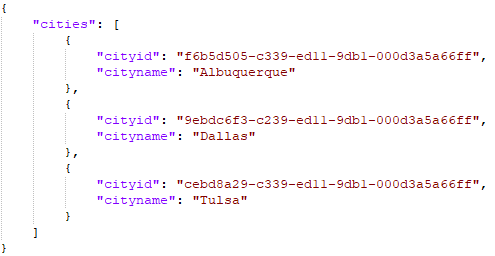
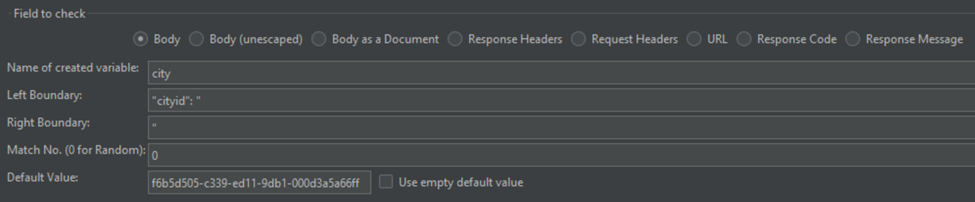
If I want to use the boundary extractor to store one of these cityid values in a variable for use throughout the script, this is how the extractor should be configured:
Name of the created variable: city
Left Boundary: "cityid": "
Right Boundary: "
Match No.: 0 (Sets an index for the found value if there are multiple matches. Use 0 for random)
*Default Value: f6b5d505-c339-ed11-9db1-000d3a5a66ff
*Setting a default value is important in situations where search terms are randomized strings. The search needs to run as a part of the test, but the searches will not always return a result. Set a default value so samplers that depend on this will not cause the test to fail.
To make this even easier, if you add the results tree listener to the thread group in the JMeter GUI, there is a built-in tester to test post processors like the Boundary Extractor against a server response. The image below demonstrates the same extractor against a list of accounts:

CSS Selector Extractor: Allows the user to extract values from a server HTML response using a CSS Selector syntax. As a post-processor, this element will execute after each Sample request in its scope, applying the CSS/JQuery expression, extracting the requested nodes, extracting the node as text or attribute value and store the result into the given variable name. Ref: Apache JMeter - User's Manual: Component Reference
The CSS selector is useful when you need to navigate through the elements of a page to select the value of an attribute returned in a server response. For example, authentication requires you to extract hidden input values from a server response.
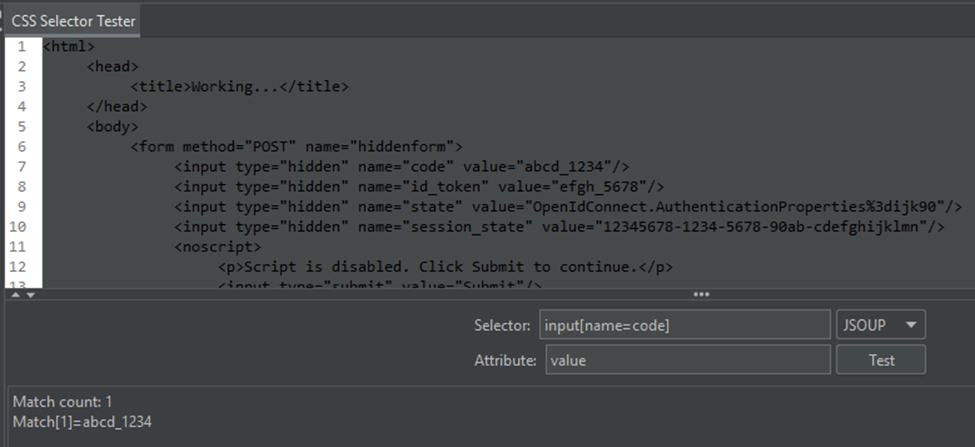
The HTML below might be part of a server response that we are expecting in a test script:

If we want to use the CSS selector to extract the values from these elements for use in a subsequent requests, we can write an expression to parse the elements as key-value pairs. In this example, the input name is our key to use in the selector expression to extract the value:
Name of the created variable: code
CSS Selector Expression: input[name=code] (ex: element[attribute=attribute value])
Attribute: value
Match No.: 0
Default Value: leave blank
In this scenario we do not want to set a default value. In a situation where the extractor fails or the property is not returned, then we expect the test to fail.
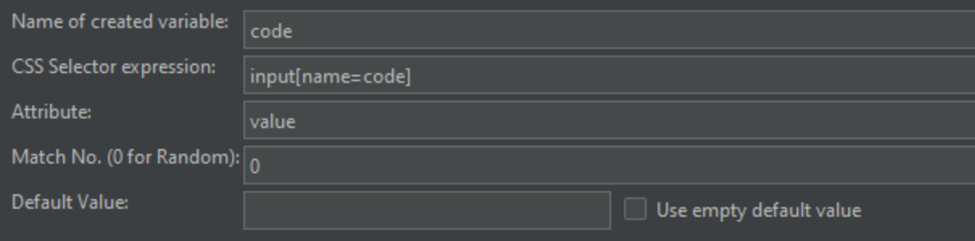
In the example above, the CSS selector is looking for "input" elements that have the name attribute of "code" to extract the "value" attribute value. https://developer.mozilla.org/en-US/docs/Web/HTML/Element/input
You will repeat this process to extract all of the required hidden input values from the response.
Just like the Boundary Extractor, the CSS Selector Tester can be used to test your expressions against a server response:
These examples are generic on purpose. You might be asking yourself; where does any of this apply to a performance test? The most common use cases are:
- Capturing tokens for authentication
- Selecting a record from a list or from search results
- Extracting the guid of a newly created record
These might not be the only use cases. Share any of your additional extraction scenarios with the community in the comments. The point is that these are universal concepts that you will use throughout your test strategy regardless of the tooling.
Summary:
In Part 1, you learned about Samplers and Post-Processors. The common Post-Processors that you will use are the Boundary Extractor and CSS Selector Extractor. These extractors will be used throughout your tests to extract values from server responses, and stored in a variable to be used in subsequent requests.
Index:


