




 10,796
 Like
Like Share
Share
 Report
Without going into more details over individual classes (RDP, Contract, UI Builder and Controller) I am writing this post to develop an SSRS report using all these classes (some of them are optional). Let’s find out how?


RDP Class
Details of this class are here;
Create a new class in AOT, I have named it FF_ReportDP and extends it from SRSReportDataProviderBase
SRSReportQueryAttribute: specifies which AOT query will be used in this report. If the RDP class uses an AOT query to process data, define this attribute at the beginning of the class.
SRSReportParameterAttribute: defines the data contract class that will be used by this report to prompt for parameter values. If the RDP class contains any parameters this define this attribute at the beginning of the class.
NOTE: Both the attributes are optional. If the report does not use any query or does not want any parameter to filter report data, these attributes do not need to be used.
Add a new method and name it getFF_ReportReportTmp.
This method is mandatory because reporting services uses this method to get the table buffer containing the processed data. The SRSReportDataSetAttributeattribute is used to indicate the temporary table name and also tells the reporting services to use this method to retrieve the processed data.
Add a new method and name it processReport. This method contains the business logic and is called by reporting services to generate data.
Initialise and retrieve contract class parameters in processReport method to get filtered records from tables based on parameter inputs. e.g. Customer account is added as a range to retrieve data only for selected customer.
Tip: For better performance RecordInsertList is used in processReport method to write data into database in one call.
Contract class
Create a new class and name it FF_ReportContract
In this class I have added two parameters Company and CustomerAccount which can be used to filter data on report either passing values from a menuitem or from a class or while calling report from a form. I will address this later in this or next post.
It will tell the contract class to build the parameter dialog. In other words, it will link the UI Builder Class with the contract class.
Parameter methods:
UI Builder Class
Details of this class are here;
Create a new class and extends it from SysOperationAutomaticUIBuilder
Override build method to create own dialog box
Override postBuild method
New method to create custom lookup of all companies in AX
Controller class

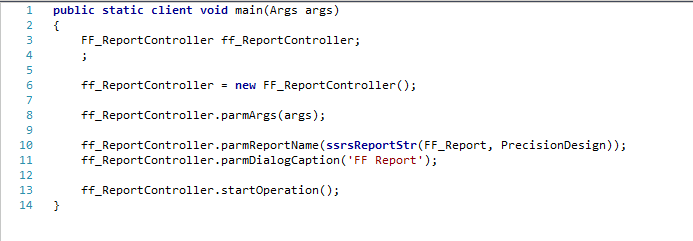


Create a new class and extends it from SrsReportRunController
Create a new Main method to call this class from a menu item which will internally call SSRS report
Add a new output menu item in AOT with name FF_ReportController with propertied Object type = Class and Object = FF_RerportController.
Run menu item and this will be the output dialog screen
Accounts receivable group parameters are three ranges added in CustBalanceList query which is used in this report example.
To hide these group parameters override showQueryValues method and return false.
 |
| After hiding parameters |
*This post is locked for comments