







CRM 2011/2013 Reports: CRMAF_Filtered Does Not Work
Views (2288)
 Aileen Gusni
 44,524
 Like
Like Share
Share
 Report
When you have query:
You are actually expected to have pre-filtering CRM Report.
But, somehow, it did not work like what I encountered before.
Well, it is my resolution.
1. I go to the RDL files
2. I take a look in the DataSource section, and I found that the data source was referring to a database, but without _MSCRM suffix, well, the report is running well eventhough using another database but no pre-filtering enabled at the very first place.
3. Change the Data Source
from
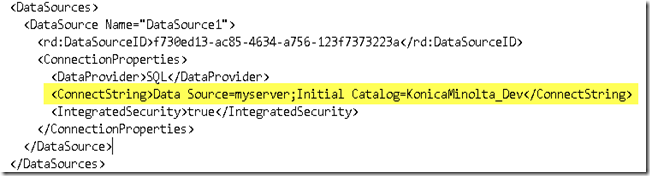
to
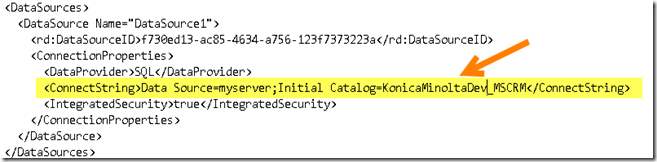
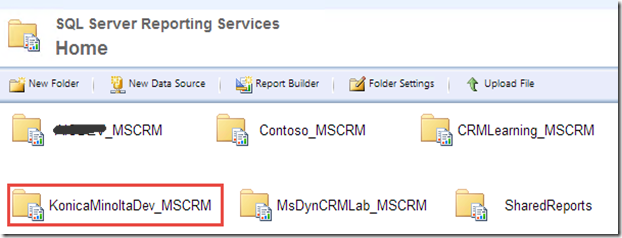
You can have the _MSCRM connection string from the http://myserver/reports
or usually by combination of OrganizationName_MSCRM
Well, this is solving my problem. And when I go to the SQL, yes, there is only one database: KonicaMinolta_Dev without MSCRM. This database name is actually different from KonicaMinoltaDev_MSCRM since this is I used when I restore and Import Organization from the existing one, and somehow, the CRM Database Name did not change and remain to this KonicaMinolta_Dev.
Hope it helps!
Thanks.
SELECT customeridname, name, owneridname, estimatedclosedate, estimatedvalue, opportunityratingcodename, closeprobability, statecodename
FROM
AS CRMAF_FilteredOpportunity
You are actually expected to have pre-filtering CRM Report.
But, somehow, it did not work like what I encountered before.
Well, it is my resolution.
1. I go to the RDL files
2. I take a look in the DataSource section, and I found that the data source was referring to a database, but without _MSCRM suffix, well, the report is running well eventhough using another database but no pre-filtering enabled at the very first place.
3. Change the Data Source
from

to

You can have the _MSCRM connection string from the http://myserver/reports
or usually by combination of OrganizationName_MSCRM
Well, this is solving my problem. And when I go to the SQL, yes, there is only one database: KonicaMinolta_Dev without MSCRM. This database name is actually different from KonicaMinoltaDev_MSCRM since this is I used when I restore and Import Organization from the existing one, and somehow, the CRM Database Name did not change and remain to this KonicaMinolta_Dev.

Hope it helps!
Thanks.
This was originally posted here.
*This post is locked for comments