







Dynamics 365 App for Outlook stops working after URL change
 Marius Agur Pedersen
 1,771
1,771
 Like
Like Share
Share
 Report
I encountered an error where the Dynamics 365 App for Outlook stopped working for a customer after we changed the URL for his instance.
As you might already know, as a D365 administrator you can go to the Dynamics Admin Portal to change the organization settings, and one of those settings is the organization URL. When we did this for a customer who was going live with a Dynamics 365 v9 organization the App for Outlook stopped working.
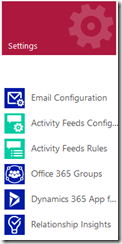
To fix this simply go to Settings –> Dynamics 365 App for Outlook
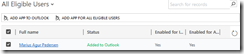
Even thought the app isn’t working the status will say “Added to Outlook”. To fix this simply select the users with the app, then click the “ADD APP TO OUTLOOK” (or “ADD APP FOR ALL ELLIGIBLE USERS”) button to re-publish the app to the users. After a few minutes the app was, again, available and working for all users.
*This post is locked for comments