






Granting Security to Basic Information and Navigation Windows
Views (1470)
 L Vail
 65,271
 Like
Like Share
Share
 Report
When security is converted, the DEFAULTUSER task is not included in the Role created for an existing user. Because this task is not included, some of the windows for general navigation new to GP 10 were not available to converted users. This post explains how to add the DEFAULTUSER role to a CNV Role.
On the Navigation Pane, select the Administration Series button to launch the Administration Area Page.
On the Administration Area Page, navigate to the Setup Content Pane and then the System menu. Select Security Roles from the System menu and the Security Role Setup window will open.
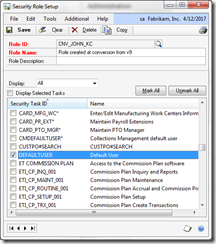
On the Security Role Setup window select each user’s Role ID, scroll down to the DEFAULTUSER Security Task ID and select it. This will grant access to a variety of navigation and lookup windows. Save this record and move on to the next applicable User Role ID. For versions prior to GP2010 there is no utility to copy security between users.
Until next post!
Leslie
On the Navigation Pane, select the Administration Series button to launch the Administration Area Page.
On the Administration Area Page, navigate to the Setup Content Pane and then the System menu. Select Security Roles from the System menu and the Security Role Setup window will open.
Select from Icon | Select from Button |
 |  |
On the Security Role Setup window select each user’s Role ID, scroll down to the DEFAULTUSER Security Task ID and select it. This will grant access to a variety of navigation and lookup windows. Save this record and move on to the next applicable User Role ID. For versions prior to GP2010 there is no utility to copy security between users.

Until next post!
Leslie
This was originally posted here.
*This post is locked for comments