







How to refresh a calling form in Dyn365FO with a simple code?
Views (1182)
 Evaldas
 1,800
1,800
 Like
Like Share
Share
 Report
Hello AX World,
Recently I was struggling to find an easy solution to refresh a calling form.
There was an easy solution in AX 2012 (link). I have tried to apply it, but it did not work.
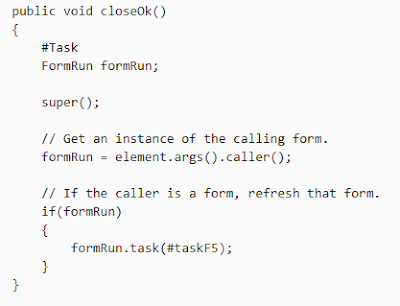
First, it has never called the task as it never run closedOk() function. It turns out, it only runs close() and closed() functions when closing a form.
I have moved the code to close() method. But the task #taskF5 (ID 2876) did not do any good to me, therefore I have started looking for another task ID.
Basically, I needed to call Shift+F5 command on a calling form which nicely refreshes the form without reloading. It calls research() function on the data source.
I have added a breakpoint in FormRun class task method to figure out the ID of the task. The ID was 2875 and that is the same as #taskRefresh macro in Task macro library.
I have changed the code and the final method looked like this:
This worked perfectly.
Be aware and take care!
Recently I was struggling to find an easy solution to refresh a calling form.
There was an easy solution in AX 2012 (link). I have tried to apply it, but it did not work.
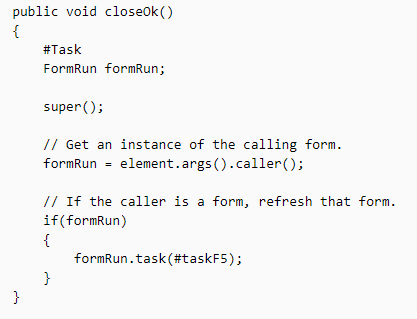
First, it has never called the task as it never run closedOk() function. It turns out, it only runs close() and closed() functions when closing a form.
I have moved the code to close() method. But the task #taskF5 (ID 2876) did not do any good to me, therefore I have started looking for another task ID.
Basically, I needed to call Shift+F5 command on a calling form which nicely refreshes the form without reloading. It calls research() function on the data source.
I have added a breakpoint in FormRun class task method to figure out the ID of the task. The ID was 2875 and that is the same as #taskRefresh macro in Task macro library.
I have changed the code and the final method looked like this:
    public void close()
    {
        super();

        FormRun formRun = element.args().caller();

        if(formRun)
        {
            #Task
            formRun.task(#taskRefresh);
        }
    }
This worked perfectly.
Be aware and take care!
This was originally posted here.
*This post is locked for comments