






Tip #1257: Learn Compose action in Flow

 Like
Like Share
Share
 Report
I wanted to name this tip “Do not use variables in Flow” but then it would have been a click-bait, not a tip.
Yesterday we worked our way through the concept of getting an attribute of the first record from the list. The very first step we avoided was to “declare the variable”. Yes, it would have worked but unless we intend to modify the value, it’d be a one-off assignment.
If you need a result of an expression and you are not planning to modify the value then, instead of a variable, consider using Compose action (which takes its name from the intent of taking multiple inputs and building a single output).
Using the same example (getting the full name of the last created contact for an account):
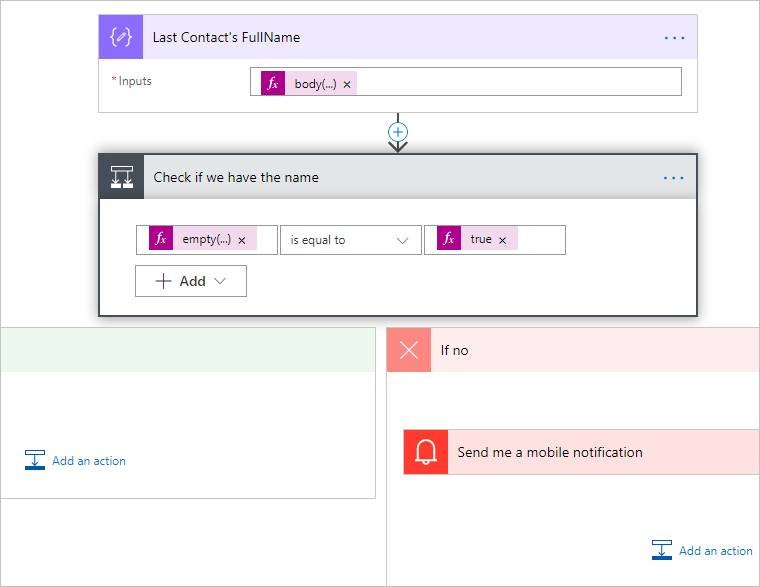
Expression in the Last Contact’s FullName Compose action is (note the use of ? to avoid runtime errors):
body('Get_Last_Contact')?['value']?[0]?.fullname
Expression in the results check is:
empty(outputs('Last_Contact''s_FullName'))
Advantages of using Compose:
- No overhead of creating and maintaining the variable
- Can be used in a scope (variables can only be declared at the top level)
- Simples!
The only downside I can think of (besides of using – gulp – code!) is that the only visual property available is Output which could potentially make the downstream use unclear.
Cover photo by unsplash-logoIsaac Ibbott
This was originally posted here.
*This post is locked for comments