




 22,809
 Like
Like Share
Share
 Report
Hello Dynamics Lover,
In this blog, I will articulate the business scenario where many of the times, we are asked to create different sets of number sequence for vendors and customers based on the vendor/Cudtomer type/groups.
Below the customer requirement (I have shared steps with vendors, however the same steps are applicable for customer as well)
1. Scenario 1: Local vendors format will be LOCV-*******1
2. Scenario 2: Foreign vendors format will be FRV-******1
3. Scenario 3: Employee Vendors format will be EMV-******1
4. Scenario 4: All other vendors will be OTHRV-******1
The end result is below we have got from the requirement gathering session.
|
Name
|
Vendor Group
|
Number Sequence Requirement
|
|
Local vendors
|
V10
|
LOCV-000000001
|
|
Foreign vendors
|
V20
|
FRV-000000001
|
|
Employee Vendors
|
E10
|
EMV-000000001
|
|
All Other vendors
|
Rest All
|
OTHRV-000000001
|
Once you defined the requirement gathering, you need to follow the below steps
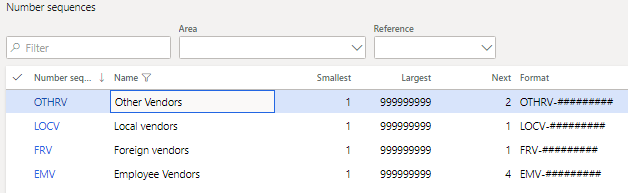
- Create the number sequence as per the standard way by given format by customer
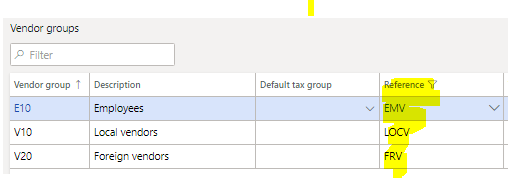
2: Now you add the newly created number sequence into the Vendor group – Default number sequence-> add the newly created sequence for respective vendor groups
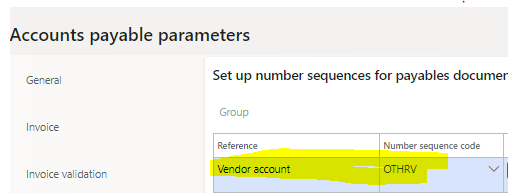
3. 3 Now you add the OTHER vendors number sequence into Accounts payable parameter for rest of the vendor groups, this will work like a global sequence and whenever any other vendor group)apart from the requirement) is selected, it will come up.
4. Now lets create individual vendors for each group to check the vendor numbers are auto populating with our criteria
I have created vendors for each group and it worked as expected, all the number sequence is different as per the requirement given by customer, thus it met the requirement.

I hope you have enjoyed this blog, any query you have, kindly feel free to connect with me at LinkedIn https://www.linkedin.com/in/ramitpaulinnovation/
*This post is locked for comments