Consider the scenario of an external system handling initial Order Capture that is then integrated into CE where the Order and Product Lines may require further validations. Depending on volumes and custom logic it may be beneficial to configure the Out of The Box price calculation logic for performance reasons.
By Default, price calculations are triggered on Product Order (salesorderdetail) Creates and Updates (depending on what has been changed), which also trigger Updates to the Order. In a high-volume Order integration scenario where all the Order Products are known before Order capture, it could make sense to skip the System Price Calculation on Create, and even Update depending on your business logic to improve performance throughput.
The Skip Price Calculation feature can be applied on Order, Opportunity, Invoice and Quote. Each of these tables has a Field called skippricecalculation which is a Choice field.
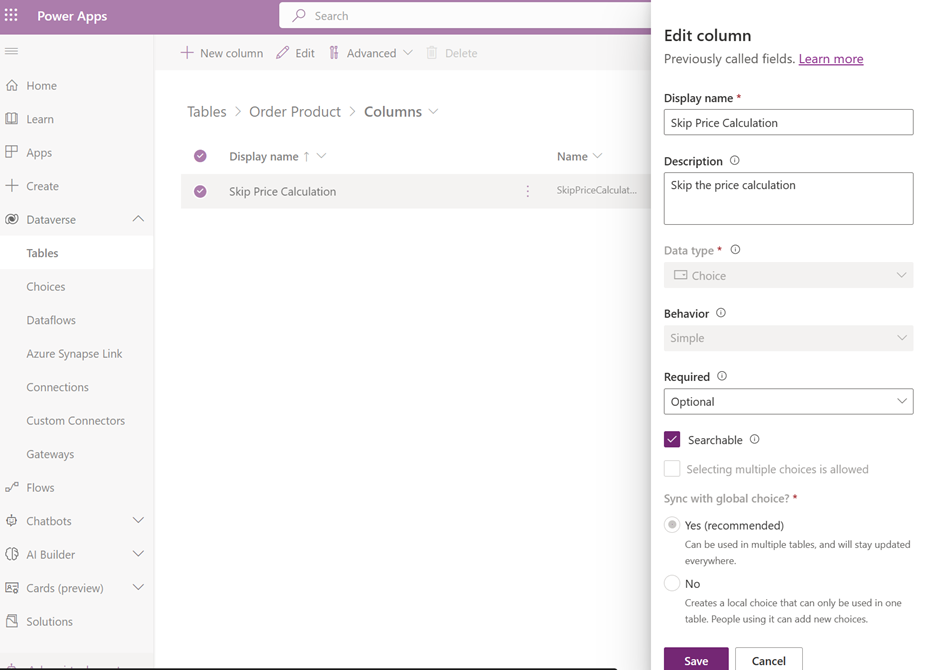
The Choice field has the following options:
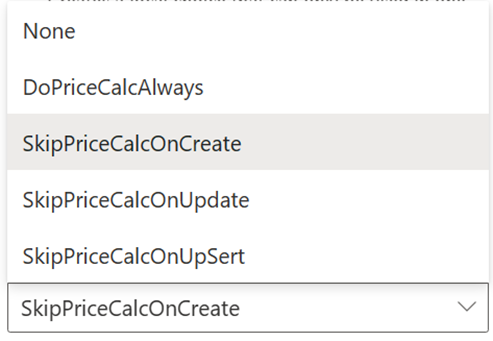
To further understand the Metadata behind the Choice you can either use the Web Api or the Metadata Browser.
Create and update choices (option sets) using the Web API (Microsoft Dataverse) - Power Apps | Microsoft Learn
Browse table definitions in your environment (Microsoft Dataverse) - Power Apps | Microsoft Learn
During an integration scenario you can set the choice on the skippricecalculation field, here is an SDK example:
for (int i = 1; i <= 5; i  )
{
 var OrderDetail = new Entity("salesorderdetail");
 OrderDetail["priceperunit"] = new Money(i);
 OrderDetail["productdescription"] = "Test Line"   i;
 OrderDetail["quantity"] = new decimal(i);
 OrderDetail["ispriceoverridden"] = false;
 OrderDetail["isproductoverridden"] = true;
 OrderDetail["skippricecalculation"] = new OptionSetValue(1);
 OrderDetail["salesorderid"] = new EntityReference("salesorder", order.Id);
 OrderDetail.Id = serviceClient.Create(OrderDetail);

 Lines.Add(OrderDetail);
}
In the above example the skippricecalucaltion was set to skip on Create. You can validate the field is set correctly on the given record by using the Web API.
Note – the skippricecalculation will also execute on Retrieve, so consider this when testing this feature in the UI (user interfaces). Use the Audit History to validate an Update to the Order did or did not occur on each Order Product line Create.
To price the Order after all Order Products have been added or validated (depending on the scenario) you can then execute the RecalculatePrice Action. Here is an SDK Example
OrganizationRequest organizationRequest = new OrganizationRequest("RecalculatePrice");
organizationRequest["entityId"] = orderAfterLinesCreated.Id;
organizationRequest["entityLogicalName"] = "salesorder";
OrganizationResponse response = serviceClient.ExecuteOrganizationRequest(organizationRequest);
Additional
If you need to set the amount on Order or Order Product during Create, then review Enable sales order processing integration | Microsoft Learn
You can also turn off the System Pricing and write a Custom Price Calculation Actions. Note – this will affect Order, Opportunity, Invoice and Quote.
System Settings Sales tab - Power Platform | Microsoft Learn
CalculatePriceRequest Class (Microsoft.Crm.Sdk.Messages) | Microsoft Learn


