




 1,800
1,800 Like
Like Share
Share
 Report
Hello AX World,
Have you ever noticed that when you explicitly call DataSourceName_ds.executeQuery() it reinstantiates the queryRun of the form and thus removes all the query filters (not ranges!).
The one good example is Release to Warehouse (WHSReleaseToWarehouse) form in Warehouse management.

When you click a button Add it refreshes the data source by calling executeQuery on it and the filters are gone. If the code would call research, it would not remove the filters and have the same result, but can I change the standard code?
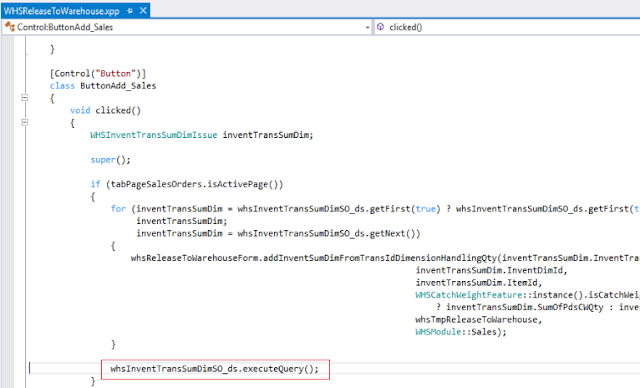
I don't know if there is a standard easy solution to preserve filters in this case, but I could not easily find one, therefore I have created a helper class for it. If you know any standard solution, let me know.
This class can be easily used in a form data source extension class by wrapping an executeQuery method.
The constructor method takes a FormDataSource object as a parameter and collects all filters of the form's queryRun query (not form's query!). After the next call, the filters are reapplied if they were removed.
Here is a code of the helper class:
Be aware and take care!
Have you ever noticed that when you explicitly call DataSourceName_ds.executeQuery() it reinstantiates the queryRun of the form and thus removes all the query filters (not ranges!).
The one good example is Release to Warehouse (WHSReleaseToWarehouse) form in Warehouse management.
When you click a button Add it refreshes the data source by calling executeQuery on it and the filters are gone. If the code would call research, it would not remove the filters and have the same result, but can I change the standard code?
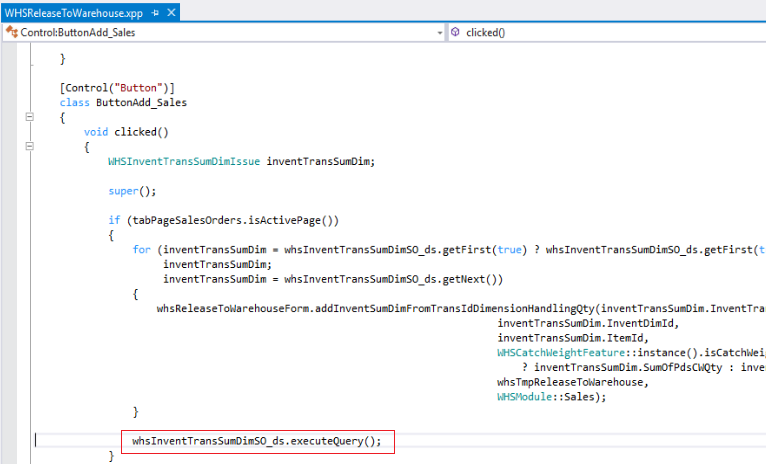
I don't know if there is a standard easy solution to preserve filters in this case, but I could not easily find one, therefore I have created a helper class for it. If you know any standard solution, let me know.
This class can be easily used in a form data source extension class by wrapping an executeQuery method.
[ExtensionOf(formDataSourceStr(WHSReleaseToWarehouse, WHSInventTransSumDimSO))]
final class WHSReleaseToWarehouseITSumDimSO_Extension
{
    public void executeQuery()
    {
        var copyDataSourceFilters = CopyDataSourceFilters::constructAndCollectFilters(this);

        next executeQuery();

        copyDataSourceFilters.applyFilters(this);
    }

}
The constructor method takes a FormDataSource object as a parameter and collects all filters of the form's queryRun query (not form's query!). After the next call, the filters are reapplied if they were removed.
Here is a code of the helper class:
class CopyDataSourceFilters
{
    /*
    The structure of the Map is the following
    {TableId1; Map{FieldId1; Container[value1, value2...]
                   FieldId2; Container[value1, value2...]
                   ...
                  }
     TableId2;Map{FieldId1;Container[value1, value2...]
                  FieldId2;Container[value1, value2...]
                  ...}
     ...
    }
    */
    protected Map queryFilters = new Map(Types::Integer, Types::Class);

    public void collectFromDataSource(FormDataSource _formDataSource)
    {
        if (_formDataSource)
        {
            QueryRun queryRun = _formDataSource.queryRun();

            if (queryRun) //QueryRun is not initiated before the first executeQuery call, therefore must be tested
            {
                this.collectFromQuery(queryRun.query());
            }
        }
    }

    public void collectFromQuery(Query _query)
    {
        int filterCount = _query.queryFilterCount();

        for (int i = 1; i <= filterCount; i++)
        {
            QueryFilter queryFilter = _query.queryFilter(i);
            TableId     tableId     = queryFilter.dataSource().table();

            this.addFilter(tableId, fieldName2Id(tableId, queryFilter.field()), queryFilter.value());
        }
    }

    protected void addFilter(TableId _tableId, FieldId _fieldId, str _value)
    {
        Map fieldValue;

        if (queryFilters.exists(_tableId))
        {
            fieldValue = queryFilters.lookup(_tableId);

            container valuesCon;

            if (fieldValue.exists(_fieldId))
            {
                valuesCon = fieldValue.lookup(_fieldId);
            }

            valuesCon += _value;

            fieldValue.insert(_fieldId, valuesCon);
        }
        else
        {
            fieldValue = new Map(Types::Integer, Types::Container);

            fieldValue.insert(_fieldId, [_value]);
        }

        queryFilters.insert(_tableId, fieldValue);
    }

    public boolean canApplyFilters(FormDataSource _formDataSource)
    {
        if (_formDataSource)
        {
            QueryRun queryRun = _formDataSource.queryRun();

            if (queryRun)
            {
                //Only apply filters when they have been removed from the queryRun
                //This happens then FormDataSourceName_ds.executeQuery() is called explicitly from the code
                return !queryRun.query().queryFilterCount() && queryFilters.elements();
            }
        }

        return false;
    }

    public void applyFilters(FormDataSource _formDataSource)
    {
        if (this.canApplyFilters(_formDataSource))
        {
            Query                   query = _formDataSource.queryRun().query();
            QueryBuildDataSource    qbds;

            MapIterator mapITables = new MapIterator(queryFilters);

            while (mapITables.more())
            {
                MapIterator mapIFields = new MapIterator(mapITables.value());
                container   values;

                qbds  = query.dataSourceTable(mapITables.key());

                while (mapIFields.more())
                {
                    values = mapIFields.value();

                    for (int c = 1; c <= conLen(values); c++)
                    {
                        query.addQueryFilter(qbds, fieldId2Name(mapITables.key(), mapIFields.key())).value(conPeek(values, c));
                    }

                    mapIFields.next();
                }

                mapITables.next();
            }

            _formDataSource.research();
        }
    }

    public static CopyDataSourceFilters constructAndCollectFilters(FormDataSource _formDataSource)
    {
        CopyDataSourceFilters copyDataSourceFilters = new CopyDataSourceFilters();

        copyDataSourceFilters.collectFromDataSource(_formDataSource);

        return copyDataSourceFilters;
    }

}
Be aware and take care!
*This post is locked for comments