






Run a class in background–Asynchronies mode
 Munib
Munib
 2,500
2,500
 Like
Like Share
Share
 Report
This is not much of a new thing but a reminder. I feel it should be used more often in D365fFO. In prior versions we showed a progress bar and gave the user a nice feeling that something was processing. In D365fFO we need better a way. If you look at the Data Management, it has a workspace for this. Process runs in async and workspace shows us the status.
Code wise, it is pretty simple. Below is an example from standard code. I got it using “Find reference” feature in Visual Studio.
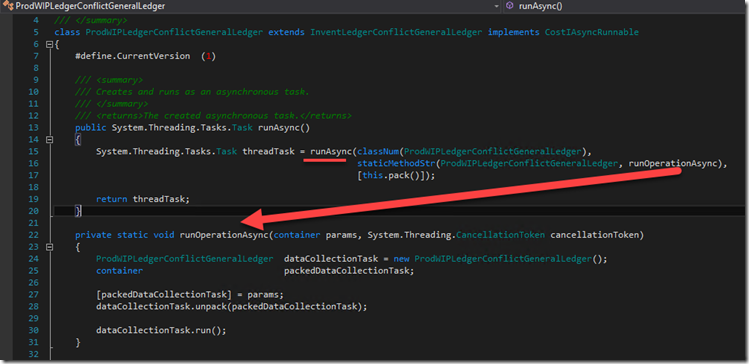
Any info or error messages will appear in the message centre. This is great as the user can continue doing their job without waiting.
Why am I writing about this?
I had a project recently where the a process was taking minutes to run. Based on the amount of data and what it was doing, I found it acceptable that it ran that long. When the user was running it, they perceive it as slow and they are waiting on the screen to refresh. I used runAsync and what do you know – happy customer.
This was originally posted here.
*This post is locked for comments