







Why don't I see my relations in Join Relation Name property?
Views (341)
 Evaldas
 1,800
1,800
 Like
Like Share
Share
 Report
Hello AX World,
Ever missed a relation in the View or Query? Read bellow to find out how to get relations there.
Recently I have been trying to create a view linking Header with Lines several times, as I needed value from each line linked to a header. Each of the lines could be linked by the enum field Rule. See the example bellow.
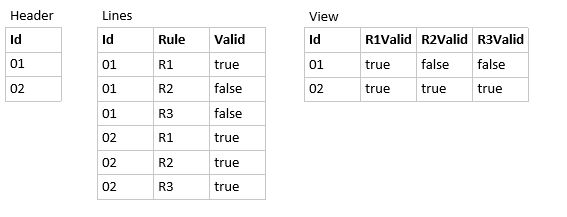
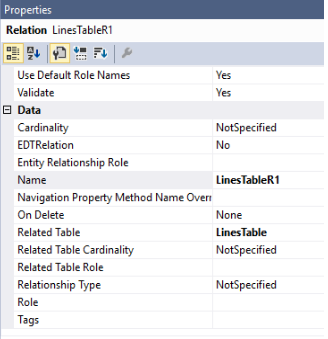
So we have 3 relations LinesTableR1, LinesTableR2 and LinesTableR3.

I am not so fond of setting up properties I do not need at this point in time, so I only set the Name and Related Table properties.
Now is time to create a view and its query.
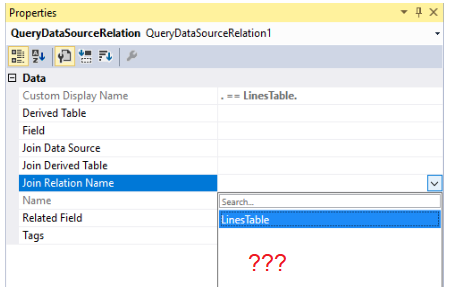
Trying to select a relation, but no relations are in the list. Why cannot I see them?

OK, sometimes you just have to type the property value, I thought, as I have noticed this onWorkflow Type property on a forms' design.

Nope. I get compilation error. What's wrong?

I started to check on standard tables and views and noticed that those relations had more properties set up.
So I started to set properties on my relations one by one. And I found one that solves the problem.
The property is called Related Table Role.

Once it's set you start seeing relations in Join Relation Name property.
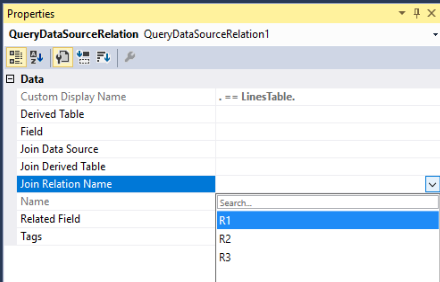
Now I can finish my view.
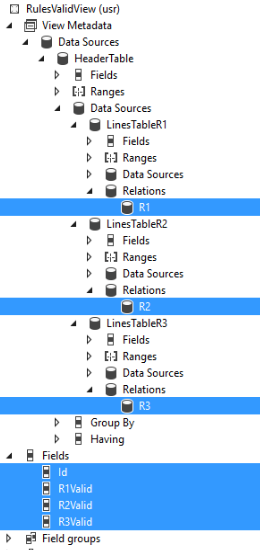

Be aware and take care!
This was originally posted here.
*This post is locked for comments