







Make attachments look mandatory and more fun stuff with icons
Views (549)
 Evaldas
 1,800
1,800
 Like
Like Share
Share
 Report
Hello AX World,
I wanted to make Attachments look mandatory and was looking for a good solution to achieve that. Perhaps, one of the options would be to give a warning message when editing or going through records. I was not a big fan of that.
Another option is to change the icon of the Attachments so it's visible and clear that I have to do something with it. The button is not available at design time, so I have to play with it at runtime.
Symbol is the easiest (for me) way of dealing with icons. You can read my older blog post "Icons on a Grid" about it, it is simple.
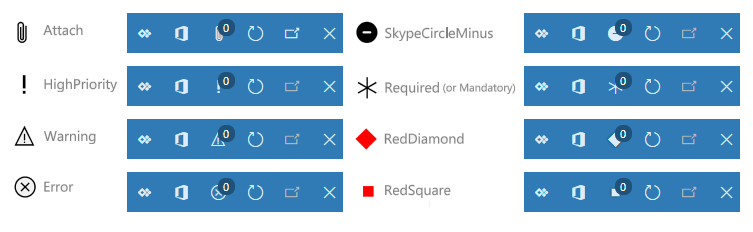
There are two problems with Symbol icons: the set is limited, if you aren't picky you can find something relatable but it's not much; another problem is when using Symbol icons on Action Pane buttons, it becomes one color. Even icons like RedDiamond or RedX which supposed to be red. Single color does not stand out, does it? Have a look:

There is hope. Another great option is URL. It's basically a link to resources on the Web like PNG or SVG files. I prefer SVG as it's vector graphics. As you can suspect the resources are unlimited. For testing purposes, I have found some icons online.
 I tried various sizes of icons: 32x32 a bit small; 48x48 too big. As far as I calculated the size of icon is 35x38, not a very standard one. Make sure the icons fit nicely in the system. Nobody wants to look at ugly icons.
So far I have managed to use two types of icons: Symbols and URL. Files, EmbeddedResource and AOTResource type icons seems no longer available. At least, I did not manage to get them working. I have tried. I am clearly missing something or they are no longer in use.

If you know how to use them as Action Pane button icons, please let me know in the comments down below. Appreciate that.

Now as you know how to improve your Attachments visibility, you can apply the same for the Edit button.
Let's say you would like a user to know that the record is not valid and should be edited. You want to make it more visible, let's say a different Edit icon and maybe even a help text. Here is an example to that:
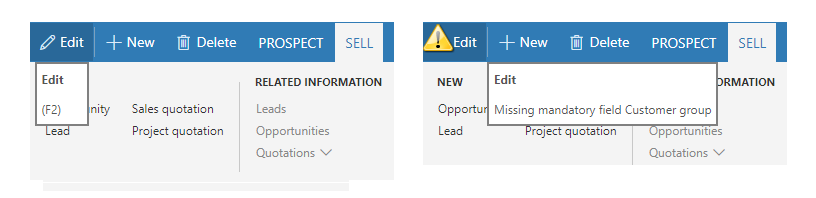
You can figure out many other scenarios. I guess you probably get the point how you can play with icons on the system defined buttons.
Lets get some reasonable color to Dynamics 365 for Finance and Operations!
Please, don't try to make it as a Christmas tree... like I did.
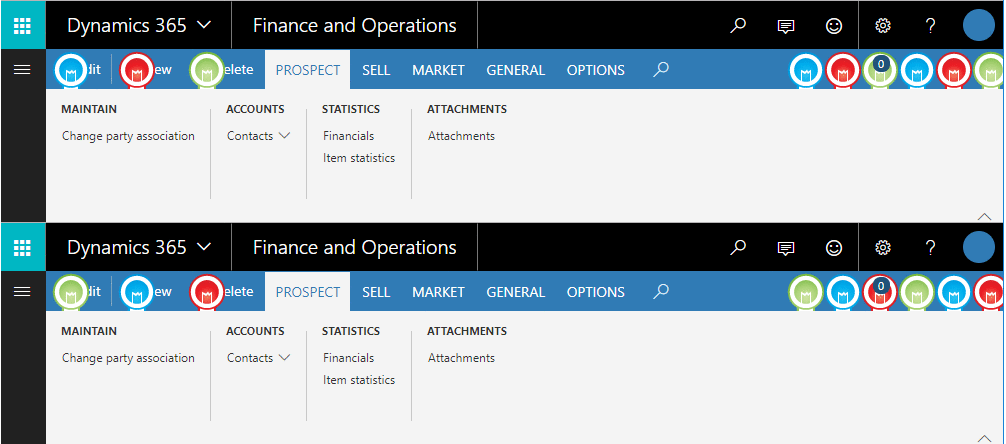
P.S. The icons used here were 48x48, that's why the bulbs overlay the text.
Merry Christmas if I don't write until then.
Be aware and take care!
I wanted to make Attachments look mandatory and was looking for a good solution to achieve that. Perhaps, one of the options would be to give a warning message when editing or going through records. I was not a big fan of that.
Another option is to change the icon of the Attachments so it's visible and clear that I have to do something with it. The button is not available at design time, so I have to play with it at runtime.
Symbol is the easiest (for me) way of dealing with icons. You can read my older blog post "Icons on a Grid" about it, it is simple.
There are two problems with Symbol icons: the set is limited, if you aren't picky you can find something relatable but it's not much; another problem is when using Symbol icons on Action Pane buttons, it becomes one color. Even icons like RedDiamond or RedX which supposed to be red. Single color does not stand out, does it? Have a look:
There is hope. Another great option is URL. It's basically a link to resources on the Web like PNG or SVG files. I prefer SVG as it's vector graphics. As you can suspect the resources are unlimited. For testing purposes, I have found some icons online.
So far I have managed to use two types of icons: Symbols and URL. Files, EmbeddedResource and AOTResource type icons seems no longer available. At least, I did not manage to get them working. I have tried. I am clearly missing something or they are no longer in use.
If you know how to use them as Action Pane button icons, please let me know in the comments down below. Appreciate that.
Once you have your icons and you know how to change it, you can add conditions for the icon change. For example, if no documents attached, show a warning icon.
For a standard form just create an event handler of Activated event and add the following code.
For a standard form just create an event handler of Activated event and add the following code.
[FormDataSourceEventHandler(formDataSourceStr(smmBusRelTable, smmBusRelTable), FormDataSourceEventType::Activated)]
public static void smmBusRelTable_OnActivated(FormDataSource sender, FormDataSourceEventArgs e)
{
    FormCommandButtonControl attachButton = sender.formRun().design().controlName('SystemDefinedAttachButton') as FormCommandButtonControl;

    if (!DocuRef::exist(sender.cursor().DataAreaId,  sender.cursor().TableId,  sender.cursor().RecId))
    {
        str link = @"https://cdn4.iconfinder.com/data/icons/32x32-free-design-icons/32/Warning.png";

        attachButton.imageLocation(SysImageLocation::URL);
        attachButton.normalImage(link);        }
    else
    {
        attachButton.imageLocation(SysImageLocation::Symbol);
        attachButton.normalImage("Attach");
    }
}
Now as you know how to improve your Attachments visibility, you can apply the same for the Edit button.
Let's say you would like a user to know that the record is not valid and should be edited. You want to make it more visible, let's say a different Edit icon and maybe even a help text. Here is an example to that:
[FormDataSourceEventHandler(formDataSourceStr(smmBusRelTable, smmBusRelTable), FormDataSourceEventType::Activated)]
public static void smmBusRelTable_OnActivated(FormDataSource sender, FormDataSourceEventArgs e)
{
    smmBusRelTable smmBusRelTable = sender.cursor();
    FormCommandButtonControl editButton = sender.formRun().design().controlName('SystemDefinedViewEditButton') as FormCommandButtonControl;

    if (!smmBusRelTable.CustGroup)
    {
        str link = @"https://cdn4.iconfinder.com/data/icons/32x32-free-design-icons/32/Warning.png";
        editButton.imageLocation(SysImageLocation::URL);
        editButton.normalImage(link);
        editButton.helpText("Missing mandatory field Customer group");
    }
    else
    {
        editButton.imageLocation(SysImageLocation::Symbol);
        editButton.normalImage("Edit");
        editButton.helpText("(F2)");
    }
}
You can figure out many other scenarios. I guess you probably get the point how you can play with icons on the system defined buttons.
Lets get some reasonable color to Dynamics 365 for Finance and Operations!
Please, don't try to make it as a Christmas tree... like I did.
P.S. The icons used here were 48x48, that's why the bulbs overlay the text.
Merry Christmas if I don't write until then.
Be aware and take care!
This was originally posted here.
*This post is locked for comments