







Turn Port Sharing On in Navision 2013
Views (1987)
 Suresh Kulla
 50,243
Super User 2025 Season 2
50,243
Super User 2025 Season 2
 Like
Like Share
Share
 Report
To use same port number for different services you need to start .Net TCP Port Sharing service on.

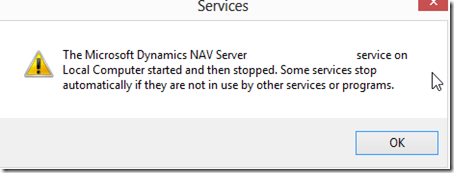
But when you create a service using NAV 2013 administration tool you don’t have the option to turn port sharing on the service, so it will throw an error when you try to open the second service

Run the below command for the service.
sc config MicrosoftDynamicsNavServer$DynamicsNAV70 depend= NetTcpPortSharing/HTTP
You need to repeat above steps for all the services which is using the same port no. Once you run the above command for all the services, stop all the services and then restart them.

But when you create a service using NAV 2013 administration tool you don’t have the option to turn port sharing on the service, so it will throw an error when you try to open the second service


Cause
The same port is used on the first service and the services created are not set for TCP port sharing, to turn port sharing on the services please follow the below steps.Resolution
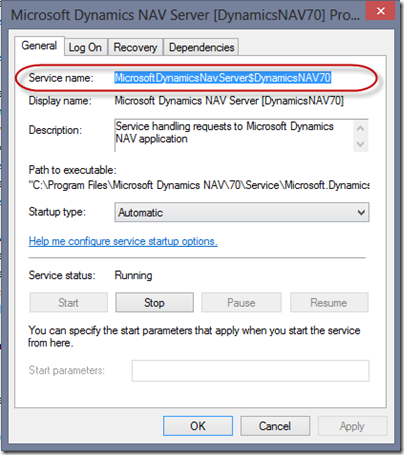
Lookup for the service name by going into Control Panel –> Administration Tools --> Services and right click on the service check properties on the NAV service. Copy the service name.
Run the below command for the service.
sc config MicrosoftDynamicsNavServer$DynamicsNAV70 depend= NetTcpPortSharing/HTTP
You need to repeat above steps for all the services which is using the same port no. Once you run the above command for all the services, stop all the services and then restart them.
This was originally posted here.
*This post is locked for comments