




 Like
Like Share
Share
 Report
Introduction
Microsoft Fabric enables efficient access to Customer Insights – Journeys interaction data for reporting and analytics purposes. The introduction of Fabric can raise questions regarding the cost implied or the architectural impact when other analytic solutions already are available. This article outlines an approach for leveraging Fabric with a minimal footprint and in a cost-effective manner to make CI-J interaction data available for custom reporting needs or the extraction of data for other analytic solutions.
Accessing CI-J interactions through Fabric
Microsoft Fabric is the primary and recommended method for accessing CI‑J interaction data.
It simplifies data handling by:
- Abstracting the underlying delta format so users don’t need to manage raw files.
- Refreshing data automatically without any operational overhead.
- Providing both SQL and file endpoints for flexible consumption scenarios.
- Provide tooling to create data management solutions like report creation and data pipelines
This approach delivers a clean, governed, and friction‑free way to work with interaction data across analytics and reporting tools.
Alternative Approach: Minimal Fabric Configuration for External Extraction
In cases where organizations need to process CI‑J data outside Microsoft Fabric—such as in external data warehouses or custom pipelines—a lightweight pattern can be used.
By creating a Fabric workspace and a lakehouse with shortcuts to the relevant Dataverse interaction tables, external systems can retrieve data via the endpoints exposed by the lakehouse.
The following picture shows the basic principle of this pattern.
This setup keeps the Fabric footprint minimal while still enabling:
As a prerequisite, access to MS Fabric is required along with a workspace and a lakehouse that has shortcuts to the corresponding Dataverse tables. Of course, this scenario is not limited to interaction data of CI-J, you could also retrieve all other Dataverse data with it.
The general idea is to access this data from outside of Fabric through the endpoints that are provided by the lakehouse. There are two options available:
- Direct access to interaction data
- Processing via external notebooks or integration services
- Custom export workflows without requiring full Fabric analytics usage
As a prerequisite, access to MS Fabric is required along with a workspace and a lakehouse that has shortcuts to the corresponding Dataverse tables. Of course, this scenario is not limited to interaction data of CI-J, you could also retrieve all other Dataverse data with it.
The general idea is to access this data from outside of Fabric through the endpoints that are provided by the lakehouse. There are two options available:
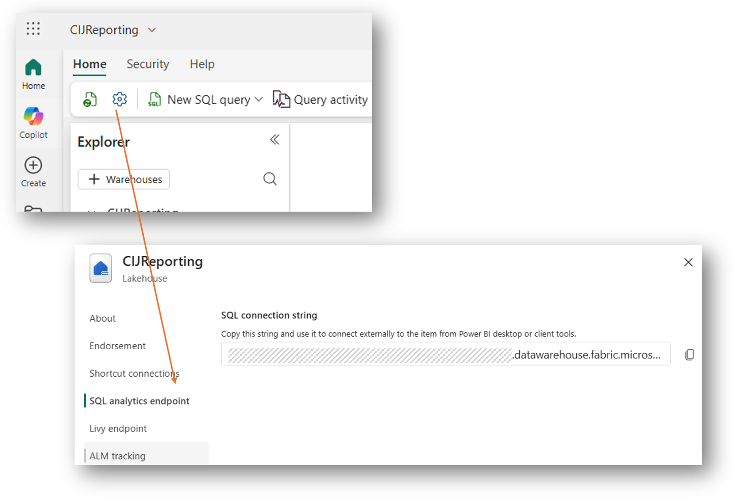
1. SQL endpoint:You can find the SQL endpoint in the properties of the lakehouse like shown in the picture below.
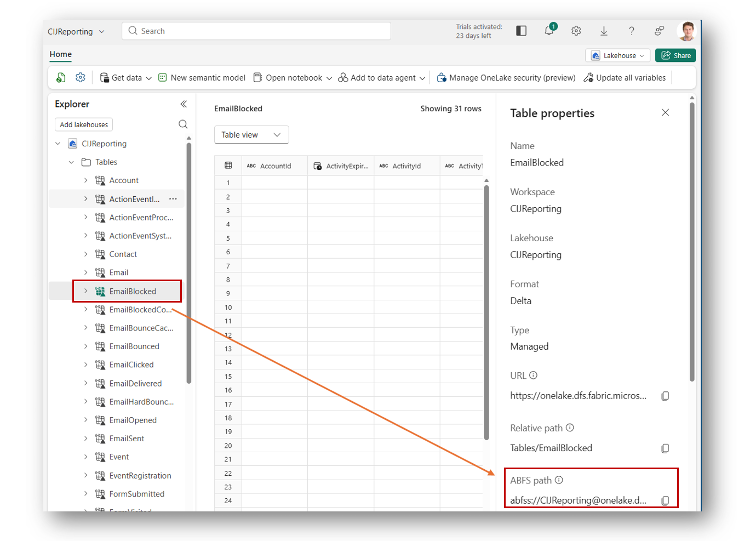
2. File endpoint: The file endpoint is available for each table. To identify the path, just open the properties for one table in the lakehouse view and watch for the ABFS path like shown below.
Once the paths are identified, you can create a notebook in Synapse to access the data in Fabric, iterate through all tables, convert it as you like and store it in another data lake.
It is important to highlight that the SQL endpoint generates higher resource consumption compared to the file endpoint. This increased usage results from the additional processing required to serve data through the SQL endpoint, as the underlying data is stored in files. Consequently, direct file access is less resource-intensive.
When you access data via the file endpoint, the following actions are happening:
While predicting consumption for specific scenarios is challenging, you can use the Fabric capacity app to monitor usage, which should generally show minimal consumption.
SQL endpoints consume more Fabric resources due to additional data processing, while direct file access is more economical.
Resource consumption depends on the number of tables accessed rather than data volume.
Identifying endpoints and paths is straightforward through lakehouse properties.
Consumption considerations
It is important to highlight that the SQL endpoint generates higher resource consumption compared to the file endpoint. This increased usage results from the additional processing required to serve data through the SQL endpoint, as the underlying data is stored in files. Consequently, direct file access is less resource-intensive.
When you access data via the file endpoint, the following actions are happening:
- The external process needs to read some metadata to access the lakehouse and list the underlying tables. The more tables you read, the higher is the consumption
- Once this is done, the external process reads the data from Dataverse. This read operation and the corresponding consumption is covered by Dataverse.
While predicting consumption for specific scenarios is challenging, you can use the Fabric capacity app to monitor usage, which should generally show minimal consumption.
Summary
This article outlines an efficient approach for accessing and utilizing Dataverse data within Microsoft Fabric, particularly focusing on cost-effective solutions for CI-J interaction data. The described pattern leverages Fabric lakehouse endpoints—both SQL and file endpoints—to retrieve data externally, enabling flexible data processing and storage workflows via Synapse notebooks. Key prerequisites include access to MS Fabric, a workspace, a lakehouse, and shortcuts to relevant Dataverse tables.- Benefits:
- Minimal Fabric resource consumption when using file endpoints.
- Flexible access to all Dataverse data, not just CI-J interaction data.
- Ease of integration with other data lakes and processing platforms such as Synapse.
- Capacity monitoring through the Fabric capacity app helps ensure resource usage remains low.
SQL endpoints consume more Fabric resources due to additional data processing, while direct file access is more economical.
Resource consumption depends on the number of tables accessed rather than data volume.
Identifying endpoints and paths is straightforward through lakehouse properties.
*This post is locked for comments