




 23,118
 Like
Like Share
Share
 Report
It is always good to have same builds in the every tier of Microsoft Dynamics NAV. Next question comes in is how to check the build,
If you want to check the build of Service Tier and Development environment please refer below articles.
- How to check Microsoft Dynamics NAV build : Service Tier
- How to check Microsoft Dynamics NAV build : Development Environment
You can view the RTC build using two methods,
Method 01.
01. Open RTC client
02. Help -> About Microsoft Dynamics NAV
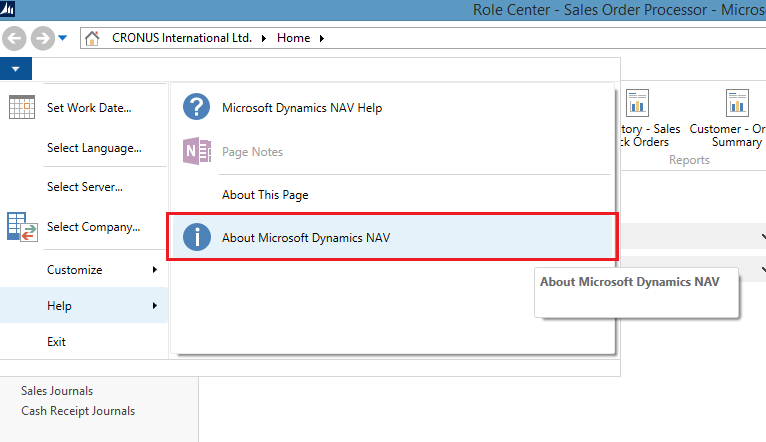
03. In the third line you can see the build of the RTC client of Microsoft Dynamics NAV.

Method 02
01. Open the exe location ( Default Location : C:\Program Files (x86)\Microsoft Dynamics NAV\80\RoleTailored Client)
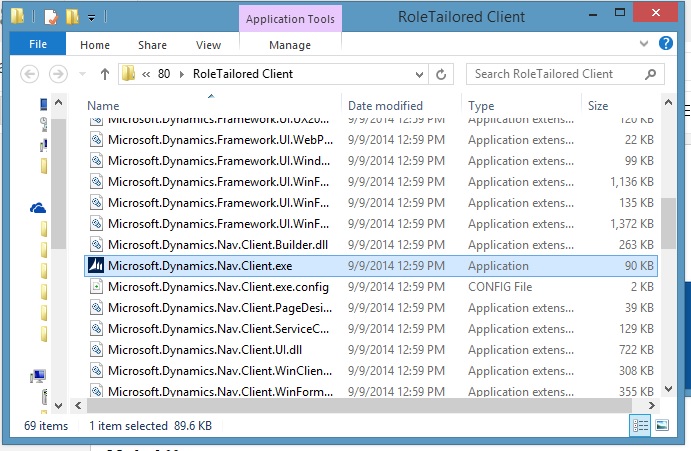
02. Go to properties of the .exe file
03. Go to Details tab of the properties and check the File version :

Please provide your feedback with a comment.
Thank you and Regards,
Tharanga Chandrasekar
Thank you and Regards,
Tharanga Chandrasekar
*This post is locked for comments