




 Like
Like Share
Share
 Report
Due to recent legislative changes, it’s important to review how we track overtime premiums for W-2 reporting.
For 2025:
You have flexibility. The overtime premium can be reported in Box 14 on the W-2 or communicated through a separate letter to employees.
You have flexibility. The overtime premium can be reported in Box 14 on the W-2 or communicated through a separate letter to employees.
For 2026:
Reporting the overtime premium on the W-2 will be mandatory, so we need to establish a process to track only the premium portion of overtime to ensure accurate reporting.
The IRS has released a draft of the 2026 W-2 that includes a new Box 12 code “TT” for reporting qualified overtime premiums.
The maximum overtime deduction is $12,500 for individuals and $25,000 for joint filers.
The IRS has released a draft of the 2026 W-2 that includes a new Box 12 code “TT” for reporting qualified overtime premiums.
The maximum overtime deduction is $12,500 for individuals and $25,000 for joint filers.
Based on conversations with many customers, we’ve seen that exceptions vary, and the approach largely depends on how overtime is tracked in Dynamics GP. Since this requirement was introduced mid-year, it’s likely that most organizations did not implement changes during 2025 payroll year.
There are no changes in the Dynamics GP 2025 year-end update specifically around overtime or tips tracking and the OBBB Act. This blog is intended to give you some ideas of how to manage this in Dynamics GP with existing functionality with what you have setup.
NOTE:
If you file your W2's thru Greenshades, it is required to use Box 14TT 'Other' vs Box 12TT.
When an employee is "paid" with the overtime pay code, the system tracks this pay in the UPR30300 (transaction history) table by check date and also by monthly summary in the UPR30301.
The amount includes the entire overtime, so now we need to troubleshoot how to isolate just the “premium” piece. Think of it like finding that one rogue setting buried three menus deep—because overtime doesn’t come with a handy checkbox for “premium only”!
The amount includes the entire overtime, so now we need to troubleshoot how to isolate just the “premium” piece. Think of it like finding that one rogue setting buried three menus deep—because overtime doesn’t come with a handy checkbox for “premium only”!
To do this, I created a simple SmartList for you, it may not work for all companies, but you can also fine tune it. In my example, I'm pulling the information by pay code name, but if you have "many" overtime codes, you could look at pulling this by the overtime paytype which is the following from the pay code setup table.
select * from UPR40600 where paytype ='6' (double time is 7)
select * from UPR40600 where paytype ='6' (double time is 7)
This script/view is doing the math to isolate the premium—basically, it’s playing detective with your overtime. Make sure it behaves with your data and tracking (no rogue numbers allowed!). Once it passes the vibe check, export to Excel and slice and dice like a payroll chef prepping for a data buffet!
I have created a simple SmartList to help compile overtime premium under the Payroll US section install the OVERPREM25 view.
An option to track this in the 2026 year would be to setup a non-taxable benefit (name it what you want). You would base your benefit on your overtime pay codes and if you put the percent at 33.33 it should calculate just the premium portion as noted below. You can then enter the W-2 box you want it to print.
Example setup below:
Make sure to include this new benefit when you run payroll for 2026 and save it to your build default options.
If this is a new benefit for you and you want it to go to a specific GL posting account, make sure to define this under Tools | Setup | Posting | Payroll Accounts.
If this is a new benefit for you and you want it to go to a specific GL posting account, make sure to define this under Tools | Setup | Posting | Payroll Accounts.
2026 W4 NOTE:
The IRS released a new 2026 W4 form incorporating changes from the One Big Beautiful Bill Act (OBBBA), which allows for deductions on qualified tips and overtime. The updated form (and its instructions) allows employees to better calculate their federal income tax withholding by accounting for these new deductions in 2026.
The Deductions Worksheet (used in Step 4(b)) has been updated to include lines for qualified tips and qualified overtime compensation.
Employees with significant tips or overtime can use the new, updated form to reduce their withholding, allowing them to receive the tax benefit in their paychecks throughout the year rather than waiting for a refund.
The Deductions Worksheet (used in Step 4(b)) has been updated to include lines for qualified tips and qualified overtime compensation.
Employees with significant tips or overtime can use the new, updated form to reduce their withholding, allowing them to receive the tax benefit in their paychecks throughout the year rather than waiting for a refund.
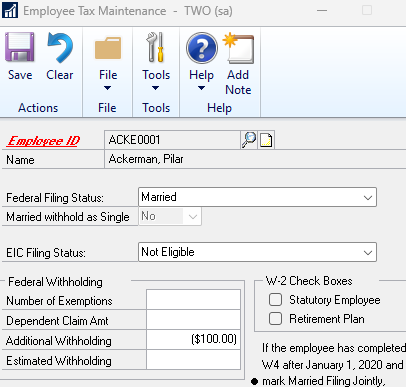
Employees must submit a new 2026 Form W-4 to their employers to adjust their withholding for these new tax benefits. As noted in my blog from 2020 the field 4B is not supported in Microsoft Dynamics GP, but there is an easy workaround if the employee chooses to reduce their federal tax withheld per paycheck, you can enter a negative amount in the additional withholding field located under Cards | Payroll | Tax. Based on the below example, each payroll my federal tax withheld will be reduced by $100.00.
I hope these tips above help you with the new overtime premium rules and tracking in Microsoft Dynamics GP.
If you’re still having trouble with your setup, I recommend reaching out to your partner. They know your environment best and may have alternative ideas or even a tailored report that fits your needs perfectly. We also know there are companies that use Dynamics GP Payroll and are super complex and the above does not work for them, this is why I love our Dynamics GP community, Implementation Specialists, created a customization for purchase if you so need it! Check out the OVTPremium Tool.
Hope these tips help you wrangle the new overtime premium rules in Dynamics GP—because nothing says “fun” like chasing down payroll quirks! May your tracking be smooth and your W-2s drama-free.
Be sure to refer to the 2025 Year-End Blog Schedule to review current and upcoming blog posts and other helpful resource links related to Year-End Closing for Dynamics GP.
Thanks
Terry Heley
Microsoft
Microsoft
*This post is locked for comments