




 Like
Like Share
Share
 Report
One of the most common asks as an administration is to know when the user started accessing the system and from where.
In your Dynamics 365 Customer Engagement apps, you can enable Auditing for User Access.
Enable Auditing of User Access
You need to enable this feature once you enable Auditing on Organization level. Then, you can enable User Access Auditing as well
Navigate to Settings > Administration > System Settings and under Auditing tab
OR
Settings > Auditing > Global Audit Settings
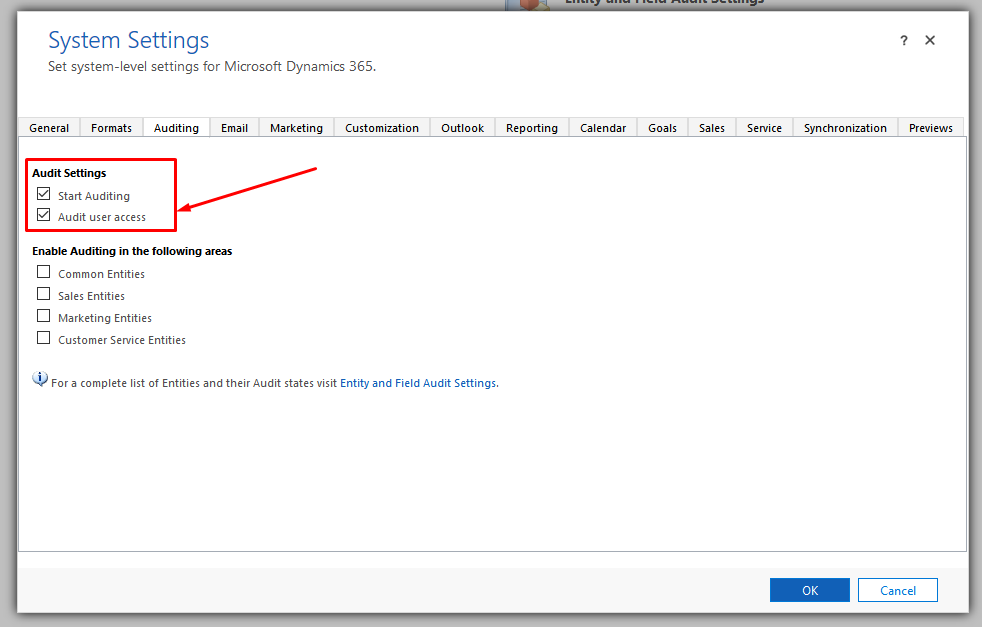
Once the Auditing for User Access has started, the Audit Summary will record this –

And whenever a User logs into Dynamics 365 via the Web Application, Phone app or WebServices that provide authentication, the Auditing will be logged as shown below –
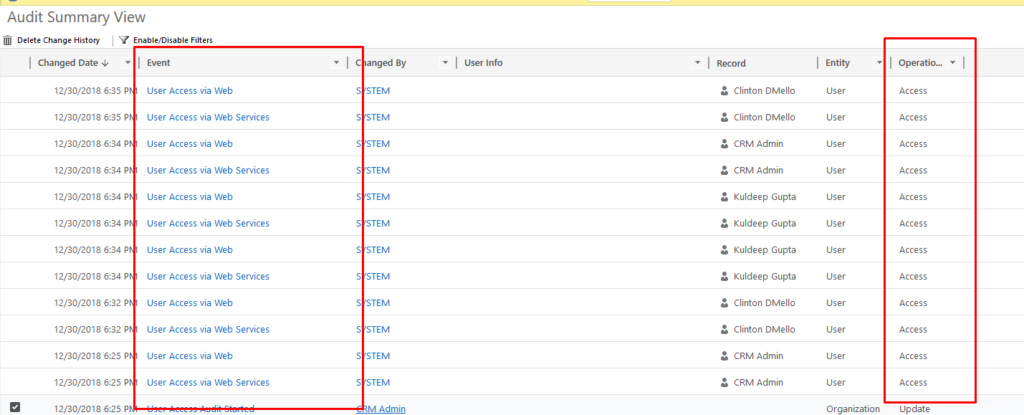
The Operation will be Access and the Event will be User Access via Web or User Access via Web Services.
If you want to enhance user login, you can quickly enable Multi-Factor Authentication for the users, read my blog on MFA here.
Hope this quick tip helps.
The post Audit User Access in D365 appeared first on CloudFronts - Microsoft Dynamics 365 | Power BI | Azure.
*This post is locked for comments