







Add WhatsApp and Other Source as New ‘Case Origin’ in CRM 2013
Views (2122)
 Aileen Gusni
 44,524
 Like
Like Share
Share
 Report
In my post, I was adding WhatsApp message as the new Case Source, so in this post, for those who still need further explanation how to add WhatsApp as new Case Origin, I will explain how to add WhatsApp as new Case Origin.
First of all, please read this excellent blog:
http://msdn.microsoft.com/en-us/library/dn660975.aspx
and this link also for Spanish version:
http://www.comunidadcrm.com/demianrasko/2014/07/17/iconos-de-orgenes-de-casos/
Okay, now here we go.
1. Open the Customization
2. Go to Case entity
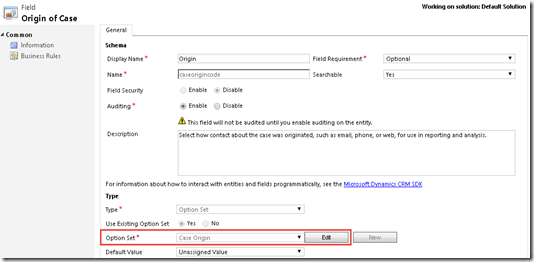
3. Go to ‘Case Origin’ field
4. Edit the field:
5. Add new Item, add the Label and Value
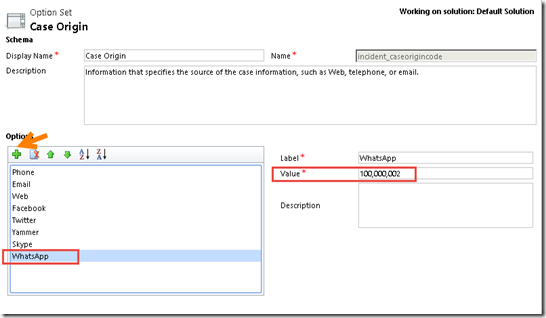
*Please remember your given value for this new Case Origin.
6. Save and Close and Publish it.
7. Go to Web Resources section.
8. Create a new Web Resource with type = .PNG
You can download the WhatsApp image 16x16 from here (you can choose):
WhatsApp16x16_black
WhatsApp16x16_green1
WhatsApp16x16_green2
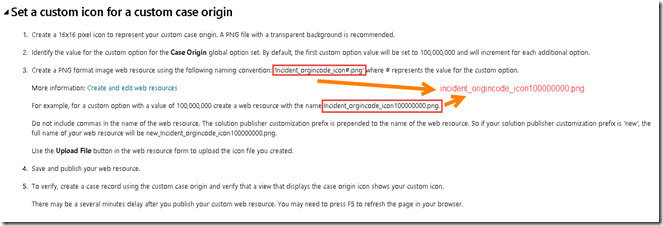
9. Give the name with format: Incident_origincode_iconxxxxxxxxx.png
with the xxxxxxxxx is the given value for the new origin code.
For example: Incident_origincode_icon100000000.png
*Please be aware that on the website there is a typo, it said:‘Incident_orgincode_icon#.png’
The correct one it should be: ‘Incident_origincode_icon#.png’
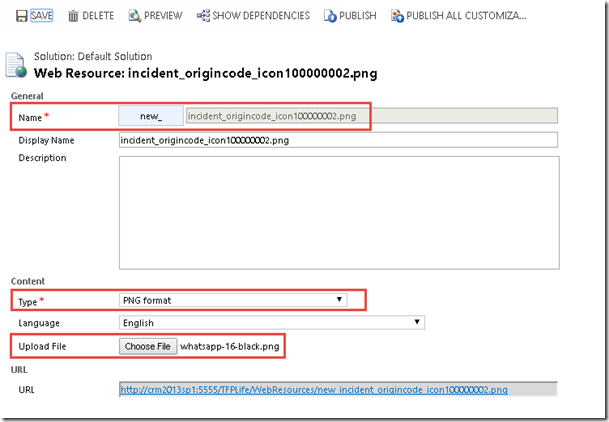
*Remember you give the value at the step #5.
*And so far I tried using different prefix other than new_ and it did not work, so I recommend you to use prefix new_
Save and Publish It.
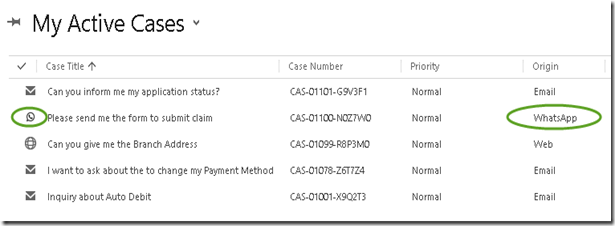
10. Create a new Case with Origin = ‘WhatsApp’ and see the result in the Case View.
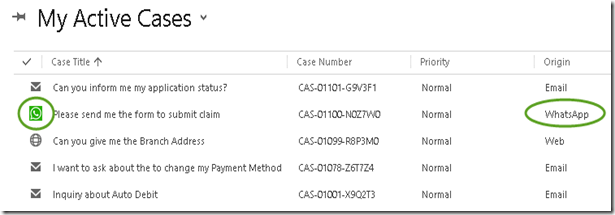
*If you choose the Green Color as your icon
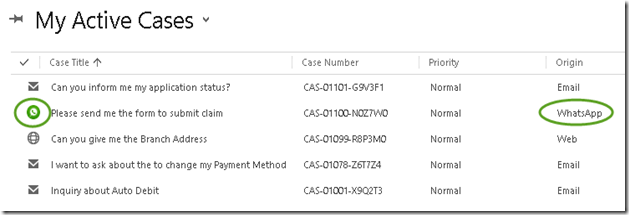
*Another green icon.
Please refer to my other post to convert WhatsApp message to a Case in CRM 2013.
Check my Post!
Hope this helps!
Thanks.
First of all, please read this excellent blog:
http://msdn.microsoft.com/en-us/library/dn660975.aspx
and this link also for Spanish version:
http://www.comunidadcrm.com/demianrasko/2014/07/17/iconos-de-orgenes-de-casos/
Okay, now here we go.
1. Open the Customization
2. Go to Case entity
3. Go to ‘Case Origin’ field
4. Edit the field:

5. Add new Item, add the Label and Value

*Please remember your given value for this new Case Origin.
6. Save and Close and Publish it.
7. Go to Web Resources section.
8. Create a new Web Resource with type = .PNG
You can download the WhatsApp image 16x16 from here (you can choose):
WhatsApp16x16_black
WhatsApp16x16_green1
WhatsApp16x16_green2
9. Give the name with format: Incident_origincode_iconxxxxxxxxx.png
with the xxxxxxxxx is the given value for the new origin code.
For example: Incident_origincode_icon100000000.png
*Please be aware that on the website there is a typo, it said:‘Incident_orgincode_icon#.png’
The correct one it should be: ‘Incident_origincode_icon#.png’


*Remember you give the value at the step #5.
*And so far I tried using different prefix other than new_ and it did not work, so I recommend you to use prefix new_
Save and Publish It.
10. Create a new Case with Origin = ‘WhatsApp’ and see the result in the Case View.

*If you choose the Green Color as your icon

*Another green icon.

Please refer to my other post to convert WhatsApp message to a Case in CRM 2013.
Check my Post!
Hope this helps!
Thanks.
This was originally posted here.
*This post is locked for comments