







CRM 2016 – XRMToolBox – loadFromRemoteSources error

 Like
Like Share
Share
 Report
Do not wait; the time will never be ‘just right.’ Start where you stand, and work with whatever tools you may have at your command, and better tools will be found as you go along.
George Herbert
The latest XRMToolBox is fantastic, its awesome you can download the external plugins from the plugin store by clicking on the plugin store button.
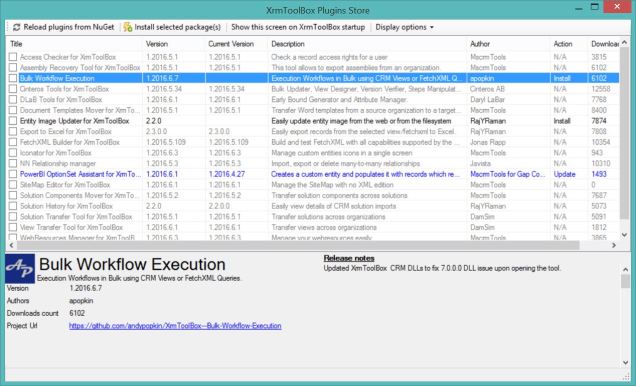
If you are not using the XRMToolbox then download it here and go to the plugin store and you will find something useful which will save you hours of manual work.
loadFromRemoteSources error
I opened up the XRMToolbox and got the error below when I tried to use the plugin store

This error is caused by an assembly (dll) being loaded from a remote source and be granted full trust
You can find information about the error on the page below
https://msdn.microsoft.com/en-us/library/dd409252(v=vs.110).aspx
This stackoverflow page helped me understand the issue
In the xrmtoolbox config file you can have the element – loadFromRemoteSources and this can have a true or false value. To make the PluginStore work we need to set the trust to true.
In the folder you should find a file called
XrmToolBox.exe.config
Below is the code I put at the bottom above the configuration
<runtime>
<loadFromRemoteSources enabled = “true” />
</runtime>
Here is a picture, to show you where I put the lines
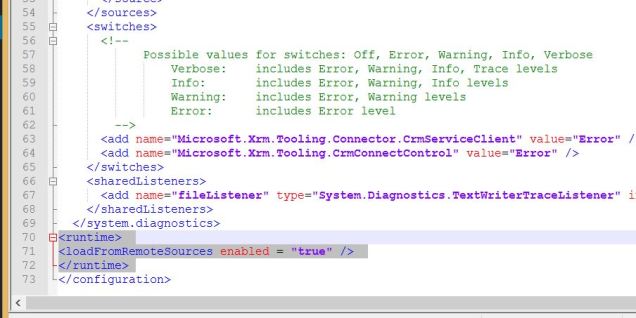
Save the XrmToolBox.exe.config and open the XRMToolbox again and now the plugin store should work.
Filed under: CRM 2016, tools


This was originally posted here.
*This post is locked for comments