






Can’t see a model-driven app? Try to activate it
 ashlega
 34,477
 Like
Like Share
Share
 Report
Apparently, model-driven apps may need to be activated now:
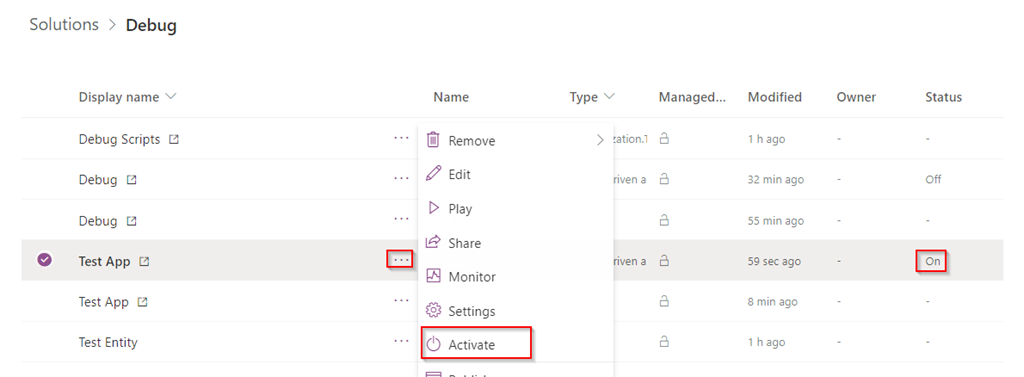
This is part of the ALM updates released recently:
https://powerapps.microsoft.com/en-us/blog/key-alm-updates/

Somehow, there seem to be a bit of inconsistency there. For example, as of writing this blog post, when I created an app through the classic designer, for instance, it’s did not show up in the UI right away. For two different apps, I ended up with one of them hidden and another one displayed in the UI. This might have something to do with me playing with the “preview” version of the maker portal at the same time.
In the end, though, if, for some reason, you get a model-driven app that’s not showing up in the UI, make sure to open the maker portal, choose your app, and activate it:
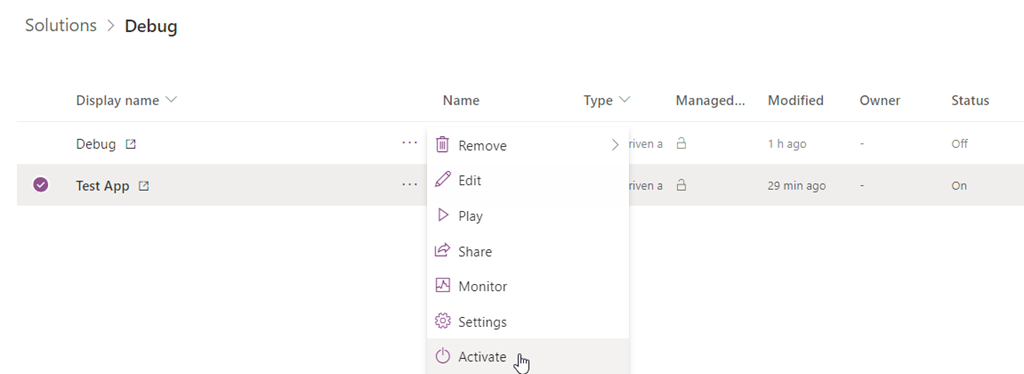
PS. And you may need to disregard the status column for now – it seems the values are in reverse there (what’s showing up as “on” can and should be activated… those apps will flip to “off” status, but, at least, they’ll become visible in the UI… What’s showing up as “off” can be deactivated if needed)
This was originally posted here.
*This post is locked for comments