







Posting Groups #18 – FA Sales Posting
 Aleksandar Totovic
 16,765
 Like
Like Share
Share
 Report
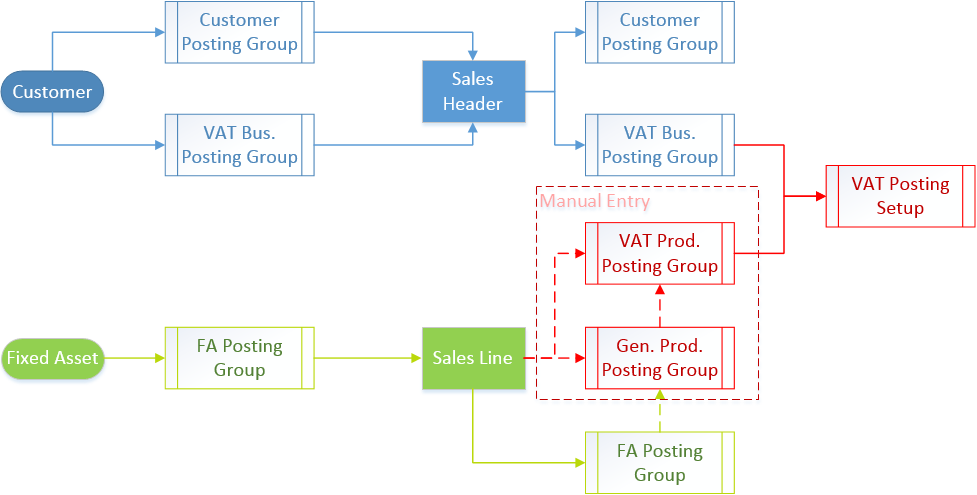
If we want to sale our fixed assets, it is a similar process as FA purchasing, but in opposite direction. In this situation, system uses customer posting group, VAT and general posting groups and FA posting groups.
You can see this process concept on following flowchart. One of specifics is how system determines VAT Production Posting Group. You can use it on one of following ways:
- Manually choosing VAT Production Posting Group;
- Inheriting from manually choosing/changing General Production Posting Group (Def. VAT Prod. Posting Group);
- Inheriting from VAT Production Posting Group, configuring on Acq. Cost Acc. On Disposal on FA Posting Group;
- Inheriting from General Production Posting Group (Def. VAT Prod. Posting Group), configuring on Acq. Cost Acc. On Disposal on FA Posting Group.
Other specific in FA sales process is that system uses different configuration from FA Posting Group, depending of FA sales price (higher or lower price in comparison with Book Value).
In my first example, you will see what G/L entries you will get when we sale FA with higher price:

In this example, you will see result of FA sales posting with lower price:

On both of these examples, you will see that we have the last additional G/L entry. This entry will exist as Residual caused by rounding of Additional-Currency, but only if you use Additional Currency configured on General Ledger Setup. This entry will be usually a zero amount.


This was originally posted here.
*This post is locked for comments