







SQL Server - Determining the language of a name: Arabic English or Multilingual.
Views (4258)
 Mahmoud Saadi
 32,738
 Like
Like Share
Share
 Report
As part of Data Cleansing project, I struggled with one specific case while developing custom algorithms to cleanse, detect and smartly handle duplicates in master files. The case was primarily related to fields with mixed language.
The original legacy system has fields for the name in which; sometimes, both Arabic and Language characters are recorded. Theoretically speaking, there must be a very simple way out of this in SQL Server, which is not supposed to be time-consuming neither a reinvention of the wheel.
There was someone in the Stack Overflow community talking about something similar but not precisely the exact thing, he was proposing a way to determine the language of the field by using the Patter Index function in SQL server, his way is quite simple and to the point, which looks for any of the alphabetical characters within the passed string, and return the position of this character. If the return value is larger than 0, it means that any of the alphabetical characters was found (either English or Arabic). Although, that would never be comprehensive in my case as some fields may contain both characters. The function is illustrated below:
CREATE FUNCTION [dbo].[Fn_CheckName] ( @string NVARCHAR(MAX) )
RETURNS NVARCHAR(100)
BEGIN
DECLARE @Value NVARCHAR(100)
IF ( PATINDEX(N'%[أ-ي]%', RTRIM(@string)) > 0 )
BEGIN
SET@Value = 'A'
END
ELSE
IF ( PATINDEX(N'%[A-Za-z]%', RTRIM(@string)) > 0 )
BEGIN
SET@Value = 'E'
END
RETURN @Value
END
GO
>> Reference: How to check whether a character is Arabic or English
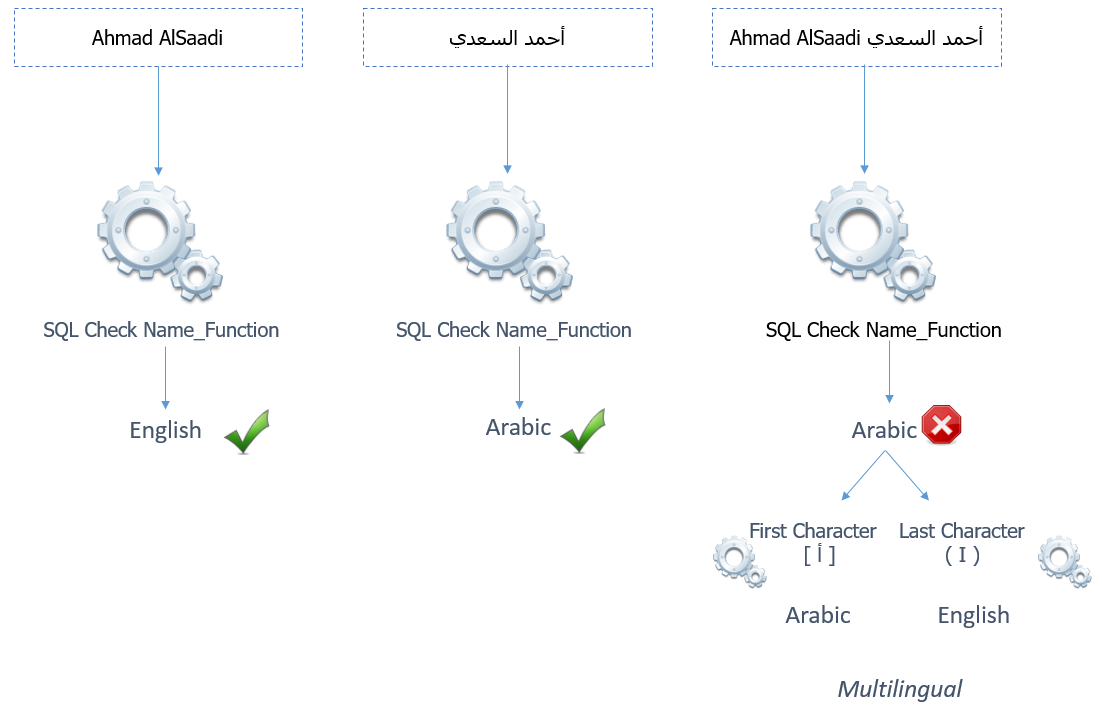
Now, the alternative of checking the pattern within the name which could be misinterpreted and processed, is to consider the first and last characters of the string, and compare the result with the original result retrieved by the function above. As follows:
SELECT ( SELECT dbo.Fn_CheckName(NAME)
) AS Language ,
LEN(NAME) Length ,
( SELECT dbo.Fn_CheckName(SUBSTRING(NAME, 1, 1))
) AS F_Character_Language,
( SELECT dbo.Fn_CheckName(SUBSTRING(NAME, 2, 1))
) Second_Character_Checkname,
( SELECT dbo.Fn_CheckName(SUBSTRING(NAME, LEN(name), 1)))
AS L_Character_Language ,
name
FROM [dbo].[namelist]
Here is the overall criteria when breaking down the name into characters and check the language of the first and last character to determine which is an Arabic, English or Multilingual field.
 |
| Process Visualization |
Best Regards,
Mahmoud M. AlSaadi
Mahmoud M. AlSaadi
This was originally posted here.
*This post is locked for comments