




 44,524
 Like
Like Share
Share
 Report
Hi all,
So, imagine that you have 2 tables
Table A: "Team Assignment" and Table B: "Player", with Player (Display Name: Player and Schema Name is new_playerid) is the Foreign Key

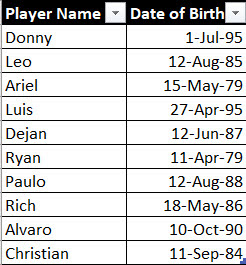
Now, I want to have gallery in CanvasApp that showing the Information:
Team Name, Player Name, and Date of Birth
I have been trying to find the answer and could not find it because typically if you just use lookup and without match the foreign key which is Player Id in this case, you will not get the correct Date of Birth, instead will just get the "first record" which is in the case is 1-Jul-95 (Donny's)
So, here is the answer:
Put the code in the Items property of the Gallery
AddColumns('Team Assignments',
"PlayerObject",
LookUp(Players, Player = 'Team Assignments'[@Player].Player))
With this, you can get all the columns from both tables, if you need just one column, you can just add it in the LookUp formula
Reference:
https://docs.microsoft.com/en-us/powerapps/maker/canvas-apps/functions/function-table-shaping
Hope it helps!
*This post is locked for comments