




 23,136
 Like
Like Share
Share
 Report
The 2026 Release Wave 1 (BC28) update of Microsoft Dynamics 365 Business Central introduces an important improvement to approval workflows. With this enhancement, approval processes are now extended to Item Journals as well as Requisition and Planning Worksheets.
This feature helps organizations ensure that inventory adjustments and planning decisions are reviewed before they are executed, improving control and reducing the risk of errors.
By introducing approvals in these areas, companies can make sure that critical operational entries are validated by the appropriate users before being posted or converted into purchasing documents.
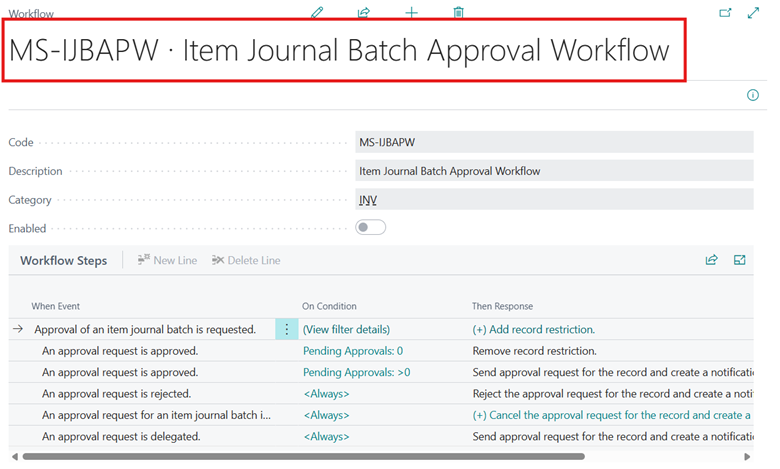
Item journals are commonly used to record inventory-related transactions such as adjustments, production output, or consumption. With the BC28 update, item journal batches can now be sent for approval before they are posted.
This functionality works in a similar way to the existing approval workflows available for general journal batches.
Approval workflows are supported for the following journals:
Approvers can perform several actions, including:
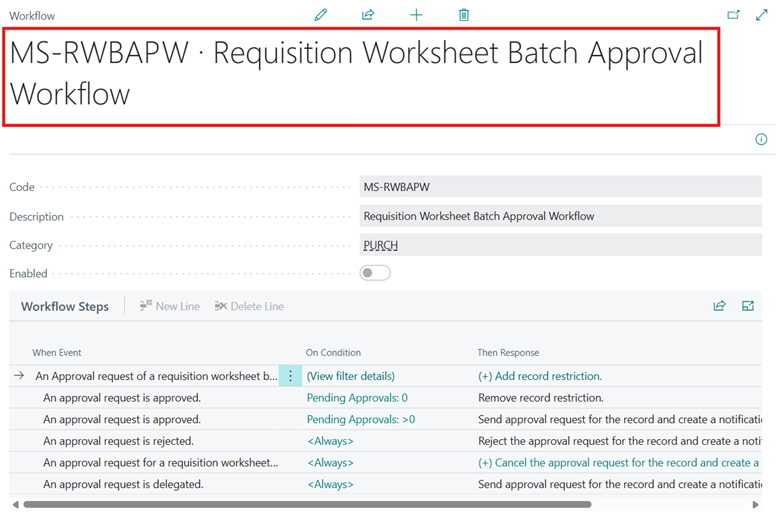
important enhancement in BC28 is the addition of approval workflows for requisition and planning worksheets.
These worksheets are typically used to plan supply and demand and generate purchase or production orders. Because these decisions can significantly impact purchasing and inventory levels, having an approval process adds an additional layer of control.
In this update, approvals are handled at the worksheet batch level.
What Happens When a Worksheet Is Sent for Approval
When a requisition or planning worksheet batch is submitted for approval:
Approvers can take actions such as:
Updated workflow events and responses allow organizations to build automated approval processes, notifications, and integrations with other systems. This provides greater flexibility in managing approvals across different business scenarios.
📌In the upcoming blog of this series, we will walk through the complete step-by-step process to configure approval workflows for Item Journals and Requisition/Planning Worksheets in Business Central.
Thank you for Reading…!!
Regards,
Khushbu Rajvi
This feature helps organizations ensure that inventory adjustments and planning decisions are reviewed before they are executed, improving control and reducing the risk of errors.
Overview of the Feature
Approval workflows are widely used in Business Central for documents such as purchase orders or general journals. In BC28, Microsoft has expanded this capability so that businesses can also apply approvals to inventory journals and planning worksheets.By introducing approvals in these areas, companies can make sure that critical operational entries are validated by the appropriate users before being posted or converted into purchasing documents.
Approval of Workflows for Item Journals
Item journals are commonly used to record inventory-related transactions such as adjustments, production output, or consumption. With the BC28 update, item journal batches can now be sent for approval before they are posted.
This functionality works in a similar way to the existing approval workflows available for general journal batches.
Approval workflows are supported for the following journals:
- Item Journal
- Physical Inventory Journal
- Output Journal
- Consumption Journal
What Happens During the Approval Process
When a journal batch is waiting for approval:- Users cannot edit the journal lines
- Users cannot delete the batch
- Users cannot post the journal
Approvers can perform several actions, including:
- Approve the batch
- Reject the batch
- Delegate the approval to another user
- Add comments during the approval process
Approval of Workflows for Requisition and Planning Worksheets
important enhancement in BC28 is the addition of approval workflows for requisition and planning worksheets.
These worksheets are typically used to plan supply and demand and generate purchase or production orders. Because these decisions can significantly impact purchasing and inventory levels, having an approval process adds an additional layer of control.
In this update, approvals are handled at the worksheet batch level.
What Happens When a Worksheet Is Sent for Approval
When a requisition or planning worksheet batch is submitted for approval:
- Users cannot insert new lines
- Existing lines cannot be modified
- Lines cannot be deleted
Approvers can take actions such as:
- Approve the worksheet batch
- Reject the batch
- Delegate the request to another approver
Integration with Power Automate
This feature also includes improved support for Microsoft Power Automate.Updated workflow events and responses allow organizations to build automated approval processes, notifications, and integrations with other systems. This provides greater flexibility in managing approvals across different business scenarios.
📌In the upcoming blog of this series, we will walk through the complete step-by-step process to configure approval workflows for Item Journals and Requisition/Planning Worksheets in Business Central.
Thank you for Reading…!!
Regards,
Khushbu Rajvi
*This post is locked for comments