







How to call a Dynamics 365 Action with Input parameters from Logic App or Microsoft Flow
Views (44)

 107
107 Like
Like Share
Share
 Report
How to call a Dynamics 365 Action with Input parameters from Logic App or Microsoft Flow
On my previous post How to call Dynamics 365 Action from Logic App. I have described how to call an Action from a Logic App or Microsoft Flow. So you can refer that post to set up your configuration.
This post is going to be about calling an Action that has Input parameters from Logic App or Microsoft Flow. We are going to use the Http Request.
As a Sample Action we are going to create a global Action with 2 Input parameters,
- String
- EntityReference


After we have set up our Http Request with the proper Authentication we will call the Sample Action as follows
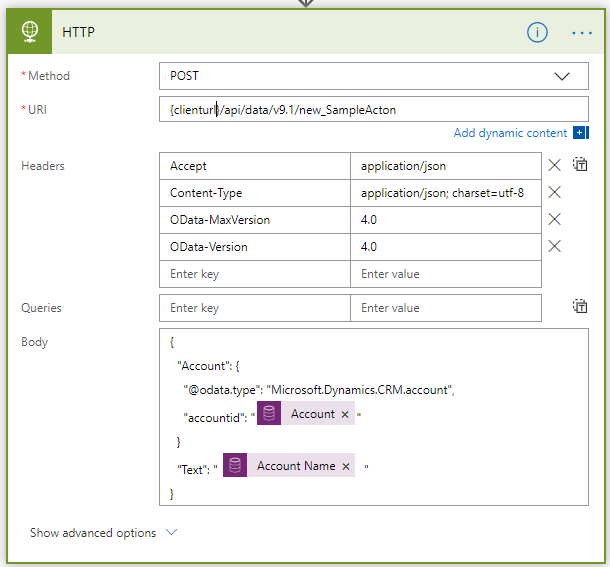
Parameters Inputs are passedunder the body, for any EntityReference the following entries are expected:
- type → “Microsoft.Dynamics.CRM.{{entity name}}
- id → Guid as string
Happy Coding :)
This was originally posted here.
*This post is locked for comments