







Data Sources
Views (190)
 Hossein.K
 6,648
6,648
 Like
Like Share
Share
 Report
Data source(s) define the interface between the form and the database. An entry
is added for each table. The properties of the individual data sources determine
the relationship between the data sources. Each data source also has system
methods that can be overridden to control the display of data or act on an event.
The data source contains all fields in the table. Again, all fields have properties
and system methods that can be overridden. These methods control the following
functions.
• Field specific navigation (filter, lookup, jump to main table and
more)
• Validating the field
• Modifying the field
Use the list of fields as a source for drag-and-drop operation when you build the
design of the form. You cannot drag fields directly from the underlying table as
the form must know which data source the field is linked to.
Field groups display below the list of fields. They can also be used as the source
for drag-and-drop operation.
Notice that after accessing the form in the AOT the definition of the data source
is cached locally in the definition of the form. If changes are made when you
create a new field in the underlying table, you must restore the form to access the
new field in the form. Remember to save the form before clicking Restore from
the shortcut menu.
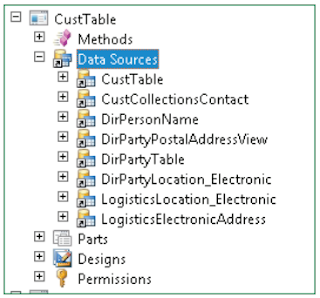
The following illustration shows the data source on the CustTable form.
Best Regards,
Hossein Karimi
is added for each table. The properties of the individual data sources determine
the relationship between the data sources. Each data source also has system
methods that can be overridden to control the display of data or act on an event.
The data source contains all fields in the table. Again, all fields have properties
and system methods that can be overridden. These methods control the following
functions.
• Field specific navigation (filter, lookup, jump to main table and
more)
• Validating the field
• Modifying the field
Use the list of fields as a source for drag-and-drop operation when you build the
design of the form. You cannot drag fields directly from the underlying table as
the form must know which data source the field is linked to.
Field groups display below the list of fields. They can also be used as the source
for drag-and-drop operation.
Notice that after accessing the form in the AOT the definition of the data source
is cached locally in the definition of the form. If changes are made when you
create a new field in the underlying table, you must restore the form to access the
new field in the form. Remember to save the form before clicking Restore from
the shortcut menu.
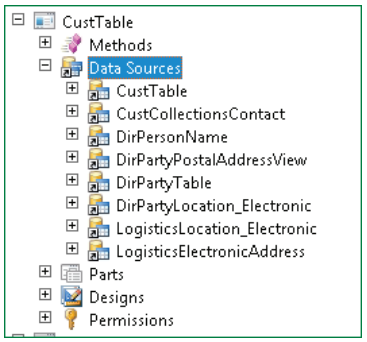
The following illustration shows the data source on the CustTable form.
Best Regards,
Hossein Karimi
*This post is locked for comments