1. Reverse Charge Mechanism (RCM) – Legal Perspective & Compliance (India GST)
Under the Indian GST framework, the Reverse Charge Mechanism (RCM) shifts the responsibility of paying tax from the supplier to the recipient of goods or services. This concept is legally defined under Section 9(3) of the CGST Act and Section 5(3) of the IGST Act, where the government notifies specific categories of supplies on which RCM is applicable.
1.1 RCM applicability
- GTA (Goods transport agency) Vendor
- Legal or professional services (advocate service to business and etc.)
- Sponsership services
- Import of services
1.2 Ineligible Input - Section 17(5) of CGST Act - Blocked Credit Under GST
- Clauses (a), (aa) and (ab) – Conveyance & Transportation
- Clause (b) – Food, Catering, Vehicle Renting, Club, & Travel
- Clauses (c) & (d) – Building Construction
- Clause (h) – Free sample & lost
1.3 Legal Compliance Requirements under RCM
- Self-Invoicing:
The recipient must generate a self-invoice if the supplier is unregistered. - Tax Payment:
GST under RCM must be paid in cash (not via input credit). - Input Tax Credit (ITC) Eligibility Check:
ITC can only be claimed if it is not restricted under provisions like Section 17(5) of the CGST Act.
2. RCM Cases Overview
| Case | Scenarios Description | HSN/SAC | RCM Services | Rate | ITC |
| Case 1 | Load on invenotry (expense off) - 100% | 9982 | Legal services | 18% | Capitalised into cost - No ITC |
| Case 2 | General RCM case - No load on inventory | 8703 | Motor Vehicle | 28% | Claimed ITC |
| Case 3 | (General RCM + Ineligible input) - Rent a cab services
Tax expense (GST expense ledger) - "Non business usage" - Section 17(5) of CGST act | 996601 | Rent a cab services | 5% | Expensed - No ITC |
3. Case 1 - RCM with Load on Inventory (Expense Off) – 100%
This scenario applies when GST paid under RCM becomes part of the cost of inventory. Typically, this happens when the input tax credit (ITC) is not claimable or when valuation rules require tax capitalization.
Example:
Freight or import-related services where GST is paid under RCM and included in inventory cost.
| Case 1 JV | (RCM+Loab on inventory) - Since load on inventory so RCM interim receivable ledger posting voucher line not created |
| Legal services Expenses | Dr | 1180 |
| IGST payable | Cr | -180 |
| Vendor | Cr | -1000 |
Required Setup:
4. Case 2 - General RCM Case – No Load on Inventory
This is the standard RCM case where GST is payable by the recipient but eligible for input tax credit (ITC).
Example:
Legal services, GTA services (in some cases), or services from unregistered vendors.
| Case 2 JV | (General RCM case) - No Load on inventory |
|
|
| Moter vehical (expense) | Dr | 2000 |
| IGST RCM recoverable | Dr | 560 |
| IGST payable | Cr | -560 |
| Vendor | Cr | -2000 |
Required Setup:
5. Case 3 - General RCM + Ineligible Input (e.g., Rent-a-Cab – Non-Business Use)
Certain expenses (like rent-a-cab for personal or non-business use) are blocked under ITC rules, even if GST is paid under RCM.
Example:
Employee transportation for personal use.
| Case 3 JV | (General RCM + Ineligible input) - non-business usage 100% |
|
| Rent a cab service (expense) | Dr | 5000 |
| GST Expense | Dr | 250 |
| IGST Payable | Cr | -250 |
| Vendor | Cr | -5000 |
Required Setup:
Case 2 setup and fill Non-business usage % as 100 on Tax information tab on the fly as below on AP invoice journal/General journal or PO line
6. Bonus Point
Note 1:
In certain business scenarios, organizations may require that the tax liability under Reverse Charge Mechanism (RCM) be recorded in a dedicated RCM payable account instead of the standard GST payable ledger. This approach is typically driven by internal accounting policies or reporting preferences.
Within Microsoft Dynamics 365 Finance & Operations, this can be achieved through configuration in Electronic Reporting (ER):
Path:
Electronic Reporting → Tax Configuration → Taxable Document (India) → Tax India (GST) (Self Created Configuration - not microsoft standard config) → Designer
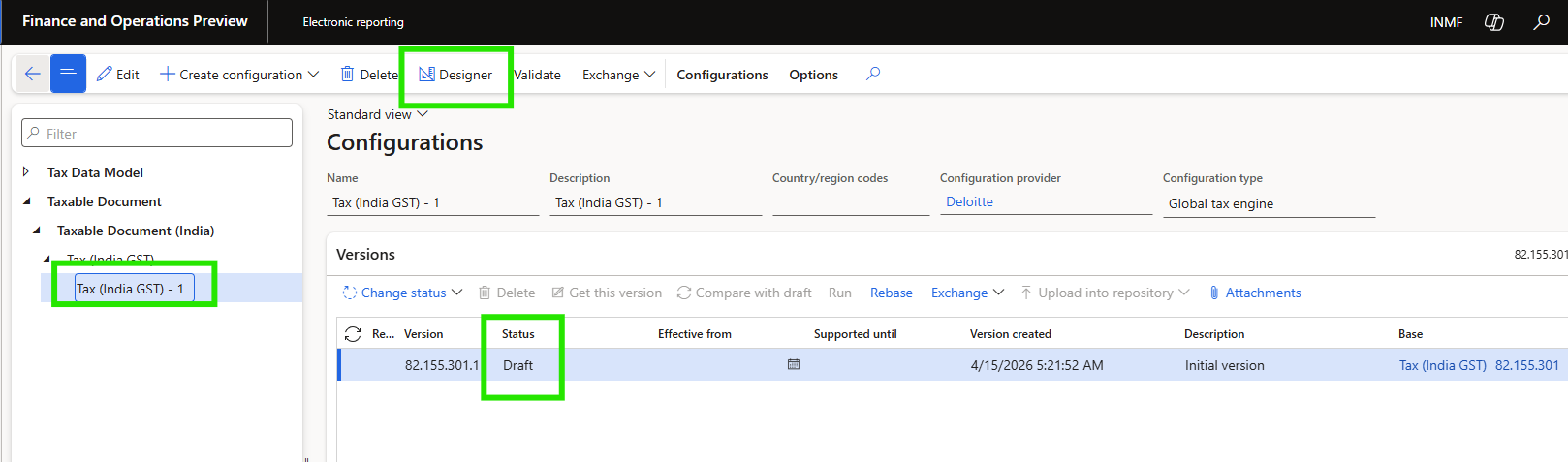
Replicate below configuration for all the component of GST (CGST, SGST and IGST)
Selecte Interim payable instead of Tax Payable in Credit calumn for Purchase item (2) and/or purchase service (1)
And finally, Change the status of configuration "Tax India (GST) - 1" to completed and add this GST configuration on Tax Module configuration and activate
Note 2:
In case of RCM is applicable because the vendor is GTA (Goods transport agency) vendor. In that case no need to configure reverse charge percentage as 100% on Tax setup (refer above case 2 required setup screenshot) instead on GTA vendor master tick the "GTA - Commercial vendor" boolean YES.
7. Comparative view of RCM cases
| Case | Scenario | ITC Eligibility | Inventory Impact | GST Treatment |
|---|
| Case 1 | Legal Services (RCM) | ❌ Not Eligible | ✅ Yes | Capitalized |
| Case 2 | Motor Vehicle (RCM) | ✅ Eligible | ❌ No | Input Credit |
| Case 3 | Rent-a-Cab (RCM) | ❌ Blocked (Sec 17(5)) | ❌ No | Expensed |
Thank you🙂
Happy Learning!


