







Error Activating the SharePoint List Component - Check the Server Resource Quota
Views (4100)
 jlattimer
 24,562
 Like
Like Share
Share
 Report
I ran into an unexpected error trying to install the SharePoint List Component to hook up a CRM Online environment with a SharePoint Online environment. I had uploaded the .WSP file and when I clicked on Activate I was presented with this "unexpected error has occurred" message:

After quite some time searching I was lead back to the SharePoint Site Collections administration screen.
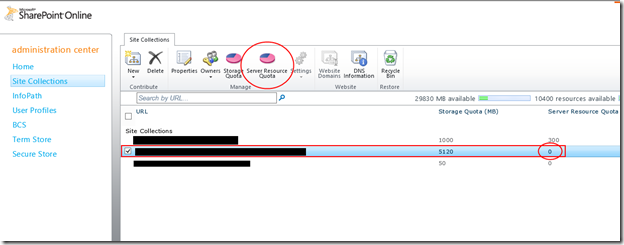
Assuming you have available resources it is easy enough to reset the default value. I'm not sure what the actual number of resource units the SharePoint List Component needs or how this is calculated. On an almost empty site the resource usage shows ~.3 resources being used after this was installed and activated.
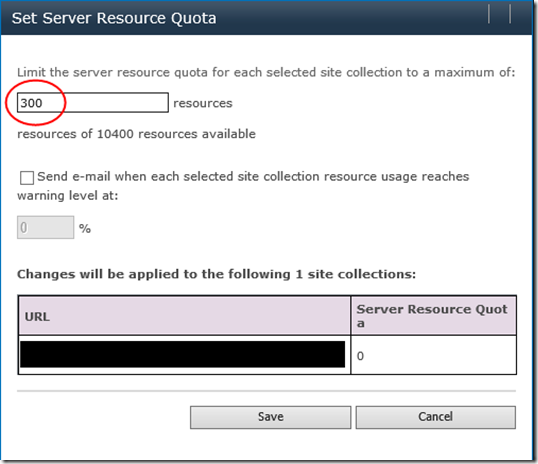
Once you've saved here it may take a few moments for the change to take effect. You might notice a green activity spinner to the eight of the Site Collection URL while the change is being applied. Once this was complete I was able to activate the List Component.

After quite some time searching I was lead back to the SharePoint Site Collections administration screen.
- https://portal.microsoftonline.com
- Admin Overview
- Microsoft Office 365 -> SharePoint -> Manage
- Manage Site Collections

Assuming you have available resources it is easy enough to reset the default value. I'm not sure what the actual number of resource units the SharePoint List Component needs or how this is calculated. On an almost empty site the resource usage shows ~.3 resources being used after this was installed and activated.

Once you've saved here it may take a few moments for the change to take effect. You might notice a green activity spinner to the eight of the Site Collection URL while the change is being applied. Once this was complete I was able to activate the List Component.
This was originally posted here.
*This post is locked for comments