It's that time of the year again. Release Wave 1 2022 is being deployed this month. We're all excited about the new features and announcements. You can see the highlights from the Business Applications Launch Event from April 6th.
With this excitement, I’m also reminded that there are customers who simply don’t follow best practices in managing these major updates. Some are turned off by the large number of items in the release notes. Some customers just review the deprecation announcements. Others just say they’re too busy to pay attention to it and will react to anything that changes or breaks once the updates are deployed.
These customers are in the minority but it’s important to reiterate the need to work these updates in your Application Lifecycle Management (ALM) strategy. Here are some of the best practices for managing release waves:
Factor the release waves in your project plan and roadmap
The two major updates occur at the same time every year. Microsoft provides ample time to prepare by sending out communications and release notes in advance. By opting in early to the release waves, you control the timing of the deployment to ensure there’s appropriate support and minimal disruption to your IT team and user group.
Importance of regression testing
Sure, we don’t expect things to break… But as a longtime software solutions implementor, I always want to be certain. Allocating time to properly test and address any issues up front is always preferable.
Understand the impact to users
The release waves incorporate new features! Explore and take advantage of the new capabilities that are available for immediate use. But also understand the impact of User Interface (UI) and functional changes to end users. A feature that existed in the past may behave or look different (e.g. grid control) which could be confusing to some users. You may want to provide additional training or support in such scenarios to minimize disruption.
Review the release notes
With so many new capabilities, you may feel overwhelmed by the sheer volume of information. One way to manage this is to focus on each area of the application that you have implemented (e.g. Sales, Customer Service, Field Service, etc.) so that you can consume them in chunks. Also, pay special attention to the “Enabled for” column which tells you how the feature will be enabled in your environment.
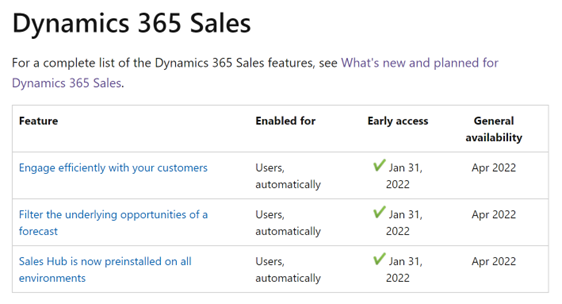
If the feature is available to an audience “automatically”, it will show up by default. Make sure to understand the impact to the user group and be prepared. For items that are marked as “Users by admins, makers, or analysts”, they are turned off by default. You can address these features at your convenience.
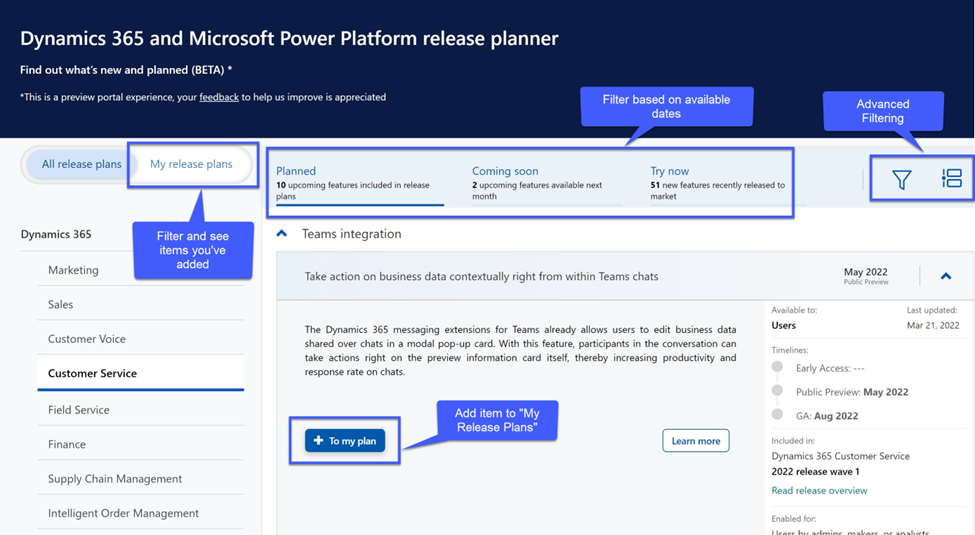
The Dynamics team is currently working on a new format for the release notes. You can take a look here and please provide feedback! You will notice that we’ve added advanced sort and filtering. We've also added the capability to create a personalized “My release plan” section so that you only see the features that are most important to you.
The ALM strategy has changed as Software-as-a-service (SaaS) continues to gain prominence. Benefits of a SaaS application is that you get new features and capabilities that benefit your business with little to no customization. But with these benefits, come a shift in strategy for managing these updates.
Take a look at Chapter 20: Service the Solution of the Implementation Guide for more best practices to manage your SaaS solution.


