






Power Automate Fundamentals # 73: Get Current Weather from MSN in Power Automate
 venkatsr
User Group Leader
venkatsr
User Group Leader
 Like
Like Share
Share
 Report
Introduction:
In order to get details of current weather , we can use MSN Weather connector that is available in power automate.
Step 1:
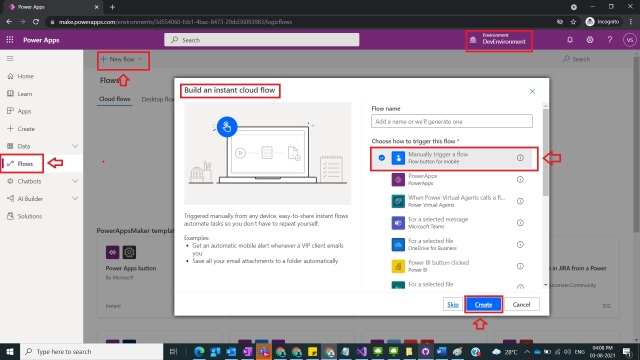
Login to the required Power Apps environment using URL make.powerapps.com by providing username and password and click on Flows on the left-hand side as shown in the below figure.
Figure 1

Step 2:
After Step 1, Click on New Flow and select instant cloud flow and provide the trigger as Manually trigger a flow and click on Create as shown in the below figure.
Figure 2
Step 3:
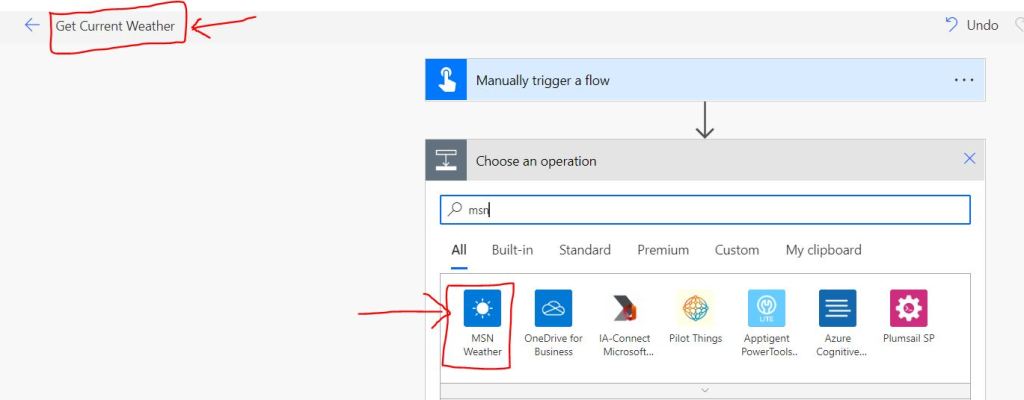
After Step 2 , name the flow as Get Current Weather and after Manually trigger action under choose an operation select MSN Weather Connector
as shown in the below figure.
Figure 3
Step 4:
After Step 3 , take Get forecast for today Action as shown in the below figure.
Figure 4

Step 5:
After Step 4, take condition Action and provide the values for location as pincode of my current location at Hyderabad , India.
Location : 500084
Units : Imperial
As shown in the below figure
Figure 5

Step 6:
After Step 5, save the flow and test and run and observe the with details of Pressure,Conditions,Humidity,Temperature,UV Index,Wind Speed etc as shown in the below figure.
Figure 6

Note:
- In the outputs of step 6, there are other details like Dewpoint,Apparent Temperature,Visibility Distance,Latitude,Longitude,Pressure Units,Speed Units,Distance Units etc.
- Microsoft documentation can be found here .
- Under Location parameter in Get Current Weather action valid inputs are City,Region,State,Country,Landmark,Postal Code,Latitude and Longitude.
Conclusion: In this way we can easily get current Weather from MSN- Connector in Power Automate .
This was originally posted here.
*This post is locked for comments