







Microsoft Dynamics GP displaying overlapping text on home page
Views (1491)
 MG-16101311-0
 26,225
 Like
Like Share
Share
 Report
Scouting the Microsoft Dynamics GP Partner Online Technical Forum, I came across this interesting case, in which a partner reported seeing overlapping options text on the home page and missing picture bars. The problem, as reported by the partner, was only happening with a user on a specific workstation, but not with his domain account and Microsoft Dynamics GP user.
Initially, the partner attempted to reduce Internet Explorer's Internet zone's security to the bare minimum, which would allow all home page scripts to be executed, with no results. Still puzzled, they began running a ProcMon trace on Microsoft Dynamics GP to look for ACCESS DENIED events, as instructed by Microsoft's Partner Online Technical Community support engineer, Jason Larson.
The partner recorded all trace results, but SUCCESS, and found the following being displayed several times in the log:
FILE LOCKED WITH ONLY READERS
FAST IO DISALLOWED
NAME NOT FOUND
REPARSE
NO MORE ENTRIES
NAME COLLISION
They also reported one message that appeared several times, NAME NOT FOUND pointing to the registry entry:
HKU\S-1-5-21-2191439342-1828296097-4069510072-1121\Software\Microsoft\Internet Explorer\Security\DisableSecuritySettingsCheck
The partner also noticed that if they assigned the affected users to the Domain Administrators group via Active Directory, they would no longer experience the issue. The other groups they are in have Full Access to the Microsoft Dynamics GP program files folder.
The partner also found only one ACCESS DENIED entry in the trace pointing to the following key:
HKEY_CLASSES_ROOT\Wow6432Node\MIME\Database\Content Type\application\futuresplash
After doing some research, the partner assigned Read permissions on the above key and the problem went away.
You can find more information on and download Process Monitor over at the Windows Sysinternals team blog at:
http://technet.microsoft.com/en-us/sysinternals/bb896645
Until next post!
MG.-
Mariano Gomez, MVP
IntellPartners, LLC
http://www.IntellPartners.com/


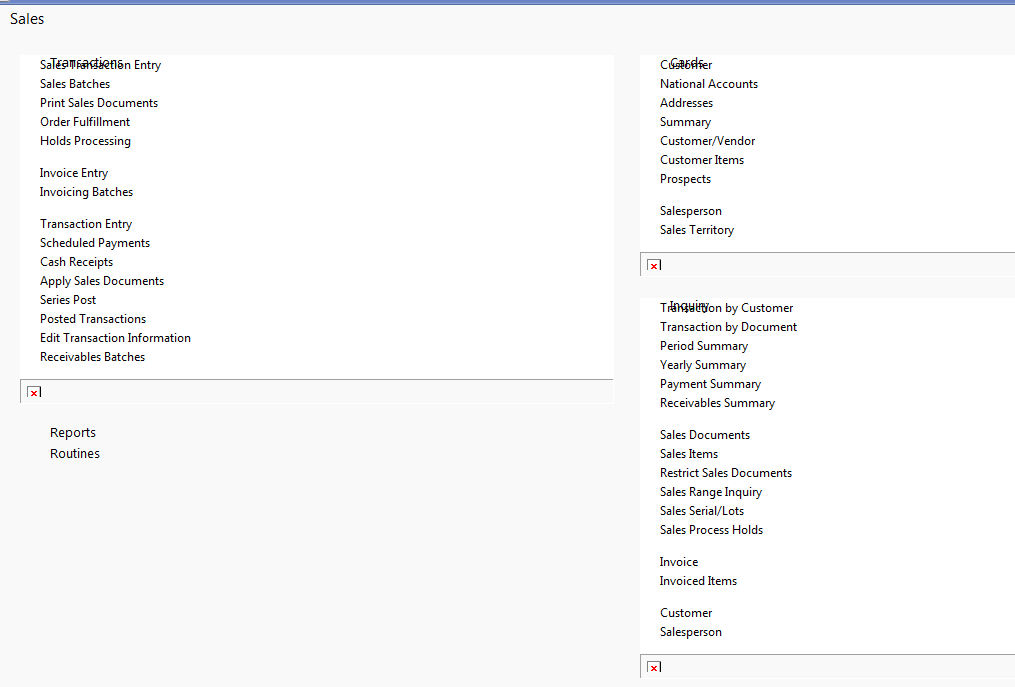 |
| Home page with overlapping text and missing pictures |
The partner recorded all trace results, but SUCCESS, and found the following being displayed several times in the log:
FILE LOCKED WITH ONLY READERS
FAST IO DISALLOWED
NAME NOT FOUND
REPARSE
NO MORE ENTRIES
NAME COLLISION
They also reported one message that appeared several times, NAME NOT FOUND pointing to the registry entry:
HKU\S-1-5-21-2191439342-1828296097-4069510072-1121\Software\Microsoft\Internet Explorer\Security\DisableSecuritySettingsCheck
The partner also noticed that if they assigned the affected users to the Domain Administrators group via Active Directory, they would no longer experience the issue. The other groups they are in have Full Access to the Microsoft Dynamics GP program files folder.
The partner also found only one ACCESS DENIED entry in the trace pointing to the following key:
HKEY_CLASSES_ROOT\Wow6432Node\MIME\Database\Content Type\application\futuresplash
After doing some research, the partner assigned Read permissions on the above key and the problem went away.
You can find more information on and download Process Monitor over at the Windows Sysinternals team blog at:
http://technet.microsoft.com/en-us/sysinternals/bb896645
Until next post!
MG.-
Mariano Gomez, MVP
IntellPartners, LLC
http://www.IntellPartners.com/
This was originally posted here.
*This post is locked for comments