







Dynamics GP 2018 - Purchase Order Processing Enhancements
Views (1163)
 Mahmoud Saadi
 32,738
 Like
Like Share
Share
 Report
The release of Dynamics GP2018 has introduced interesting enhancements to the Purchasing Module, the purchasing cycle is now becoming richer and more effective. In this post, I will shed a light on some impressive features which are:
- Purchase Order Generator opens the list of purchase orders filtered by the generated PO
- Purchase Order and originating Requisition are displayed on the Home Page - Requisition List
While completing the purchase of requisition, the purchase order generator window opens to list down all the related POs for the specific vendors that are associated with requisitions. After finalizing the purchasing process, the purchase order generator will print out and then the list of POs will be automatically displayed and filtered by the specific generated order.
Here are the steps in the sequential order:
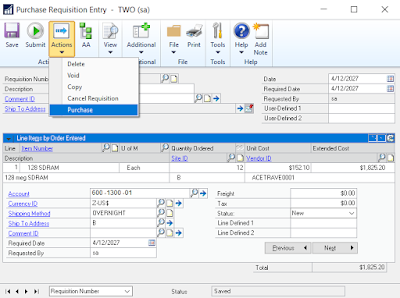 |
| Purchase Order Entry |
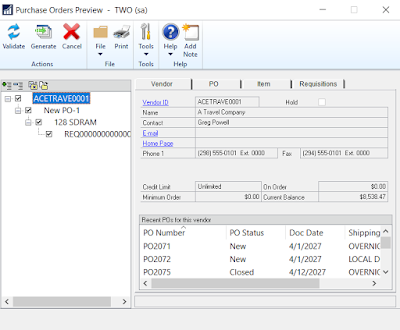 |
| Purchase Order Generator |
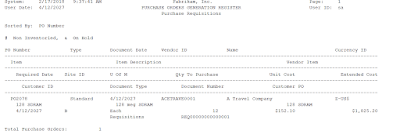 |
| Purchase Order Generator - Report |
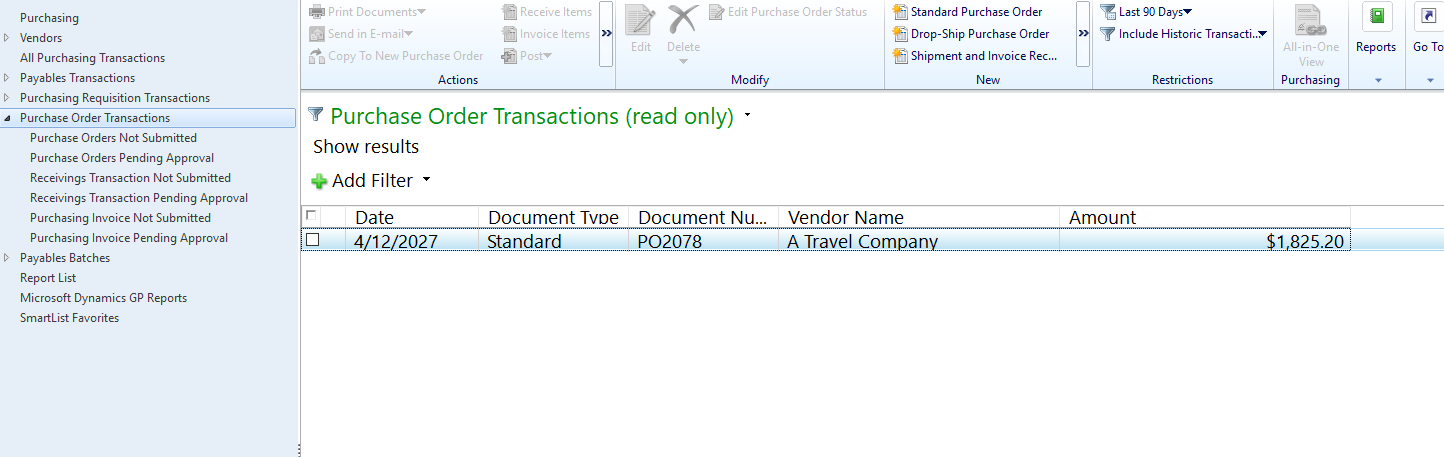 |
| List of Purchase Orders - Filtered by Generated PO |
Now the other feature is that you can refer to the "Procurement" tab on Dynamics GP home page for the list of requisitions and the associated purchase orders as illustrated below:

 |
| List of Requisitions - Dynamics GP Home Page |
Furthermore, requisition report has been added to the purchasing cycle which has already been illustrated in a previous post
Best Regards,
Mahmoud M. AlSaadi
This was originally posted here.
*This post is locked for comments