web
You’re offline. This is a read only version of the page.
close
Skip to main content

Announcements

No record found.

News and Announcements icon
Community site session details

Community site session details

Session Id :
Finance | Project Operations, Human Resources, ...
Suggested Answer

Financial reporting

(0) ShareShare
ReportReport
Posted on by 111

Dear colleagues,

Please help me if it possible to show account description, cost center description in separate columns after exporting financial report into excel.

For example

1 I export report with this parameters
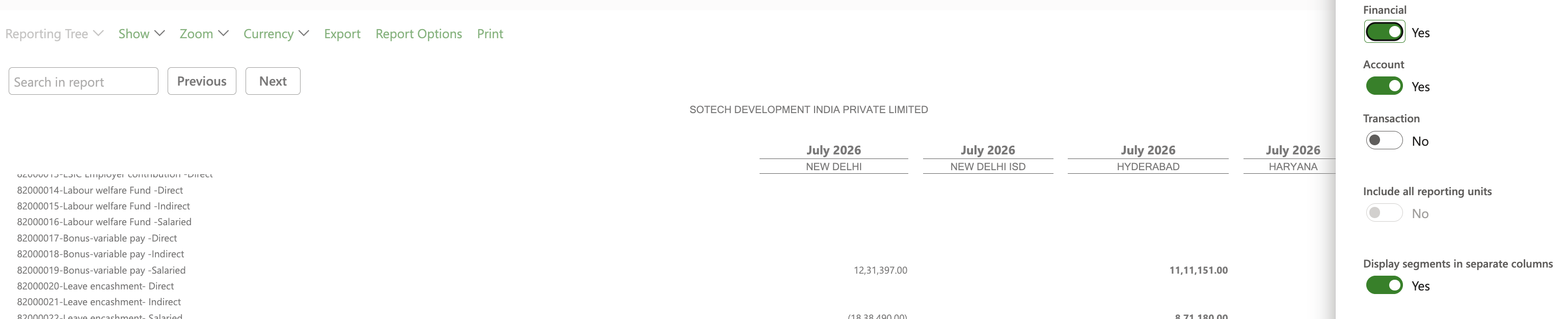
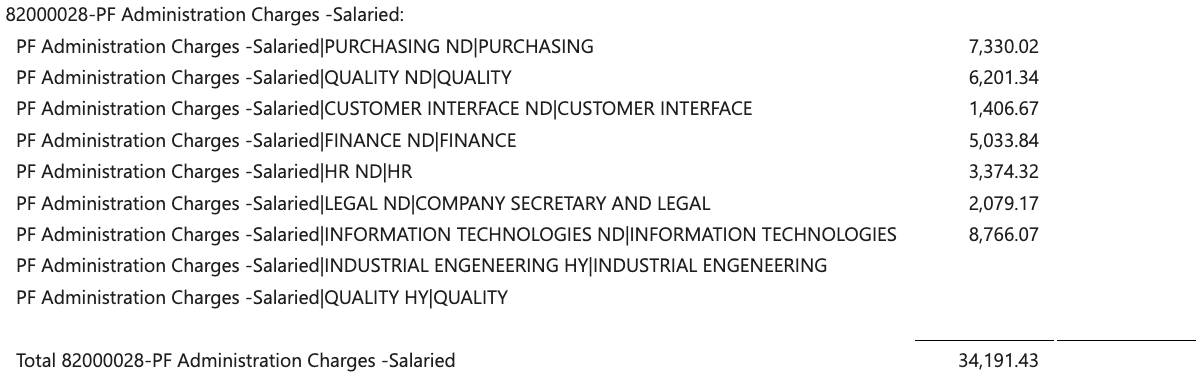
2 In excel on accounting level I see that system displayed account number, cost center number is separate columns. But description of account and cost center in one column combined with delimiter |. Is it possible to make descriptions also in separate columns

3 And also when I view report in D365 FO directly is it possible to also view account number and cost center number in account level not only descriptions
I have the same question (0)
  • Suggested answer
    Shri Ranjani Profile Picture
    217 on at

    Hi,
    Open your Row Definition inside the financial report designer. In the description formatting parameters for your transaction lines, you can alter how rows are named. You can use standard formatting variables (such as combination strings like &&Account_Code&& - &&Account_Description&&) to explicitly tell the designer to display both the numerical code and text description simultaneously whenever it expands account details. 
    https://learn.microsoft.com/en-us/dynamics365/fin-ops-core/fin-ops/analytics/design-financial-reports


  • YD-01101305-0 Profile Picture
    111 on at

    @Shri Ranjani Hi! Can you explain in more details because I do not get how to achieve what you describe.

  • Suggested answer
    Aayush Tiwari Profile Picture
    367 on at

    Hello @YD-01101305-0 


    This is a genuine requirement requirement, However to me best of knowledge, I don't know if even this is configurable by Financial reporter to bring the account description and cost center description in different columns, However if their is a way, I would also love to update my knowledge.


    Meanwhile I would suggest a excel workaround - Use Text to column wizard using the delimited functionality to bring the description in separate columns, If you had to do this multiple times you can create a script by recording your actions once using automate functionality of excel, Then from next time you can perform this action by just a single click.


    Regards

    Aayush Tiwari  

  • YD-01101305-0 Profile Picture
    111 on at

    @Aayush Tiwari This is exactly what I propose to our business and it takes 2 min of work to make look standard report the same way as they want. But they are very demanding and their requirement is that report should look the way they want directly after export. Explanation that making changes in core of fin reporting might not be possible or cost more money then efforts they will make to edit excel is not convincing for them)

  • Aayush Tiwari Profile Picture
    367 on at

    It's a system limitation that they have to understand, financial reporter can't be customised, if still they still insist on this type of requirement as a must have, then you have to move to a custom SSRS report as a solution which will loose the flexible configurable reporting features that financial reporter provides.


    Regards

    Aayush Tiwari

Under review

Thank you for your reply! To ensure a great experience for everyone, your content is awaiting approval by our Community Managers. Please check back later.

Helpful resources

Quick Links

Season of Sharing Community Challenge Winners!

Congratulations to our community stars!

Women in Power Builds Momentum

Expanding mentorship, skilling, and AI innovation

Congratulations to the July Top 10 Community Leaders

These are the community rock stars!

Leaderboard > Finance | Project Operations, Human Resources, AX, GP, SL

#1
Martin Dráb Profile Picture

Martin Dráb 373 Most Valuable Professional

#2
CU10121822-0 Profile Picture

CU10121822-0 324

#3
André Arnaud de Calavon Profile Picture

André Arnaud de Cal... 321 Super User 2026 Season 2

Last 30 days Overall leaderboard

Product updates

Dynamics 365 release plans
