web
You’re offline. This is a read only version of the page.
close
Skip to main content

Announcements

No record found.

News and Announcements icon
Community site session details

Community site session details

Session Id :
Customer experience | Sales, Customer Insights,...
Suggested Answer

Copilot failing to load

(1) ShareShare
ReportReport
Posted on by 2

Hi, 

Copilot is failing to load in the Sales Hub. In our DEV environment it stopped loading suddenly without any changes from our side. Previously it was working perfectly fine before. 

We have made customizations on top of Copilot in Dynamics 365 Sales.
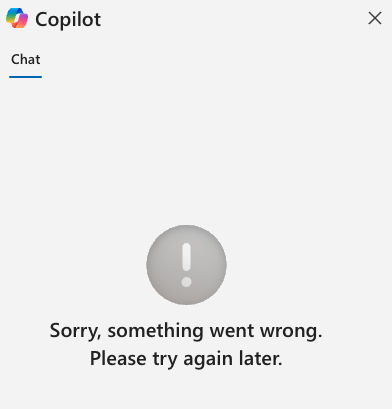
The error:

 

We have this solution deployed to 4 environments:

  • DEMO. Unmanaged Solution. Older version. Agent stopped working there as well.
  • DEV. Unmanaged Solution. Latest version. Agent stopped working
  • TEST. Managed Solution. Latest version. Agent is working without any issues. 
  • QA. Managed Solution. Latest version. Agent is working without any issues. I've tried deploying here from DEV multiple different versions and our solution was still working without any issues.

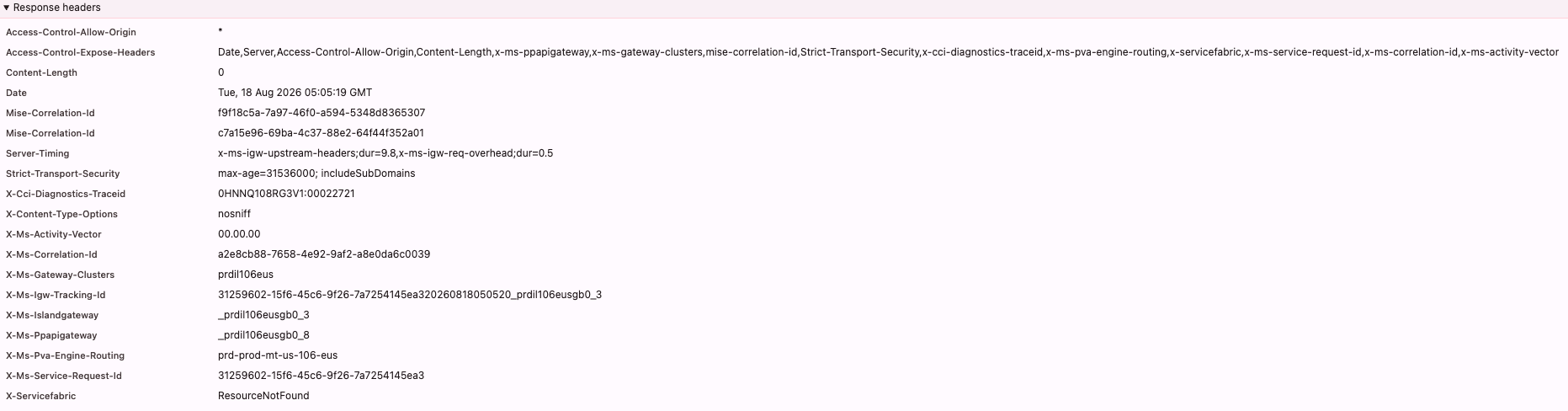
My previous theory was what if it is related to X-Ms-Pva-Engine-Routing. Both DEV and DEMO environments were going through us-106-eus, QA and TEST were using different one. I've created new agent in the DEV and checked with live demo channel, it was also using us-106-eus routing and working just fine. So I guess that is not the issue. 

I've tried removing all our customizations from Conversation Start topic(we had several buttons at the end which were leading to our custom topics) and agent started loading without issues for a moment. But then it failed again. 

In test mode in the Copilot Studio agent works perfectly, publishing doesn't give any errors. I've checked copilot setting in the Sales Hub in different environments - they're the same. Checked records in the copilot table for msdyn_salesCopilot and their publish state. At this point I've tried everything suggested by LLM's. I'd appreciate any inputs!


Categories:
  • CU08091731-0 Profile Picture
    2 on at

    Hello, The 404 Not Found on the conversations?api-version=2022-03-01-preview request is the key clue. Since the same solution works in TEST/QA and a newly created agent works in DEV, I’d suspect an environment/agent configuration or backend routing issue rather than your custom topics.

    You should check/recreate the Sales Copilot agent/channel configuration in DEV and compare the generated agent/bot configuration and connection references against TEST/QA. Also try removing/recreating the msdyn_salesCopilot configuration rather than only republishing the solution.

    The fact that TEST/QA work with the same managed solution strongly suggests the customization itself isn't the root cause.

  • Suggested answer
    Syed Aqib Raza Profile Picture
    152 on at

    This looks more like a backend/resource resolution issue than a Copilot Studio customization issue.

    The key error in the response headers is:

    X-Ms-Servicefabric: ResourceNotFound

    Since the same solution works correctly in TEST/QA but fails in DEV/DEMO, I would first compare the Sales Copilot/agent registration and environment-specific configuration, rather than the custom topics.

    I would recommend:

    1. Create a completely new Copilot Studio agent in DEV.
    2. Publish it and configure it in Sales Hub.
    3. Test whether the new agent loads consistently in Sales Hub, not only in the Live Demo channel.
    4. Compare the working TEST/QA environment with DEV/DEMO for the msdyn_salesCopilot configuration, agent/bot ID, publish state, and related references.
    5. Test in InPrivate/another browser to rule out client-side caching.
    6. If the new agent also fails in Sales Hub, open a Microsoft support ticket and provide the correlation IDs from the failed request.

    In particular, the headers contain:

    X-Ms-Correlation-Id: a2e8cb88-7658-4e92-9af2-a8e0da6c0039

    X-Ms-Service-Request-Id: 31259602-15f6-45c6-9f26-7a7254145ea3

    X-Ms-Servicefabric: ResourceNotFound

    These should help Microsoft trace the backend failure.

    Also, I wouldn't focus too much on us-106-eus routing at this point, because you already confirmed that a newly created agent using the same routing works. That makes an agent/resource binding or environment-specific backend issue more likely.


Under review

Thank you for your reply! To ensure a great experience for everyone, your content is awaiting approval by our Community Managers. Please check back later.

Helpful resources

Quick Links

Season of Sharing Community Challenge Winners!

Congratulations to our community stars!

Women in Power Builds Momentum

Expanding mentorship, skilling, and AI innovation

Congratulations to the July Top 10 Community Leaders

These are the community rock stars!

Leaderboard > Customer experience | Sales, Customer Insights, CRM

#1
Syed Aqib Raza Profile Picture

Syed Aqib Raza 96

#2
11manish Profile Picture

11manish 88 Super User 2026 Season 2

#3
ParthPatel249 Profile Picture

ParthPatel249 84

Last 30 days Overall leaderboard

Product updates

Dynamics 365 release plans